
Disclosure: This page may contain affiliate links. Prices were checked on the date shown and may change.
An introduction to Baby Audio Humanoid, based on information from the maker and distributors: what it does, how to use it and who it may suit. It is not scored.
Humanoid is a versatile plugin for turning any vocal into a robotic, hyper-synthetic performance.
— Baby Audio official site
What is Humanoid?
Humanoid is a vocal transformation plug-in from Baby Audio. According to the official description, it combines hard-tuning (abrupt pitch correction) that turns singing into a robotic, hyper-synthetic sound with features for heavily reshaping the voice itself.
It is built on the company's own resynthesis and phase-vocoding technology, using an FFT-based re-tuning engine. The maker plainly says it is not for natural vocals and is made for extreme hard-tuning.
An internal wavetable synth follows the pitch of the incoming signal and resynthesizes the voice, so you can turn a voice into a synth waveform or blend in a little for electronic shine. It has 64 factory wavetables and lets you import your own.
Besides automatic correction, pitch can be controlled manually with MIDI or automation, allowing you to build new melodies, harmonies and chords from a single vocal take. 180 presets are included.
Key features
Hard-tuning (Pitch)
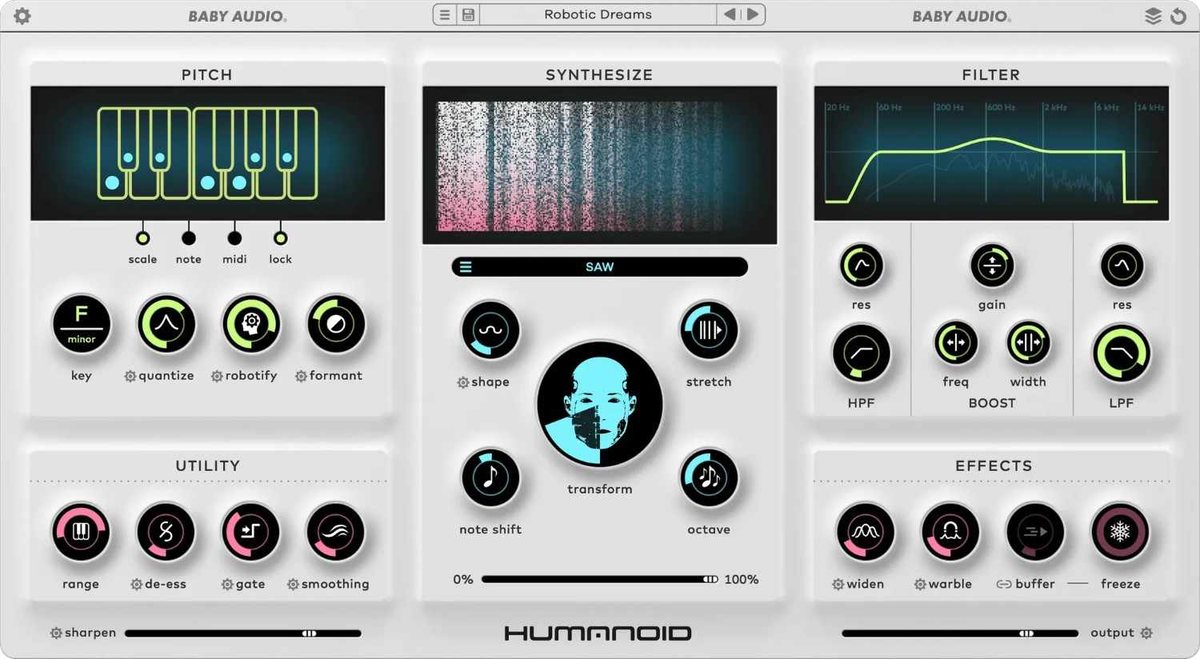
Scale mode corrects in real time to a selected key, Note mode lets you set pitch on the keyboard display or by automation, and MIDI mode takes pitch from a MIDI track or controller. It may suit an extremely pitch-locked vocal.
Wavetable resynthesis
A wavetable synth that follows the incoming pitch resynthesizes the voice, from fully turning it into a waveform to adding a subtle electronic shine. You can choose from 64 wavetables or import your own.
Transform knob
Morphs between robotic hard-tuning and the resynthesized voice. Shape and Stretch manipulate the wavetable, while Note Shift and Octave thicken and shift the pitch. It may help when you look for a point between human and machine.
Filter and effects
The filter offers high-pass, low-pass and a sweepable mid band that can boost or cut. It acts on the spectral content from the analysis phase, allowing very sharp cuts. The effects are Widen, Warble (spectral vibrato) and Freeze (a stutter that can sync to BPM or be set freely).
Utility (tools to clean up the result)
Includes a note-range limit to improve pitch detection, a de-esser, a gate to reduce bleed and background noise, and Smoothing to soften harsh harmonics. It may help with vocals that have some bleed.
Buffer and low latency
The Buffer setting selects Low, Medium or High analysis window size. Low favors low latency, while Medium and High give better pitch tracking at the cost of latency. The official site also mentions a new low-latency option in v1.1.
180 presets
180 presets from top sound designers are included, covering everything from classic hard-tuning to transformative manipulation. They may suit a quick start without detailed tweaking.
Specifications
| Item | Details |
|---|---|
| Maker | Baby Audio |
| Type | Vocal pitch correction / voice transformer |
| Presets | 180 |
| Factory wavetables | 64 (import your own) |
| Engine | FFT-based re-tuning / phase vocoder |
| Plug-in formats | VST, VST3, AU, AAX (64-bit) |
| macOS | macOS 10.11 and up (native Apple Silicon M1/M2) |
| Windows | Windows 10 and newer |
| Supported DAWs | Ableton Live, Pro Tools, Logic Pro, FL Studio, Cubase, Studio One, Bitwig, Reaper, Reason and others |
What is included and system requirements
- Humanoid plug-in
- 180 presets
- 64 wavetables (import your own as well)
- Formats: VST, VST3, AU, AAX (64-bit)
- System: macOS 10.11 and up (Apple Silicon native), Windows 10 and newer
How to use it
- Buy Humanoid on the Baby Audio site or at Plugin Boutique and receive your license.
- Run the installer and rescan plug-ins in your DAW.
- Insert Humanoid on the vocal track you want to process.
- Start with a preset close to what you want, such as a classic robotic one.
- Set the key in the Scale mode of Pitch and listen to the auto-corrected voice.
- Use the Transform knob to balance robotic hard-tuning against the resynthesized voice.
- Clean up the result with the gate, de-esser or Smoothing in Utility as needed.
- Switch to MIDI mode to set the pitch from MIDI and build harmonies or chords.
Where it may come in handy
Robotic or hyperpop-style vocals
This is the central use the maker describes: strong correction in Scale mode can create an artificial voice.
Building harmonies from one vocal
Setting pitch by MIDI and layering the same voice at several pitches may give chorus or chord effects.
Using the voice like a synth
Pushing the Transform knob toward the synth waveform may give lead- or pad-like textures.
Vocoder-style effects
The maker says it can be used as a futuristic vocoder. Setting pitch by MIDI may suit this use.
Who it may suit
- People who want robotic or artificial-sounding vocals
- People who want to build synth-like timbres from a voice
- People who want to make harmonies or chords from one vocal
- People who want to try unusual voices quickly from presets
Good to know before you buy
- The maker says it is not for natural vocals. If you want natural-sounding correction, consider other pitch correction tools.
- Latency changes with the Buffer setting: Low gives low latency, while Medium and High improve pitch tracking at the cost of more latency.
- It is described as a vocal tool, but the maker's text suggests it may be used on other instruments too.
- Before buying, check on the official site that your DAW and operating system are supported.
How it differs from similar products
We do not pick a winner; the official figures are placed side by side.
IK Multimedia ReSing MAX
Both turn a vocal into something else, but the approach differs. The maker says Humanoid uses FFT-based re-tuning and a wavetable synth for artificial voices, while ReSing replaces the tone and pronunciation of a vocal using AI voice models.
Price
$129 (Plugin Boutique, checked 2026-10-27). Prices can vary by region and promotion, so check the official page before buying.
See Humanoid on the product page
More of the same kind
We have introduced 35 vocal processors. Here are some of the others.
- DOTEC-AUDIO DeeVocalTools
- Waves Renaissance Vox
- Antelope Audio InTune Chorus
- United Plugins QuickVox
- Leapwing Audio UltraVox 2
- Waves JJP Vocals
We have introduced 11 other products from Baby Audio.
- Baby Audio BA-1
- Baby Audio Baby Audio Parallel Aggressor
- Baby Audio Crystalline
- Baby Audio Transit 2
- Baby Audio TAIP
For a side-by-side comparison scored on the same criteria, see our comparison of vocal processors.
See the full list in Product database: Effects.
Sources: babyaud.io pluginboutique.com (checked 2026-10-27)










Comments