
Disclosure: This page may contain affiliate links. Prices were checked on the date shown and may change.
An introduction to United Plugins TrapTune, based on information from the maker and distributors: what it does, how to use it and who it may suit. It is not scored.
TrapTune is (not just) an automatic tuner which can give you everything from subtle pitch correction to the strong artificial Cher-effect.
— United Plugins official site
What is TrapTune?
TrapTune is a vocal-oriented automatic tuner developed by Soundevice Digital and sold by United Plugins. It is described as covering everything from natural-sounding correction to a strong robotic effect in a single interface.
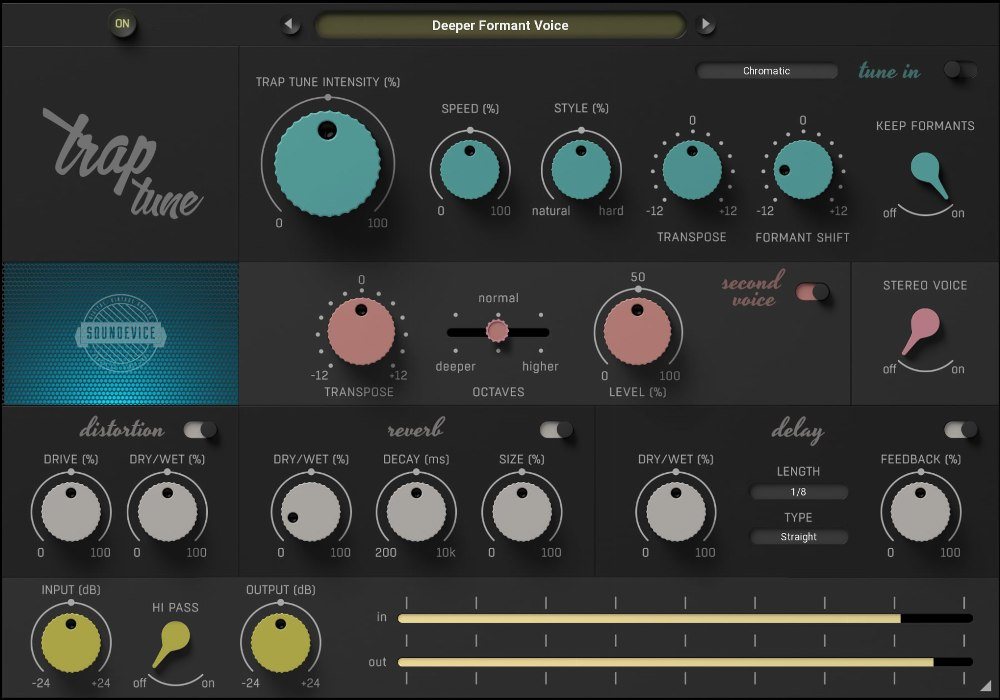
The core is the Tune-in section, which controls the intensity and speed of natural tuning as well as the intensity of hard tuning. It also works with formants, voice transposition and the key of the song.
After correction come a Second Voice section that adds another voice in unison, a stereo doubler, a distortion tuned for vocals, a plate reverb and a delay. In effect it combines pitch correction with the finishing effects a vocal often needs.
Each section has its own bypass, so you can use only the parts you want. Licensing is file-based, and the maker states that no iLok, dongle or internet connection is needed for activation. A 15-day trial is offered.
Key features
Tune-in section
This is the heart of the plugin, controlling the intensity and speed of natural tuning and the intensity of hard tuning. The maker notes that some users may need only one knob, so it may suit anything from light to strong correction.
Formant, transposition and key
You can adjust formants, transpose the voice and set the key used for tuning. Setting the key helps pull notes toward the scale you intend.
Second Voice
This section adds another voice in unison with the original. It can be transposed in semitones and shifted by octaves, which may be handy for a quick harmony.
Stereo voice doubler
Switching on the stereo voice activates the doubler, making the vocal wider and thicker. It may help you judge the width you want before recording extra layers.
Distortion, reverb and delay
The distortion has two knobs and ranges from warm saturation to heavy distortion. The plate reverb is tuned for vocals, and the delay offers Feedback and Time, so space and texture can be added with few controls.
Presets and per-section bypass
A large number of presets is included and can be auditioned in the trial. Every section has a dedicated bypass, so you can use only the tuning or only the effects.
64-bit processing and sleep mode
Internal processing is 64-bit at any sampling rate. A sleep-on-silence function pauses processing to save CPU, and the smart bypass is designed to avoid clicks when automated.
Specifications
| Item | Details |
|---|---|
| Type | Vocal auto-tuner plus effects |
| Developer | Soundevice Digital |
| Sections | Tune-in, Second Voice, Stereo Voice (doubler), Distortion, Reverb, Delay |
| Internal processing | 64-bit |
| Mac | macOS 10.10 or newer (64-bit), Intel or Apple Silicon, VST 2 / VST 3 / AAX / AU |
| Windows | Windows 8 to 11 (64-bit), Intel or AMD with SSE2, VST 2 / VST 3 / AAX |
| Licensing | License file (no iLok or dongle) |
| Trial | 15-day free trial |
What is included and system requirements
- TrapTune (pitch correction, second voice, doubler, distortion, reverb, delay)
- A large set of presets
- A 15-day trial to try before buying
- Formats: VST 2 / VST 3 / AAX (plus AU on Mac)
How to use it
- Download the trial or purchased version from the United Plugins site.
- Install it and activate it with the license file.
- Open your DAW and insert TrapTune on a vocal track.
- Adjust the intensity and speed of natural tuning in Tune-in.
- Set the key of the song and, if needed, move formant or transposition.
- Turn on Second Voice or Stereo Voice to add thickness or width.
- Add distortion, reverb and delay little by little, and audition the presets.
Where it may come in handy
Hip-hop and R&B vocals
The maker says it suits genres that need hard tuning. You may try strong correction and then add thickness with Second Voice.
Natural pitch correction
Lowering the intensity and speed in Tune-in may allow subtle correction. Setting the key may help when you want off notes pulled toward nearby pitches.
Finishing a vocal in one place
With tuning, thickness, distortion, reverb and delay in one window, it may serve as a quick sketch of the direction before you assemble a longer chain.
Processed EDM and pop vocals
Moving formant or transposition to change the voice and widening it with the doubler may let you prototype heavily processed vocals.
Who it may suit
- People who want to try auto-tune-style effects with few controls
- Producers making hip-hop, trap, R&B or EDM vocals
- Those who want pitch correction and basic finishing in one plugin
- Users who prefer an iLok-free license and a trial before buying
Good to know before you buy
- A 15-day trial is available, and the maker says the plugin continues with limited access to several features after the trial period.
- The maker states that updates are free.
- The maker suggests pairing it with Voxessor from the same company for the technical vocal work.
- The listed price may differ between stores, so check each page before buying.
Price
Please check the official page for the price.
See TrapTune on the product page
More of the same kind
We have introduced 10 pitch correction tools. Here are some of the others.
- Rys Up Audio RysUpTune
- Antelope Audio InTune Performer
- Waves Waves Tune LT
- Slate Digital Slate Digital MetaTune
- Universal Audio Topline Vocal Tune
- Synchro Arts RePitch 2
We have introduced 34 other products from United Plugins.
- United Plugins Voxessor
- United Plugins Electrum Core
- United Plugins UniChannel
- United Plugins Continuum
- United Plugins FireCobra
For a side-by-side comparison scored on the same criteria, see our comparison of pitch correction tools.
See the full list in Product database: Effects.
Sources: unitedplugins.com pluginboutique.com (checked 2026-10-27)










Comments