
Disclosure: This page may contain affiliate links. Prices were checked on the date shown and may change.
An introduction to MeldaProduction MMorph, based on information from the maker and distributors: what it does, how to use it and who it may suit. It is not scored.
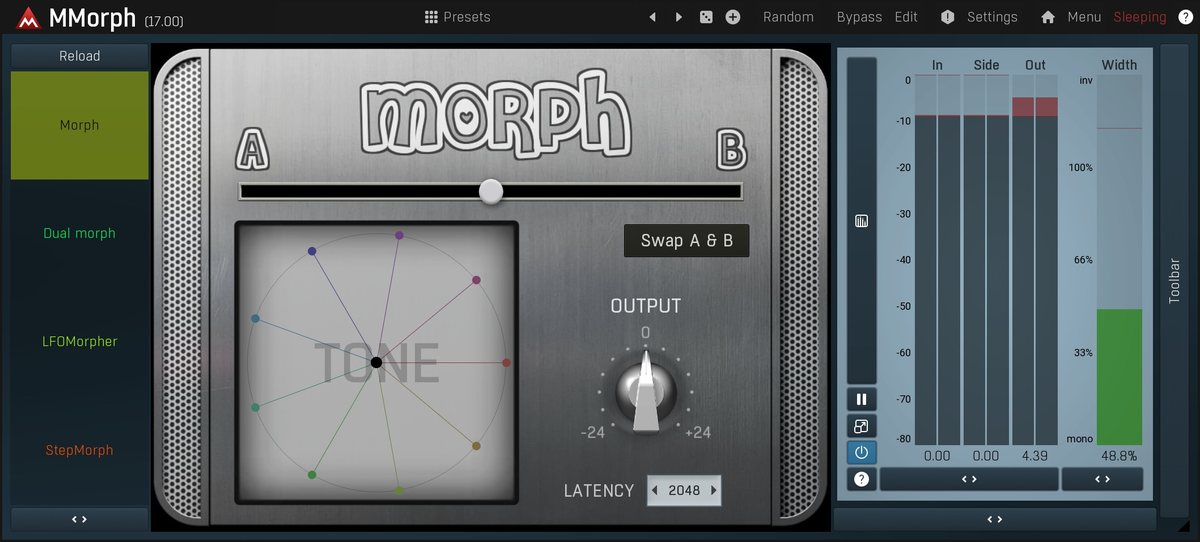
MMorph lets you morph between 2 audio materials, leading to inexhaustible creative potential.
— MeldaProduction official site
What is MMorph?
MMorph is an effect from MeldaProduction that morphs between two audio materials. The maker presents it as a tool for composers, producers and DJs who want to be creative.
A plain crossfade is just one fader going down while the other goes up. MMorph is described as different: it analyzes the main input and the side-chain input, finds important features and morphs them, much like morphing a photo of one person into another.
According to the official description it can combine a voice with a tonal instrument, produce robotic voices, or morph between two songs. All that spectral processing is available from one big knob.
To handle material that seems to have little in common, such as sub-bass and vocal, it includes features such as spectral compression and harmonic generation. It has a rich set of modulators and supports VST, VST3, AU and AAX.
Key features
Two-input morphing
The main and side-chain inputs are analyzed and their features combined, which may let you build a transition between the character of two sounds in one plug-in.
One big knob
The complex spectral processing is controlled from one large knob, so you can explore intuitively before diving into details.
Works with dissimilar material
Features such as spectral compression and harmonic generation make different materials more alike, so even sub-bass with vocal is said to work.
Modulation
Four versatile modulators are available, with sources such as LFO, audio level follower, envelope generator, randomize and pitch detector.
Shared Melda interface
The stylable, resizable, GPU-accelerated interface offers classic meters and time graphs.
Utility features
M/S, single-channel and up to 8-channel surround processing, automatic gain compensation, a safety limiter, smart randomisation and four multi-parameters are included.
Technical details
64-bit processing with no sample-rate limit, AVX optimization, native Apple Silicon support and free-for-life updates.
Specifications
| Item | Details |
|---|---|
| Type | Morphing / spectral processing |
| Inputs | Main input and side-chain input |
| Formats | VST, VST3, AU (Mac), AAX |
| OS | Windows 8/10/11 (64-bit); macOS 10.14 or newer (64-bit; Intel/AMD/M1; native Apple Silicon) |
| Channels | M/S, single-channel, up to 8-channel surround |
| Processing | 64-bit, no sample-rate limit |
| Activation | No dongle or internet access required |
| Trial | Available |
What is included and system requirements
- The plug-in (Windows / macOS)
- Global preset management and online preset exchange
- Free-for-life updates
- Demo available to download
How to use it
- Download the demo from the official site and try it.
- Put one material on a track and insert MMorph.
- Send the other material in through the side-chain.
- Move the big knob and listen to how the two sources blend.
- If they do not blend well, adjust spectral compression and harmonic generation.
- Use modulators to move the knob and other parameters.
- Level can change a lot, so use automatic gain compensation and the safety limiter.
- Save settings you like as a preset.
Where it may come in handy
Merging drums and a pad
As in the official video title, two quite different sources such as drums and a pad can be combined.
Voice and instrument morphing
The maker lists combining a voice with a tonal instrument and producing robotic voices.
Moving between two songs
The maker states that morphing between two different songs is possible, which may suit DJ-style transitions or creative mix moments.
Keeping it moving with modulation
LFOs, level followers, envelopes, randomizers and pitch detectors can drive parameters, which may help create evolving morphs.
Who it may suit
- Those who want two sounds to fuse rather than just layer.
- Producers who want to push a vocal toward an instrument or synth.
- Sound designers looking for creative processing.
- DJs or mixers who want to experiment with transitions in a plug-in.
Good to know before you buy
- The second source must be routed to the side-chain input, so some DAW routing is needed.
- Official requirements: Windows 8/10/11 (64-bit) and macOS 10.14 or newer.
- The feature set is deep, so starting with the single big knob may be the easiest way in.
Price
Please check the official page for the price.
See MMorph on the product page
More of the same kind
Other introduction articles of the same kind.
- UJAM Finisher BOOST
- Klevgrand STARK
- Waves Cobalt Saphira
- Waves Greg Wells ToneCentric
- Waves Scheps Parallel Particles
- iZotope Vinyl
We have introduced 32 other products from MeldaProduction.
- MeldaProduction MHarmonizerMB
- MeldaProduction MVintageRotary
- MeldaProduction MMatcher
- MeldaProduction MCompare
- MeldaProduction MAutoVolume
See the full list in Product database: Effects.
Sources: meldaproduction.com pluginboutique.com (checked 2026-10-27)










Comments