
Disclosure: This page may contain affiliate links. Prices were checked on the date shown and may change.
An introduction to Moog Moogerfooger MF-101S Lowpass Filter, based on information from the maker and distributors: what it does, how to use it and who it may suit. It is not scored.
The MF-101S Lowpass Filter is a re-invention of the classic Moog MF-101 analog effects pedal.
— Moog official site
What is Moogerfooger MF-101S Lowpass Filter?
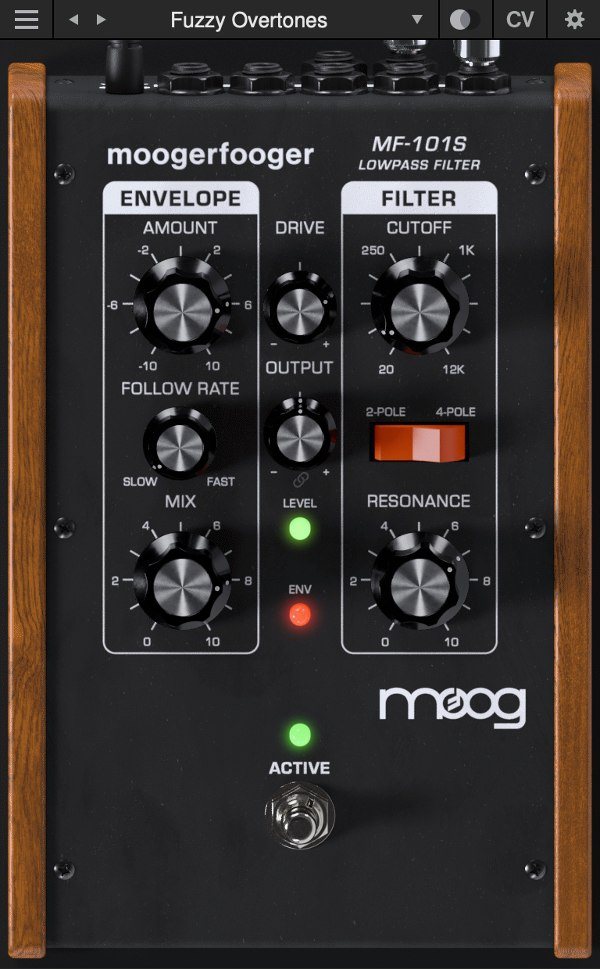
The MF-101S Lowpass Filter is a plugin re-creation of Moog's MF-101 analog effects pedal. The original appeared in 1998 and combined a 4-pole analog lowpass filter with an envelope follower in one unit.
A lowpass filter gradually reduces the content above a set frequency. In the MF-101S, the Moog filter approach that sits at the heart of the Moog synthesizers can be applied to any input, such as guitar, voice or synthesizer.
The envelope follower reads the level of the input and feeds it into the filter movement. Because the tone changes with the strength of the playing, it creates variation that differs from a static filter.
The plugin version adds CV inputs, stereo operation, multiple instances and presets. It supports AAX, AU and VST3 and can be combined with other Moogerfooger plugins in the DAW.
Key features
4-pole lowpass filter
It recreates the 4-pole analog lowpass filter at the heart of the original. Moving cutoff and resonance lets you soften the highs or emphasize the area around the cutoff.
Envelope follower
The input level moves the filter cutoff. On sources with a clear attack such as bass or drums, you may be able to try a brightness that changes with how hard each note is played.
ENVELOPE (mono / stereo)
You can choose mono envelope following as in the original, or stereo operation with separate left and right envelope followers. It is an option when you want to keep the left-right differences in stereo material.
STEREO RESPONSE
This adjusts how the curve of the envelope follower is shaped by the dynamics of the input. The manufacturer lists it as an addition in the plugin version, allowing you to tailor the response.
CV inputs
CV inputs are provided for filter cutoff, resonance, envelope amount and mix, and the modulation can be attenuated. The manufacturer describes driving them with signals from other Moogerfooger plugins or other instances.
Presets and automation
Presets can be saved and recalled, and the official pages state that parameters can be automated in the DAW. Moving the cutoff along with the arrangement is one possible use.
Specifications
| Item | Details |
|---|---|
| Formats | AAX / AU / VST3 |
| Supported OS | macOS 11.7 or newer (Intel / Apple Silicon), Windows 10 or newer (64-bit) |
| Original hardware | MF-101 Lowpass Filter, introduced in 1998 |
| iOS version | Sold separately as AUv3 (listed on the official store) |
What is included and system requirements
- MF-101S Lowpass Filter plugin (Mac/PC version)
- Presets
- Formats: AAX, AU, VST3
- System requirements: macOS 11.7 or newer, Windows 10 or newer (64-bit)
How to use it
- Buy the plugin from the official Moog Music software store or Plugin Boutique and obtain the installer.
- Install the format you need among AAX, AU and VST3.
- Insert MF-101S Lowpass Filter on a track in your DAW.
- Choose a preset and move the cutoff first to hear how the sound changes.
- Raise the resonance gradually and listen to the emphasis around the cutoff.
- Increase the envelope amount and check how the filter opens and closes with the input level.
- With stereo material, switch the envelope to stereo and compare the left and right movement.
- Save settings you like as a preset.
Where it may come in handy
Shaping bass and synth tones
Applied to a bass or synth track, adjusting the cutoff and envelope amount may let you create a tone whose brightness follows the strength of the playing.
Processing vocals and narration
You could close the highs of a voice for part of a song to create a muffled feel. Automating the cutoff may serve as a transition effect.
Adding movement to drum loops
Running a drum loop through it with the envelope follower engaged may let you try patterns in which the filter moves with the kick and snare dynamics.
Who it may suit
- People who want to use a Moog-style lowpass filter as an effect
- Those who want to try tone changes linked to playing dynamics
- Users interested in combining Moogerfooger plugins
- Anyone looking for a filter with a simple layout
Good to know before you buy
- The price applies to the Mac/PC version; the iOS (AUv3) version is sold separately.
- A bundle of the Moogerfooger plugins is also offered by the manufacturer.
- This article does not evaluate sound quality.
How it differs from similar products
We do not pick a winner; the official figures are placed side by side.
Moogerfooger MF-105S MuRF
The MF-101S centers on a 4-pole lowpass filter and an envelope follower, with four CV inputs. The MF-105S MuRF centers on an eight-band resonant filter array with ANIMATION and lists five CV inputs.
Price
$79 (Moog official site, checked 2026-10-27). Prices can vary by region and promotion, so check the official page before buying.
See Moogerfooger MF-101S Lowpass Filter on the product page
More of the same kind
Other introduction articles of the same kind.
- LEWITT Space Replicator
- Sugar Bytes Artillery 2
- FKFX Audio Noise Bleach
- Blue Cat Audio Blue Cat's Chorus
- United Plugins QuickBass
- Antelope Audio VP Drum-All-Nite
We have introduced 2 other products from Moog.
See the full list in Product database: Effects.
Sources: software.moogmusic.com pluginboutique.com (checked 2026-10-27)










Comments