
Disclosure: This page may contain affiliate links. Prices were checked on the date shown and may change.
An introduction to Arturia Filter MS-20, based on information from the maker and distributors: what it does, how to use it and who it may suit. It is not scored.
Filter MS-20 is a stereo filter and distortion effect modeled on the infamously abrasive MS-20 synthesizer.
— Arturia official site
What is Filter MS-20?
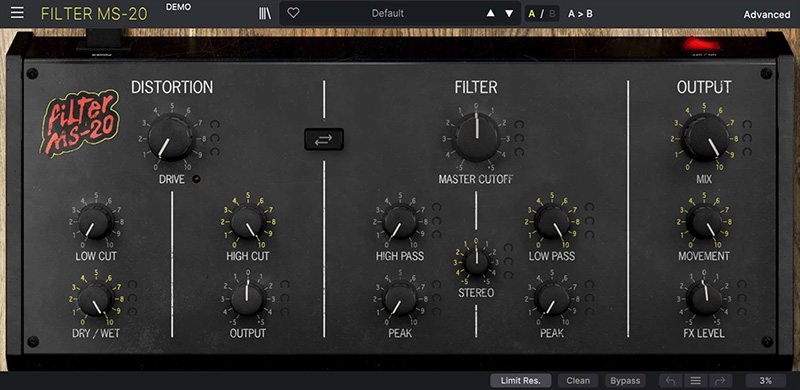
Filter MS-20 is a stereo filter and distortion effect from Arturia. It is modeled on the filter and external signal processing sections of the MS-20, an analog semi-modular synthesizer that appeared in 1978.
Using Arturia's TAE technology, it recreates the circuit with resonant low-pass and high-pass modes, an ESP-style distortion input and switchable routing. A single switch decides whether distortion or filter comes first.
Modern additions include an envelope follower, a function generator and a 16-step sequencer. These let the filter react to the incoming audio or move the cutoff in rhythm.
The interface has a knob for each function, and a macro-style Movement control is included. It is designed for moments when you want a rougher, thicker sound on drum loops, bass, synths or vocals.
Key features
ESP distortion
Raising the virtual ESP input moves from light crunch to heavy fuzz. Input filtering lets you focus the distortion on a frequency range so low-end depth or high-frequency detail can be kept.
Switchable routing
A switch swaps the order between distortion into filter and filter into distortion. The change in signal flow alters the character, so it is worth comparing both settings.
Low-pass, high-pass and master cutoff
Resonant low-pass and high-pass filters are included, and the master cutoff applies a relative offset to both for a result close to band-pass. It may suit build-ups and low-end emphasis.
Stereo offset
A small cutoff difference between left and right channels adds width. This parameter can also be modulated for movement across the stereo field.
Envelope follower
The filter can be driven by the level of the incoming audio. The maker describes uses such as quacking auto-wah movement and pumping percussive loops.
Step sequencer and function generator
The sequencer supports sync, randomization and scaling for quick repeating movements. The function generator draws curves from smooth to jagged and assigns them to any parameter.
Movement macro
This macro reduces the effect of all modulation sources, and fully counter-clockwise removes them. One knob sets how strongly the sound moves, which helps fit it to a mix.
Specifications
| Item | Details |
|---|---|
| Type | Stereo filter and distortion effect |
| Filters | Resonant low-pass and high-pass, master cutoff |
| Modulation | Envelope follower, function generator, 16-step sequencer |
| Formats | Standalone, VST, AAX, Audio Unit, NKS (64-bit DAWs required) |
| Mac | macOS 10.13 or later, 4 GB RAM, 4-core 3.4 GHz CPU or Apple silicon |
| Windows | Windows 10 or later (64-bit), 4 GB RAM, 4-core 3.4 GHz CPU; ARM processors not supported on Windows |
| Disk space | 1 GB |
| GPU | OpenGL 2.0 compatible |
| Authorization | Arturia Software Center |
What is included and system requirements
- Filter MS-20 plugin with a library of dozens of presets
- Formats: Standalone, VST, AAX, Audio Unit, NKS
- A/B comparison
- Also included in FX collection PRO, per the maker
How to use it
- Sign in to your Arturia account and install the product through Arturia Software Center.
- Authorize the license and rescan plugins in your DAW.
- Insert Filter MS-20 as an effect.
- Pick low-pass or high-pass and set the basic tone with cutoff and resonance.
- Raise the ESP input gradually to decide the amount of distortion.
- Flip the routing switch and compare distortion before filter with filter before distortion.
- Assign the envelope follower or sequencer to add movement.
- Use the Movement knob and dry/wet to fit the amount to your mix.
Where it may come in handy
Roughing up drum loops
Raising the ESP input and stepping the cutoff with the sequencer may add rhythmic distortion to a loop. The maker's preset examples include processed kicks and drums.
Adding thickness to bass and synths
Combining low-pass resonance with light distortion can create low-end movement. Swapping the routing may change the texture even with the same settings.
Light distortion on vocals
The maker says it can add subtle clipping saturation to vocals. You can begin with a low wet amount as part of a production chain.
Who it may suit
- People who want filter and distortion in one effect
- Producers who want movement from a sequencer or envelope
- Users interested in MS-20 style filter character
- Anyone who wants to try low-pass and high-pass effects quickly
Good to know before you buy
- The Windows version does not support ARM processors.
- Authorization is handled through Arturia Software Center.
- A free demo is offered on the official site.
- It is also provided as part of FX collection PRO.
How it differs from similar products
We do not pick a winner; the official figures are placed side by side.
Antelope Audio Marble White AutoWah
Filter MS-20 combines low-pass and high-pass filters, ESP distortion and a sequencer. Marble White AutoWah is an auto-wah for guitar and bass controlled by Sensitivity, Bias, Resonance and Decay.
Price
Please check the official page for the price.
See Filter MS-20 on the product page
More of the same kind
We have introduced 82 saturation and distortion effects. Here are some of the others.
- AIR Music Technology Vocal Distortion
- Eventide MangledVerb
- Universal Audio Oxide Tape Recorder
- Kuassa Efektor Bass Smasher Distortion
- MNTRA Instruments BRUITAGE
- Signum Audio SKYE Clipper Surround
We have introduced 45 other products from Arturia.
For a side-by-side comparison scored on the same criteria, see our comparison of saturation and distortion effects.
See the full list in Product database: Effects.
Sources: arturia.com pluginboutique.com (checked 2026-10-27)










Comments