
Disclosure: This page may contain affiliate links. Prices were checked on the date shown and may change.
An introduction to Arturia Filter SEM, based on information from the maker and distributors: what it does, how to use it and who it may suit. It is not scored.
Combining simplicity with pure tone-shaping power, Filter SEM is a futuristic twist on a classic synth filter.
— Arturia official site
What is Filter SEM?
Filter SEM is a filter plugin from Arturia of France. It is based on the filter of the SEM (Synthesizer Expander Module), the 1970s analog synth designed by Tom Oberheim. It takes a filter that used to live inside a synthesizer and lets you put it on any track in a DAW.
The original SEM filter is a 12 dB per octave multimode design. Filter SEM lets you crossfade between low-pass, high-pass, notch and band-pass modes, and shape the tone with cutoff frequency and resonance. The official page also gives plain examples, such as removing low rumble from a vocal or taming high frequencies on hi-hats.
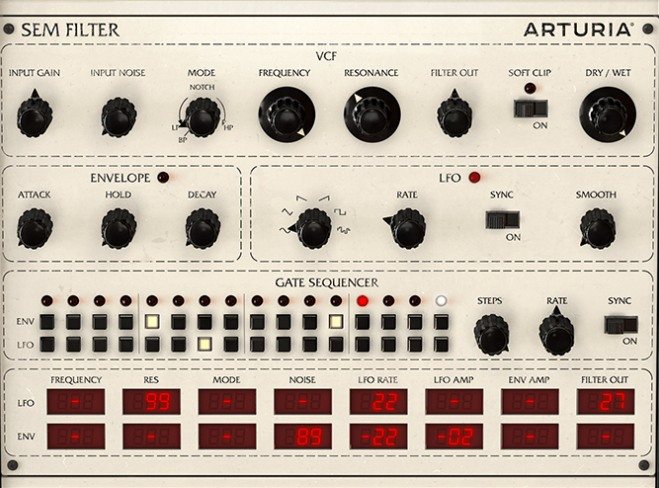
It adds functions the original did not have: a noise oscillator, a soft-clipping circuit model, a gate sequencer, and a simple modulation matrix fed by an envelope and an LFO. Arturia says it modeled the SEM in 2012 as the software synth SEM V and then isolated the filter as a standalone effect.
Formats are VST, AAX, Audio Unit and NKS for 64-bit hosts on Windows and macOS. It ships with 40 presets and is also part of FX Collection PRO. A free demo is offered by Arturia, so you can try it on your own audio first.
Key features
12 dB/octave multimode filter
Switch between low-pass, high-pass, notch and band-pass, and crossfade between them for in-between shapes. Cutoff and resonance alone move the tone, which may suit sweeps and build-ups.
Noise oscillator
Adds noise to the signal feeding the filter. Arturia notes that a filter's effect becomes more dramatic with noise. It may be worth trying to add texture to a drum loop.
Soft clipping
Models how the original SEM circuit saturated when driven. Turn it on and raise the input gain for analog-style distortion, which may help when you want light grit.
Gate sequencer
Up to 16 steps that trigger or retrigger the envelope and LFO, synced to the DAW clock. It may be handy for filter movement that follows the rhythm.
Envelope and LFO
An Attack/Hold/Decay envelope and an LFO with five waveforms plus sample and hold. The LFO can sync to the DAW tempo, covering slow drifts to fast rhythmic motion.
Simple modulation matrix
Uses the envelope and LFO as sources with eight destinations. It allows movement the original SEM could not do, beyond the cutoff alone.
MIDI CC control and presets
Every parameter can be controlled by MIDI CC, and 40 presets are included as starting points for your own settings.
Specifications
| Item | Details |
|---|---|
| Type | Filter (effect) |
| Filter design | 12 dB/octave multimode (low-pass, high-pass, notch, band-pass) |
| LFO | 5 waveforms plus sample and hold, DAW sync |
| Gate sequencer | Up to 16 steps |
| Modulation | Envelope and LFO to 8 destinations |
| Presets | 40 |
| Plugin formats | VST, AAX, Audio Unit, NKS (64-bit only) |
| Windows | Windows 10 or later (64-bit), 4 GB RAM, OpenGL 2.0 GPU; ARM processors not supported |
| macOS | macOS 11 or later, 4 GB RAM, OpenGL 2.0 GPU |
| Free disk space | 1 GB |
What is included and system requirements
- 40 presets
- Formats: VST, AAX, Audio Unit, NKS (64-bit hosts only)
- Arturia Software Center for download, activation and updates
- Also included in FX Collection PRO
How to use it
- Install Arturia Software Center, log in and activate the product.
- Open your DAW and load Filter SEM as an insert on the track you want to filter.
- Choose a mode such as low-pass, then move cutoff and resonance and listen to the change.
- Set the Dry/Wet mix against the original sound and match levels with the output volume.
- Add the noise oscillator or soft clipping a little at a time and listen to how the texture changes.
- Assign the LFO or envelope to the cutoff in the modulation matrix to create movement.
- Program gate sequencer steps so the motion follows the rhythm.
- Save settings you like as your own presets.
Where it may come in handy
Cleaning up home-recorded vocals
The high-pass and low-pass modes may help cut unwanted low or high content. The official page gives removing low rumble from a vocal as an example.
Build-ups and drops
Automating a rising low-pass cutoff may create a build-up over a few bars. Arturia's own demo list includes a 4-bar cutoff rise.
Adding movement to drum loops
The gate sequencer and LFO may add rhythmic motion to hi-hats and similar parts.
Supplementing a soft synth's own filter
Arturia also mentions using it to improve a soft synth's stock filter.
Who it may suit
- People who want to use a synth-style filter on ordinary tracks such as vocals and acoustic instruments
- Producers building sweeps and build-ups with DAW automation
- People who want to try a vintage synth filter as a plugin
- Users who prefer to manage products in the same tool as other Arturia plugins
Good to know before you buy
- The Windows version does not support ARM processors.
- NKS is for compatible hosts and hardware; most DAWs use the VST, AAX or Audio Unit versions.
- It is also part of FX Collection PRO, so check whether you already own it.
- A free demo is available before purchase.
How it differs from similar products
We do not pick a winner; the official figures are placed side by side.
Arturia Flanger BL-20
Filter SEM is a 12 dB/octave multimode filter with four modes. Flanger BL-20 is a flanger with three combinable modulation sources (Auto, Env, Manual) and 28 presets, against 40 for Filter SEM.
Price
Please check the official page for the price.
See Filter SEM on the product page
More of the same kind
We have introduced 34 filters. Here are some of the others.
- Polyverse Music Filterverse
- MeldaProduction MCombMB
- AudioThing Things – Bubbles
- Minimal Audio Minimal Audio Hybrid Filter
- PSP Audioware PSP stompFilter
- Applied Acoustics Systems Objeq Delay 2
We have introduced 45 other products from Arturia.
- Arturia Filter MINI
- Arturia Arturia Filter M12
- Arturia Jun-6 V
- Arturia Arturia Emulator II V
- Arturia Pre V76
See the full list in Product database: Effects.
Sources: arturia.com pluginboutique.com (checked 2026-10-27)










Comments