
Disclosure: This page may contain affiliate links. Prices were checked on the date shown and may change.
An introduction to Arturia Arturia Filter M12, based on information from the maker and distributors: what it does, how to use it and who it may suit. It is not scored.
Filter M12 is a full-featured recreation of the multi-mode filter found in Oberheim's iconic Matrix-12
— Arturia official site
What is Arturia Filter M12?
Filter M12 is a filter plugin from Arturia. It recreates the multi-mode filter of the Oberheim Matrix-12, an analog polysynth from 1984, and turns it into a standalone effect for the DAW. The official page explains that it was created by taking the filter out of Matrix-12 V.
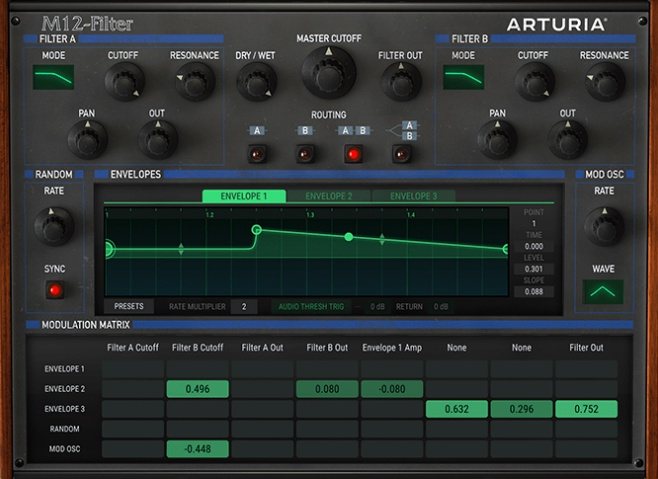
The original synth had one filter per voice with 15 modes, including a low pass, three high passes, two band passes, a notch, and a phase shift mode. Filter M12 lets you use two filters with all 15 modes at the same time, each with its own pan and output level controls.
There are four routing options: A, B, series, and parallel. A MatrixBrute-style master cutoff moves both filters together, and a dry/wet knob is included.
For modulation, three multi-segment envelopes, a random generator, and a modulation oscillator can be routed through eight matrix slots to 22 parameters. The envelopes can act as LFOs or step sequencers and sync to the DAW clock.
Key features
Matrix-12 filter recreation
Arturia's TAE (True Analog Emulation) technology models the Matrix-12 multi-mode filter, which was central to the original synth's sound, as a standalone effect.
Two filters, 15 modes
Each of the two filters has cutoff, resonance, pan, and output level, with 15 modes to choose from. You can also stack different modes.
Four routing options
Switch between A, B, series, and parallel to change how the two filters connect. Dry/wet and master cutoff can be used together.
Three envelopes
Three multi-segment envelopes can loop or be triggered by audio. They can serve as LFOs or step sequencers and sync with the DAW.
Modulation matrix
Envelopes, the random generator, and the mod oscillator can be assigned through eight slots to 22 parameters, for effects from smooth sweeps to glitchy textures.
Modulation oscillator
With five waveforms, it can modulate parameters at audio rates, which allows frequency-modulation-style sounds using the filters.
40 presets
40 presets from sound designers are included. The official page showcases examples such as a preset that adds a zap to transients and one that emulates a guitar wah.
Specifications
| Item | Details |
|---|---|
| Filter modes | 15 (two filters) |
| Routing | A / B / series / parallel |
| Envelopes | 3 (looped or audio-triggered) |
| Mod matrix | 8 slots, 22 parameters |
| Presets | 40 |
| Formats | Standalone, VST, AAX, AU, NKS (64-bit) |
| Mac | macOS 10.13+, 4 GB RAM, 4-core 3.4 GHz CPU or Apple Silicon, 1 GB free disk, OpenGL 2.0 GPU |
| Windows | Windows 10+ (64-bit), 4 GB RAM, 4-core 3.4 GHz CPU, 1 GB free disk, OpenGL 2.0 GPU (ARM processors not supported) |
What is included and system requirements
- Filter M12 itself (standalone, VST, AAX, AU, NKS)
- 40 presets
- Activation and management through Arturia Software Center
- One of the effects included in FX Collection PRO
How to use it
- Install via Arturia Software Center and activate the license.
- Load it as an insert on a DAW track.
- Choose a preset close to what you have in mind.
- Set the mode, cutoff, and resonance of the two filters.
- Switch routing (A, B, series, parallel) to change how they connect.
- Use dry/wet to decide how much blends with the original.
- Select an envelope and set it to loop or to be audio-triggered.
- In the modulation matrix, assign envelopes and other sources to the cutoff to create movement.
Where it may come in handy
Processing drum loops
The official preset notes include an example that generates a kick and hi-hats from a drum input. You might use it on loops to add rhythmic movement.
Moving synth pads
With a tempo-synced envelope, you might chop a pad like a gate.
Wah-style guitar
The official page describes an audio-triggered envelope to emulate a wah-like filter sweep.
Sound design
Combining the random generator and mod oscillator may be useful for building glitch-style material.
Who it may suit
- People interested in the Oberheim Matrix-12 filter design
- People who want to create sweeps or rhythmic motion with a filter
- People who like building sounds through modulation
- People considering FX Collection who want to check one of its effects
Good to know before you buy
- It is one of the effects in FX Collection PRO (39 effects) and is also sold on its own.
- Windows on ARM processors is not supported.
- An OpenGL 2.0 compatible GPU is required.
- License activation through Arturia Software Center is required.
- A free demo is offered on the official site.
Price
Please check the official page for the price.
See Arturia Filter M12 on the product page
More of the same kind
We have introduced 34 filters. Here are some of the others.
- AudioThing Dub Filter
- MeldaProduction MCombMB
- Waves eMo F2 Filter
- Solid State Logic Native X-Phase
- Minimal Audio Minimal Audio Hybrid Filter
- Three-Body Technology Tube Filter
We have introduced 45 other products from Arturia.
- Arturia Filter SEM
- Arturia Filter MINI
- Arturia Phaser BI-TRON
- Arturia Efx REFRACT
- Arturia Matrix-12 V
See the full list in Product database: Effects.
Sources: arturia.com pluginboutique.com (checked 2026-10-27)










Comments