
Disclosure: This page may contain affiliate links. Prices were checked on the date shown and may change.
An introduction to Arturia Flanger BL-20, based on information from the maker and distributors: what it does, how to use it and who it may suit. It is not scored.
The flanger effect but not as you know it. Based on a beloved studio classic, Flanger BL-20 is unpredictable and inspiring in equal measure
— Arturia official site
What is Flanger BL-20?
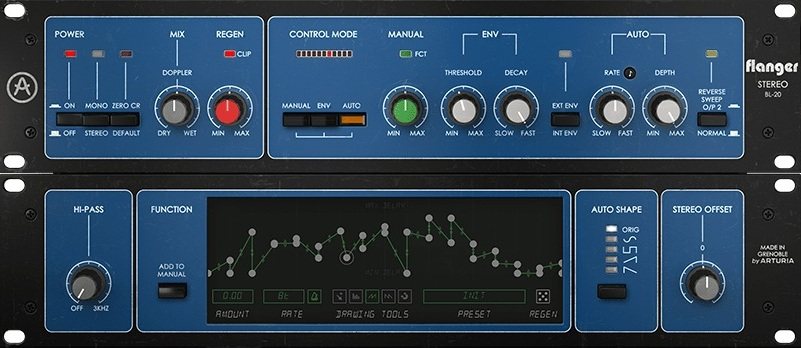
Flanger BL-20 is a flanger plugin from Arturia. It is based on a studio unit that Arturia describes as not a household name but with a distinctive feature set. It reproduces bucket-brigade device (BBD) circuitry and adds new functions.
A flanger modulates a delayed copy of the signal, for example with an LFO, and mixes it with the original. BL-20 offers three modulation sources, Auto (LFO), Env (envelope follower) and Manual, usable alone or in combination. The Env source can run from an internal or an external signal.
It also supports zero-crossing (through-zero) flanging. By applying a very short delay to the dry signal, the modulated signal passes over the original starting point, which cancels certain frequencies, according to Arturia.
It works in mono and stereo, and adds a stereo enhancer, an input high-pass filter, four extra LFO shapes, and the function generator from Pigments. It comes with 28 presets.
Key features
Three modulation sources
Use Auto (LFO), Env and Manual alone or together, for example layering a periodic LFO sweep with a sweep that follows input level.
Zero-crossing
A tiny delay on the dry signal lets the modulated signal pass the original point, cancelling certain frequencies for a deeper flange. It may suit a pronounced effect.
BBD circuit modeling
Replicates bucket-brigade circuitry to follow the original unit's warm response. Arturia says it can also serve as a sweetener in a mix.
Stereo offset and reverse sweep
Offsets the stereo spread of dry and wet signals and works with a reverse sweep switch for wider motion. Both mono and stereo modes are available.
Input high-pass filter
A 12 dB/octave high-pass on the input moderates the zero-crossing sound, and may help when lows get cloudy.
LFO shapes and function generator
The default LFO is a triangle, with sine, square, sawtooth and reverse sawtooth available. The Pigments function generator can override Manual modulation, and tempo-sync rates are supported.
External envelope
The envelope follower can be triggered by an external source, which may let one track drive another, such as drums driving a guitar flange.
Specifications
| Item | Details |
|---|---|
| Type | Flanger (effect) |
| Modulation sources | Auto (LFO), Env (internal or external), Manual |
| LFO shapes | Triangle (default), sine, square, sawtooth, reverse sawtooth |
| Input filter | 12 dB/octave high-pass |
| Modes | Mono / stereo |
| Presets | 28 |
| Plugin formats | VST, AAX, Audio Unit, NKS (64-bit only) |
| Windows | Windows 10 or later (64-bit), 4 GB RAM, OpenGL 2.0 GPU; ARM processors not supported |
| macOS | macOS 11 or later, 4 GB RAM, OpenGL 2.0 GPU |
| Free disk space | 1 GB |
What is included and system requirements
- 28 presets
- Formats: VST, AAX, Audio Unit, NKS (64-bit hosts only)
- Arturia Software Center for download and activation
- Also included in FX Collection PRO
How to use it
- Activate and install the product in Arturia Software Center.
- Load Flanger BL-20 as an insert on the track you want to flange in your DAW.
- Decide whether to use it in mono or stereo.
- Start with presets and listen to how each modulation source moves.
- Choose Auto, Env and Manual switches, combining them if you wish.
- Select an LFO shape and a tempo-sync rate to match the song.
- Adjust the zero-crossing depth and the input high-pass to keep the low end clear.
- Set the width with stereo offset and save your settings.
Where it may come in handy
Flanging guitar
Arturia mentions rhythm guitar. The deep zero-crossing effect may suit arpeggios and riffs.
Animating backing vocals
The official description includes adding motion to backing vocals, possibly widened with stereo offset.
Varying drum loops
It may bring change to a repetitive drum loop, and the external envelope can link it to another track.
Thickening synths
It may work on synths as a mix sweetener adding the BBD character.
Who it may suit
- People who want to design flanger sounds in detail
- Producers who want to try through-zero flanging
- Users who want complex motion by combining modulation sources
- Anyone who wants an effect that follows another track's signal
Good to know before you buy
- The Windows version does not support ARM processors.
- It is also part of FX Collection PRO, so check whether you already own it.
- A free demo is available from Arturia.
How it differs from similar products
We do not pick a winner; the official figures are placed side by side.
Arturia Filter SEM
Flanger BL-20 is a flanger with three modulation sources and 28 presets. Filter SEM is a 12 dB/octave multimode filter with a gate sequencer of up to 16 steps and 40 presets.
Price
Please check the official page for the price.
See Flanger BL-20 on the product page
More of the same kind
We have introduced 46 modulation effects. Here are some of the others.
- Soundtoys PhaseMistress
- Minimal Audio Ripple Phaser
- Kuassa Efektor PH3605 Phaser
- MeldaProduction MChorusMB
- Waves Space Rider
- D16 Group Antresol
We have introduced 45 other products from Arturia.
- Arturia Chorus JUN-6
- Arturia Filter SEM
- Arturia Arturia Filter M12
- Arturia CS-80 V
- Arturia Arturia Modular V
See the full list in Product database: Effects.
Sources: arturia.com pluginboutique.com (checked 2026-10-27)










Comments