
Disclosure: This page may contain affiliate links. Prices were checked on the date shown and may change.
An introduction to Arturia Chorus JUN-6, based on information from the maker and distributors: what it does, how to use it and who it may suit. It is not scored.
Chorus JUN-6 is based on the iconic stereo effect found in the Juno polysynth series from the ‘80s
— Arturia official site
What is Chorus JUN-6?
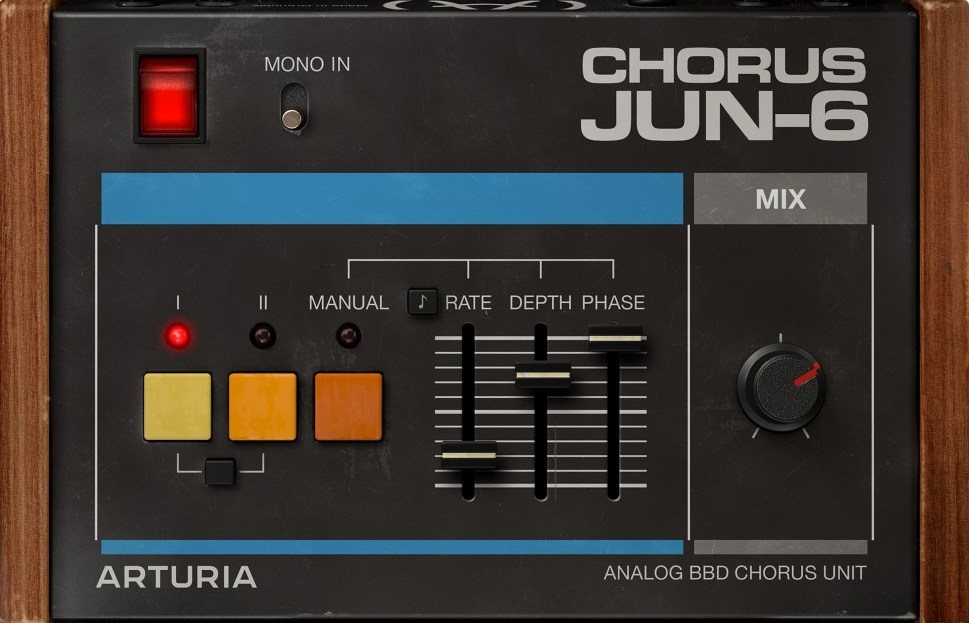
Chorus JUN-6 is an Arturia effect that recreates the stereo chorus built into Roland's Juno-series synthesizers of the 1980s. It is characterized by the thickness and slight instability of BBD (bucket-brigade) delay lines.
Its main controls follow the original's three modes. I is a gentle stereo swirl, II raises the rate and depth, and the combined I+II position sums to mono for a more vibrato-like sound, according to the official page.
A Manual mode has been added that was not on the original. It lets you set rate and depth yourself, sync to the host tempo, and adjust width with the LFO Phase control.
Input can be mono or stereo, and the Mix knob sets the dry/wet balance. The product is also part of FX Collection PRO and supports VST, AAX, Audio Unit and NKS.
Key features
Three-mode operation
Buttons I, II and I+II offer the same switching as the original. The official page says even the LFO frequencies were matched to the original behavior, so it may be quick to use without much tweaking.
BBD delay lines
The character of BBD circuitry is modeled. It may be useful for widening a sound or adding a slightly warm, gritty texture.
Manual mode
Rate and depth can be set freely and can be synced to tempo. When the original three modes are not enough, you can match the speed and depth of modulation to the song.
LFO Phase
This adjusts the phase of the left and right LFOs to change the stereo width. The official page presents it as a knob for adjusting width.
Mono input and Mix
With the mono input button engaged, a stereo input is summed to mono before processing. Otherwise the left and right inputs go through their own delay lines. Mix sets the dry/wet balance.
Presets and interface
It provides a preset browser, a resizable GUI and in-app tutorials, as listed on the official page.
Specifications
| Item | Details |
|---|---|
| Formats | VST / VST3 / AAX / Audio Unit / NKS (64-bit DAWs only) |
| Supported OS | macOS 10.13 or newer, Windows 10 or newer (64-bit) |
| Recommended spec | 4 GB RAM, 4-core CPU at 3.4 GHz, 1 GB free disk space, OpenGL 2.0 compatible GPU |
| Also included in | FX Collection PRO (also sold individually) |
What is included and system requirements
- Chorus JUN-6 plugin
- Presets
- Formats: VST, AAX, Audio Unit, NKS
- System requirements: macOS 10.13 or newer, Windows 10 or newer (64-bit)
How to use it
- Buy from the Arturia Store or Plugin Boutique, or obtain the official demo.
- Install through Arturia Software Center and activate the license.
- Insert Chorus JUN-6 on a track in your DAW.
- Start with mode I, then switch to II and I+II to compare.
- Set the amount with the Mix knob.
- Move LFO Phase when you want to adjust the width.
- Use Manual mode to set rate and depth yourself.
- With stereo material, compare the mono input button on and off.
Where it may come in handy
Widening synth pads and guitars
Passing synths or guitars with little spatial processing through it may add stereo thickness. The official page gives synths, guitars, bass and drums as examples.
Vocals and backing vocals
Blending in a small amount on vocals or backing parts may change how the track sits. A low Mix setting for a subtle effect is a possible starting point.
Changing the texture of bass and drums
You could widen a bass or add left-right movement to a drum loop. Slowing the rate in Manual mode may create a relaxed motion.
Who it may suit
- People who want to try the Juno-series chorus approach
- Those looking for a chorus with few controls
- Users who want to add stereo width to synths and guitars
- Anyone who wants one product from the FX Collection on its own
Good to know before you buy
- It is part of FX Collection PRO and can also be bought individually.
- The official page offers a free demo.
- This article does not evaluate sound quality.
How it differs from similar products
We do not pick a winner; the official figures are placed side by side.
Phaser BI-TRON
Chorus JUN-6 is a chorus with a simple layout built around three modes and a Mix control. Phaser BI-TRON has two LFOs and two phaser circuits. Both are priced at $49 by Arturia.
Price
Please check the official page for the price.
See Chorus JUN-6 on the product page
More of the same kind
We have introduced 46 modulation effects. Here are some of the others.
- Kuassa EFEKTOR CH3604 Chorus
- D16 Group Antresol
- Waves Kaleidoscopes
- MeldaProduction MeldaProduction MFlangerMB
- Kuassa EFEKTOR Omnivibe
- Minimal Audio Poly Flanger
We have introduced 45 other products from Arturia.
See the full list in Product database: Effects.
Sources: arturia.com pluginboutique.com (checked 2026-10-27)










Comments