
Disclosure: This page may contain affiliate links. Prices were checked on the date shown and may change.
An introduction to AudioThing AudioThing Phase Motion 2, based on information from the maker and distributors: what it does, how to use it and who it may suit. It is not scored.
Phase Motion 2 is a stereo phaser plugin featuring up to 32 phasing stages.
— AudioThing official site
What is AudioThing Phase Motion 2?
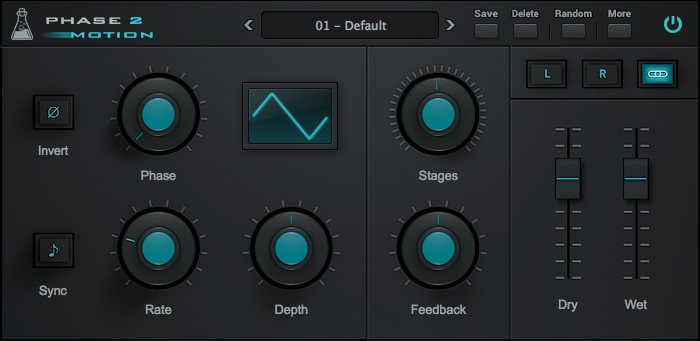
Phase Motion 2 is a stereo phaser from AudioThing. It offers up to 32 phasing stages, covering everything from light movement to large sweeps. Version 2 added separate settings for the left and right channels.
The rate can be set in Hz or synced to the host (DAW) tempo. The LFO waveform can be chosen from six: sine, triangle, ramp up, ramp down, square, and random.
By adjusting depth and feedback, the official description says you can get anything from a classic vintage phaser sound to extreme digital modulation.
A preset system with a randomizer is included, and light CPU use is listed among the specs. It runs on Windows, macOS, and Linux in VST2, VST3, AU, AAX, and CLAP formats (varies by OS).
Key features
Up to 32 stages
Up to 32 phasing stages are available. The number of stages changes how dense and deep the swirl is.
Stereo phaser
The L and R buttons let you edit one channel only, and the link icon applies changes to both. Effectively, there is one phaser for each side.
Six LFO waveforms
Choose from sine, triangle, ramp up, ramp down, square, or random to change the feel of the sweep.
Tempo sync
The rate can run in free Hz or sync to the DAW tempo, which is handy for sweeps tied to the song's rhythm.
Depth and feedback
Depth sets the sweep amount and feedback sets the resonance. Adjusting them shifts the character from gentle to strongly colored.
Presets and randomizer
Besides recalling presets, the randomizer changes settings at once so you can look for unexpected starting points.
Multi-OS and format support
It runs on Windows, macOS, and Linux and supports VST2, VST3, AU, AAX, and CLAP (formats differ by OS).
Specifications
| Item | Details |
|---|---|
| Stages | Up to 32 |
| LFO waveforms | 6 (sine, triangle, ramp up, ramp down, square, random) |
| Tempo sync | Yes |
| Formats (Windows) | VST2, VST3, AAX, CLAP (64-bit) |
| Formats (macOS) | VST2, VST3, AU, AAX, CLAP (64-bit, Universal 2) |
| Formats (Linux) | VST2, VST3, CLAP (64-bit) |
| System | Windows 7-11 / macOS 10.9+ / Ubuntu 20.04 LTS; 2 GHz CPU and 4 GB RAM on each |
| Activation | 1 license for up to 3 computers, no iLok, offline activation available |
What is included and system requirements
- Phase Motion 2 itself
- Presets
- PDF manual
- A demo version (3 seconds of silence every 45 seconds, saving disabled)
How to use it
- Download and install from the official site.
- Load it as an insert on a DAW track.
- Enable the L/R link to apply the same settings to both channels.
- Pick an LFO waveform and set the rate in Hz or tempo sync.
- Adjust depth and feedback for sweep amount and character.
- Change the number of stages and compare the density of the swirl.
- For a thicker sound, change one or two parameters on only one channel.
- Save settings you like as a preset.
Where it may come in handy
Guitar and keys
You might pass electric guitar or electric piano through it lightly for a slow sweep.
Pads and synths
Slightly different settings per side on a synth pad may give a wide, moving sweep.
Drum loops
With higher stages and feedback, a drum loop may take on a filter-like movement.
Sound design
The random waveform and randomizer may help in looking for unexpected starting points.
Who it may suit
- People who want separate phaser settings for left and right
- People who want to try classic to extreme phasing in one plugin
- People who need Linux support
- People who want to try a demo before buying
Good to know before you buy
- The demo has 3 seconds of silence every 45 seconds and disables saving.
- One license can be authorized on up to 3 computers.
- No iLok is required, and offline activation is supported.
- Supported formats differ by OS.
Price
Please check the official page for the price.
See AudioThing Phase Motion 2 on the product page
More of the same kind
We have introduced 46 modulation effects. Here are some of the others.
- W. A. Production Drifter
- United Plugins Duoflux
- Universal Audio Studio D Chorus
- Valhalla DSP ValhallaSpaceModulator
- Antelope Audio V12 Chorus
- MeldaProduction MChorusMB
We have introduced 34 other products from AudioThing.
- AudioThing Things – Motor
- AudioThing Things – Bubbles
- AudioThing Things – Flip EQ
- AudioThing RES-09
- AudioThing Wave Box
See the full list in Product database: Effects.
Sources: audiothing.net pluginboutique.com (checked 2026-10-27)










Comments