
Disclosure: This page may contain affiliate links. Prices were checked on the date shown and may change.
An introduction to BLEASS BLEASS Chorus, based on information from the maker and distributors: what it does, how to use it and who it may suit. It is not scored.
With up-to four fully stereo chorus voices, the plugin can create sumptuously rich and complex effects whilst allowing precise control over the stereo width, prominence and intensity of the results.
— BLEASS official site
What is BLEASS Chorus?
BLEASS Chorus is a chorus effect plugin from BLEASS. According to the maker, it covers everything from subtle movement and thickening to strongly stereo modulation. Besides the desktop plugin, versions for iPhone and iPad are offered.
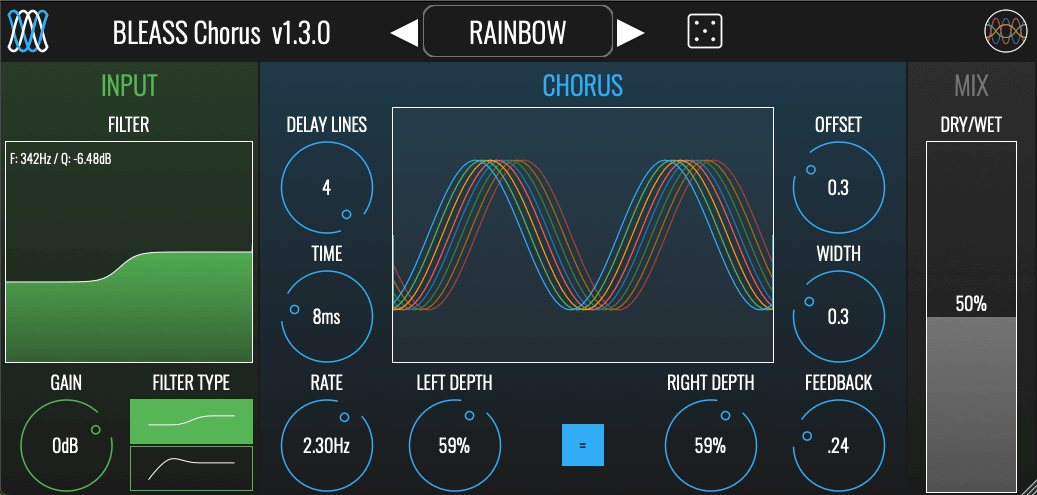
The core of the design is up to four stereo delay lines. A chorus works by modulating the pitch of a delayed copy of the signal with an LFO and blending it with the original, and adding lines makes the result more complex. Stereo width, prominence and intensity can all be set in detail.
An input filter sits ahead of the chorus and switches between low-shelving and high-pass. The maker describes the high-pass mode as a way to bring out space and air, and the shelving mode as a way to get warm thickening or thinner, lo-fi modulation.
A colored oscilloscope at the center of the interface shows how each delay line is moving. Each line has its own color, with left and right channels shown in slightly different brightness, so you can see what a setting is doing while you adjust it.
Key features
Up to four stereo delay lines
Delay Lines sets one to four lines, and the maker notes that more lines give a more complex chorus. It may help when you want to scale from light thickening to a layered spread in a single plugin.
Separate left and right Depth with Depth Lock
Depth can be set differently for the left and right channels. Turning Depth Lock on links both to the same value, so you can switch between asymmetric and matched modulation.
Offset and Width for phase spread
Offset shifts the modulation phase between lines, and Width shifts it between a line's left and right channels. At zero all lines move together; raising them gives a thicker or wider result, as the maker describes.
Time, Rate and Feedback
Time sets the delay time, and higher values make the chorus more prominent. Rate sets the LFO speed. Feedback returns processed signal to the input, and at very high settings the maker says the effect can become flanger-like.
Input filter: low-shelf or high-pass
Drag the graph to set frequency and amount (resonance in high-pass mode). Gain changes the processed signal, not the dry signal, so it also works as a way to set how prominent the effect is.
Color-coded oscilloscope
Each line's modulation is drawn in its own color, with left and right distinguished by brightness. The maker explains that with four lines and Offset and Width at zero you see a single sine wave, which helps in understanding how the controls interact.
Specifications
| Item | Details |
|---|---|
| Type | Chorus (plugin) |
| Delay lines | Up to 4 (stereo) |
| Input filter | Low-shelving / high-pass |
| Windows | Windows 8 or later (64-bit), VST3 |
| Mac | macOS 10.9 or later (64-bit only, M1 supported), VST3 / Audio Unit |
| Note | Not standalone; requires host software. iPhone and iPad versions also available |
What is included and system requirements
- Chorus plugin (VST3 / Audio Unit)
- Supports Windows 8 or later and macOS 10.9 or later (64-bit)
- Works inside VST3 or Audio Unit compatible DAWs (host required)
How to use it
- After purchase, run the installer as instructed and load the plugin in your DAW.
- Open BLEASS Chorus as an insert on the track you want to treat.
- Start with about two delay lines, and set the speed and size of the movement with Rate and Depth.
- Move Time up and down to hear how prominent the chorus becomes.
- Raise Offset and Width a little at a time to adjust thickness and stereo spread.
- If needed, switch the input filter to high-pass so the low end is left untouched.
- Add Feedback sparingly and decide by ear how the tone changes.
- Use the oscilloscope to see how each line is moving and check your settings.
Where it may come in handy
Thickening guitar or synth
With few delay lines and modest Depth, it may add light movement and thickness to guitar or synth parts. Keeping the low end out through the input filter may help avoid clashing with the bass.
Widening vocals or backing parts
Raising Width and Offset to spread the phase between channels may add a stereo-wide movement. Since Gain sets how strongly the effect is heard, you might keep the original voice in front.
Adding motion to pads
Combining four lines with some Feedback and a slow Rate may add motion to a sustained sound. For a lo-fi texture, the shelving setting of the input filter is one option.
Who it may suit
- People who want to shape stereo movement in more detail than a stock chorus allows
- People who prefer to adjust while watching a visual display of the effect
- People who want the same BLEASS interface on Mac or Windows DAWs and on iPhone or iPad
Good to know before you buy
- It does not run standalone; a VST3 or Audio Unit host is required.
- The desktop (Mac / Windows) and iPhone / iPad versions are offered separately.
- The price shown on store pages can vary with the currency or region displayed, so check the store page before buying.
How it differs from similar products
We do not pick a winner; the official figures are placed side by side.
BLEASS Flanger
BLEASS Chorus is a chorus with up to four delay lines, built around Delay Lines, Offset and Width. BLEASS Flanger is a flanger with two LFOs, an envelope generator and beat synchronization.
Price
Please check the official page for the price.
See BLEASS Chorus on the product page
More of the same kind
We have introduced 46 modulation effects. Here are some of the others.
- UVI UVI Shade
- Arturia Flanger BL-20
- United Plugins Duoflux
- Eventide TriceraChorus
- D16 Group Fazortan 2
- Eventide Instant Flanger Mk II
We have introduced 16 other products from BLEASS.
- BLEASS BLEASS Motion EQ
- BLEASS BLEASS Phaser
- BLEASS BLEASS Flanger
- BLEASS BLEASS Spectral Reverb
- BLEASS BLEASS Spectral Resonator
See the full list in Product database: Effects.
Sources: bleass.com pluginboutique.com (checked 2026-10-27)










Comments