
Disclosure: This page may contain affiliate links. Prices were checked on the date shown and may change.
An introduction to W. A. Production Drifter, based on information from the maker and distributors: what it does, how to use it and who it may suit. It is not scored.
At its core, a myriad of evolving modulators create subtle, organic shifts in tone and texture.
— W. A. Production official site
What is Drifter?
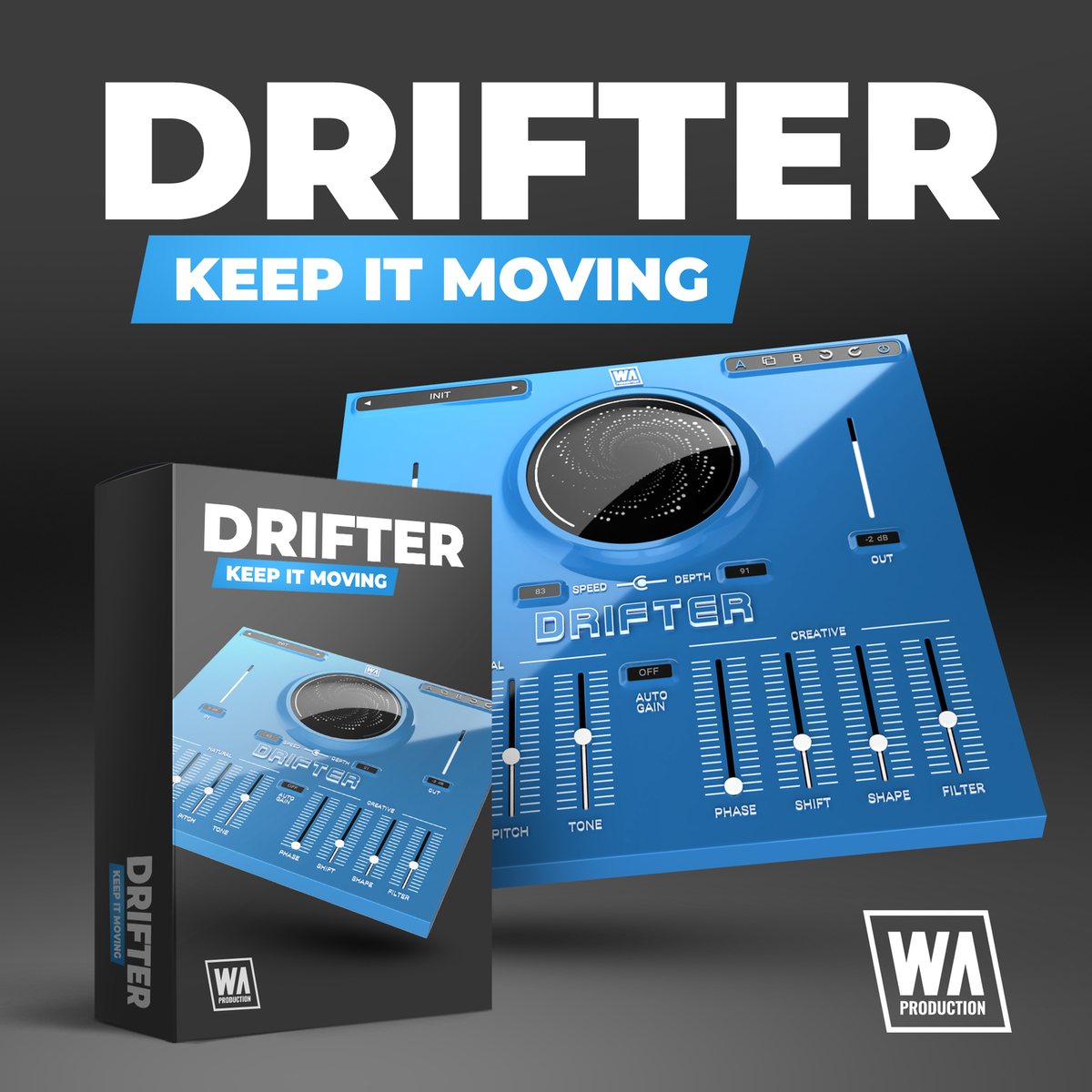
Drifter is a modulation plugin from W. A. Production. It moves a sound's level, pan, pitch, tone and more, gently or strongly, to add lifelike movement to audio that feels too perfect.
The official description says it can recreate the unstable pitch of an analog synth or the natural variation of a live performer. It can also create wider movements like those of lo-fi recordings or aged gear.
At the center are Depth, which sets the overall amount of movement, and Speed, which sets its rate. Below them, sliders set the amount for each target so you can fine-tune them one by one.
Controls are split into Natural (Level, Pan, Pitch, Tone) and Creative (Phase, Shift, Shape, Filter). Live meters, a central visualizer, A/B comparison and automatic gain compensation (AGC) are also provided.
Key features
Central Depth and Speed
Depth sets the overall amount of movement and Speed sets its rate. Many parameters are linked to these two, so you can start moving the sound quickly.
Per-target sliders
The amount for each target can be set separately. For example, you can move pitch strongly while barely touching pan.
Natural modulation
Level, Pan, Pitch and Tone (EQ) are modulated subtly. It is described as the group for adding restrained variation like analog gear or live playing.
Creative modulation
Phase (all-pass filter), Shift (frequency), Shape (harmonics) and Filter (high-pass/low-pass) are moved. The description says it suits experimental textures and evolving sounds.
AGC and gain controls
Turning on automatic gain compensation (AGC) keeps level stable while the sound is modulated. Input and output gain can be set independently.
Visualizer and presets
A central visualizer and live meters show the processing. Factory presets are described as covering subtle drift through to extreme transformation.
Specifications
| Item | Details |
|---|---|
| Type | Modulation effect |
| OS | Windows 8 or higher (64-bit) / macOS 10.10 or higher (64-bit) |
| Formats | Includes AAX (Pro Tools 11 or higher); check the store or official page for other formats |
| Functions | AGC, A/B comparison, copy/paste, undo/redo |
| Interface | Resizable vector graphics |
What is included and system requirements
- Factory presets
- Eight modulation targets across Natural and Creative
- Input/output gain and AGC
- Windows 8 or higher / macOS 10.10 or higher (64-bit)
- Check compatibility information before purchase on Apple Silicon
How to use it
- Insert it on a track that needs movement, such as a pad, drums or a synth.
- Pick a preset and check how it moves overall.
- Raise Depth to set the amount of movement.
- Adjust Speed to set the rate.
- Use the Natural sliders to set Level, Pan, Pitch and Tone amounts.
- Add Creative parameters (Phase, Shift, Shape, Filter) if needed.
- Turn on AGC to limit level differences and compare with the original using A/B.
Where it may come in handy
Pads and synths
It may be worth trying to add analog-style variation to tidy digital synth sounds.
Drums and loops
You could add a little movement to bring variation to repeating patterns.
Lo-fi textures
Strong pitch and tone movement could be used to create a worn tape or vinyl feel.
Who it may suit
- People who want to add movement to overly tidy sounds
- People creating lo-fi or vintage-style textures
- People who want several kinds of movement in a single plugin
Good to know before you buy
- Because movement can change level, it may help to decide whether to use AGC.
- Apple Silicon Mac users are advised to check compatibility information before purchasing.
Price
$39.90 (Plugin Boutique, checked 2026-10-27). Prices can vary by region and promotion, so check the official page before buying.
See Drifter on the product page
More of the same kind
We have introduced 46 modulation effects. Here are some of the others.
- u-he Uhbik 2
- Waves MondoMod
- AudioThing AudioThing Phase Motion 2
- Minimal Audio Minimal Audio Flex Chorus
- Waves Space Rider
- Universal Audio Studio D Chorus
We have introduced 42 other products from W. A. Production.
- W. A. Production Orchid
- W. A. Production BeatQuake
- W. A. Production Zqueezer
- W. A. Production Spectron by Curbi
- W. A. Production Vocal Cleaner
See the full list in Product database: Effects.
Sources: waproduction.com pluginboutique.com (checked 2026-10-27)










Comments