
Disclosure: This page may contain affiliate links. Prices were checked on the date shown and may change.
An introduction to AudioThing RES-09, based on information from the maker and distributors: what it does, how to use it and who it may suit. It is not scored.
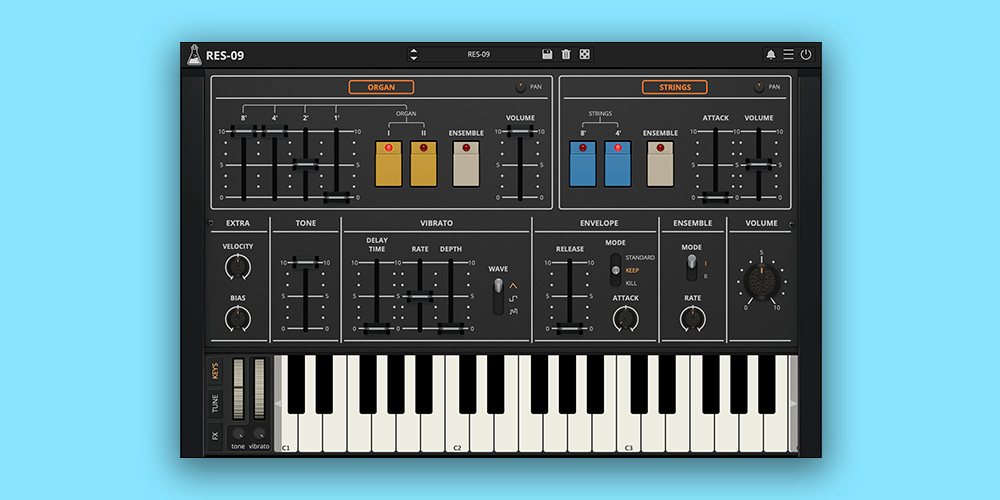
RES-09 is a faithful emulation of a classic analog organ and strings machine from the late 1970s, the Roland RS-09.
— AudioThing official site
What is RES-09?
RES-09 is a software synthesizer from the Italian developer AudioThing that plays organ and strings from a single instrument. The company says it is modeled on the Roland RS-09, an analog organ and strings machine from the late 1970s.
According to AudioThing, the original RS-09 Mark I launched at the end of 1978 and was refreshed as the Mark II in May 1980. It uses a Top Octave Generator with 12 oscillators for the highest octave and octave dividers for the lower notes, so both the organ and strings sections are fully polyphonic.
AudioThing says it reproduces how this design behaves while adding modern conveniences. Each oscillator tuning can be adjusted separately, and four effects can be reordered freely. It is built for people who want a vintage-style, thick ensemble sound inside a DAW.
Supported formats are VST2, VST3, AU, AAX, CLAP and standalone on Windows and macOS, with Linux also supported. An AUv3 version for iPhone and iPad is listed on the App Store. A demo is available with limits: 3 seconds of silence every 45 seconds, and saving is disabled.
Key features
Separate organ and strings generators
AudioThing explains that the organ section mixes four square waves, while the strings section layers several square waves into a saw-like shape. A bias control sets the balance of the layers. The two sections can be used alone or together.
Top Octave Generator design
Twelve oscillators produce the top octave and divider circuits produce the lower ones. AudioThing says the same note names stay in sync across octaves, avoiding the phasing problems typical of sample-based instruments. This matters when stacking many chord notes.
BBD ensemble chorus
The original's BBD-based ensemble effect is reproduced to add width and movement. A rate multiplier changes the speed of the internal LFOs. AudioThing notes that early and later originals used different BBD chips, both with 512 stages.
Four built-in effects
Tape echo (based on the company's Space Echo emulation), spring reverb, overdrive and phaser are built in. You can reorder them by drag and drop, for example to try distortion before or after the echo.
Vibrato with delay
The specification list includes vibrato with a delay. A slight lag before the modulation starts may help when you want string-like motion.
Tuning, presets and workflow
A tuning page adjusts each oscillator separately, and the preset system includes a randomizer. The window is resizable, with brightness and contrast controls. Version 1.1 added MIDI Learn and a new preset browser.
Specifications
| Item | Details |
|---|---|
| Type | Analog-style organ and strings machine soft synth (modeled on the RS-09) |
| Formats (Windows) | VST2, VST3, AAX, CLAP, Standalone (64-bit) |
| Formats (macOS) | VST2, VST3, AU, AAX, CLAP, Standalone (64-bit, Universal 2) |
| Formats (Linux) | VST2, VST3, CLAP, Standalone (64-bit) |
| Requirements (Windows) | Windows 7-11, 2 GHz CPU, 4 GB RAM |
| Requirements (macOS) | macOS 10.13 or later, 2 GHz CPU, 4 GB RAM |
| Requirements (Linux) | Ubuntu 20.04 LTS or later, 2 GHz CPU, 4 GB RAM |
| License | One license for up to 3 computers; no iLok or dongle, offline activation available |
| Effects | Echo, spring reverb, overdrive, phaser |
What is included and system requirements
- RES-09 plugin (organ and strings generators, ensemble effect)
- Four built-in effects (echo, spring reverb, overdrive, phaser)
- Presets and a randomizer
- PDF manual (download from the official site)
- Supported OS: Windows 7-11 / macOS 10.13 or later / Ubuntu 20.04 LTS or later
How to use it
- Create an AudioThing account and, if you bought from Plugin Boutique, enter the redeem code.
- Download and run the installer and the offline activation license file.
- Choose the formats to install (VST3, AU and so on) in the installer.
- Load RES-09 in your DAW and activate it online (account login) or offline (license file).
- Start with a preset and move the organ/strings balance to hear the difference.
- Drag the effects to reorder them and adjust echo and phaser amounts.
- Use the tuning page to detune the oscillators slightly and adjust the spread.
Where it may come in handy
Synth-pop and city-pop backing
Layering the ensemble effect on string chords may give a retro synth-pop backdrop. Adding echo or phaser could bring extra motion.
Organ bed for band tracks
Playing only the organ side could add a light bed to a band arrangement. Running it through the overdrive may give a rougher texture.
Ambient and score backgrounds
Long sustained strings with spring reverb or tape echo may produce slowly shifting backgrounds. The randomizer can also be used to look for unexpected tones.
Who it may suit
- Producers who want a 1970s organ and strings flavor in their tracks
- People who like adjusting tuning and effect order by hand
- Users who need one instrument across Windows, Mac and Linux
Good to know before you buy
- The official page states RES-09 is not affiliated with, sponsored or endorsed by Roland Corporation.
- One license covers up to 3 computers.
- The demo has 3 seconds of silence every 45 seconds and saving is disabled.
- The iOS (AUv3) version is obtained separately from the App Store.
Price
$59 (Plugin Boutique, checked 2026-10-27). Prices can vary by region and promotion, so check the official page before buying.
See RES-09 on the product page
More of the same kind
We have introduced 178 synthesizers. Here are some of the others.
- Native Instruments Rounds
- Cherry Audio Surrealistic MG-1 Plus
- GForce Software Oddity3
- Cherry Audio SH-MAX
- KV331 Audio SynthMaster 3
- Arturia SQ80 V
We have introduced 34 other products from AudioThing.
- AudioThing Materia
- AudioThing SX1000
- AudioThing miniBit
- AudioThing Things – Crusher
- AudioThing Things – Texture
For a side-by-side comparison scored on the same criteria, see our comparison of synthesizers.
See the full list in Product database: Instruments.
Sources: audiothing.net pluginboutique.com (checked 2026-10-27)










Comments