
Disclosure: This page may contain affiliate links. Prices were checked on the date shown and may change.
An introduction to Cherry Audio Miniverse, based on information from the maker and distributors: what it does, how to use it and who it may suit. It is not scored.
Whether you're seeking monstrous leads, funky basslines, or warm atmospheric pads, Miniverse has you covered.
— Cherry Audio official site
What is Miniverse?
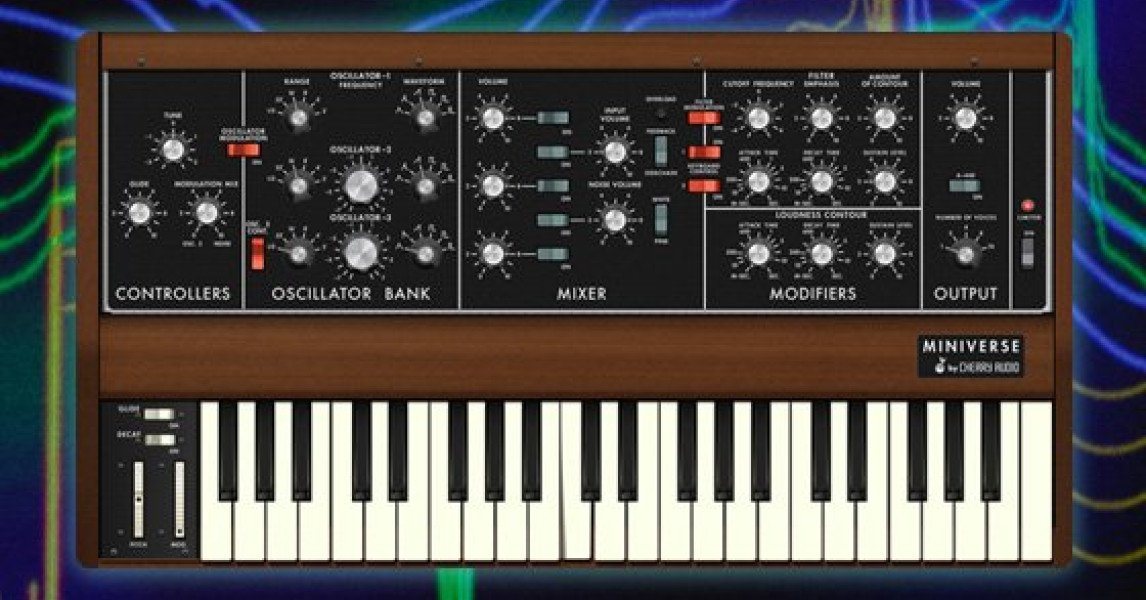
Miniverse is a virtual analog synth from Cherry Audio. It is modeled on a well-known portable analog synth that appeared in 1971, and the company names absolute authenticity as its design principle.
Working with DSP specialist Mark Barton (MRB), Cherry Audio says it measured the fine characteristics and responses of the original. The interface imitates the hardware, from the maple cabinet and textured surface to the knobs and switches.
The company states it avoided adding extra features such as additional LFOs or effects. One enhancement was added: besides single-voice playing, it can be set to 2, 4, 8 or 16 polyphonic voices.
More than 250 presets are included, ranging from brass, keys and percussion to sound effects and MPE presets. Custom MIDI controller mappings can be saved per preset or globally.
Key features
Three oscillators and ladder filter
The three oscillators offer triangle, sawtooth-triangular, ramp sawtooth, square, wide rectangular and narrow rectangular waveforms. The filter is a classic 4-pole, 24 dB/octave ladder.
Feedback and sidechain
The function of the original's external input is reproduced as feedback and sidechain, with its overdrive characteristics replicated closely according to the maker.
From mono to polyphonic
Besides monophonic play, 1, 2, 4, 8 and 16 voice settings are available, so it can be used for chords as well as single-note basses and leads.
MPE and MIDI Learn
MPE is supported, and every control works with MIDI Learn and DAW automation. MIDI mappings can be saved per preset or globally.
More than 250 presets
Presets cover bass, leads, brass, keys, percussion and sound effects. The maker's preview audio is split into categories such as basses, leads, brass and keys, pads and poly, and plucks.
Focus zoom and light CPU use
A Focus zoom feature and a user-adjustable oversampling control are included. The code is described as optimized for low CPU load.
Specifications
| Item | Details |
|---|---|
| Type | Virtual analog synth (mono or 1 to 16 voices) |
| Oscillators | 3 |
| Filter | 4-pole, 24 dB/octave ladder |
| Presets | More than 250 (maker) |
| Formats (Mac) | AU / VST / VST3 / AAX / stand-alone |
| Formats (Windows) | VST / VST3 / AAX / stand-alone |
| Supported OS (Mac) | macOS 10.13 or later, native Apple M1 support |
| Supported OS (Windows) | Windows 7 or later (including Windows 11), 64-bit |
| Recommended | 8 GB of RAM, a quad-core computer |
| Trial | 30 days (retailer listing); the demo periodically plays white noise |
What is included and system requirements
- Miniverse itself (plugin and stand-alone)
- More than 250 presets, including brass, keys, percussion, sound effects and MPE presets
- A MIDI mapping save feature
How to use it
- Download the Cherry Audio demo (30 days) and try it first.
- After purchase, register and authorize the license.
- Load Miniverse on an instrument track in your DAW.
- Choose a preset (Bass, Lead, Brass and so on) and play.
- Set the voice count to 1 for single notes, then raise it to 4 or 8 to try chords.
- Move the filter cutoff and feedback to hear how the sound changes.
- If you use a MIDI controller, assign it with MIDI Learn and save the mapping.
Where it may come in handy
Basses and leads
With three oscillators and a ladder filter, it may suit searching for basses and leads.
Pads and keys
The voice count can be raised for chords, so it may also work for pad and keys sounds.
Playing with an MPE controller
MPE presets are provided, so owners of compatible controllers may try expressive playing.
Who it may suit
- Someone who wants to try a classic mono-synth layout in software.
- Someone who prefers a simple interface without extra features.
- Someone who uses an MPE controller.
Good to know before you buy
- MPE requires a DAW and a hardware controller that support it.
- The maker explains that extra features such as additional LFOs and effects were intentionally left out.
- The demo periodically plays white noise (retailer listing).
Price
$49 (Cherry Audio official site, checked 2026-10-27). Prices can vary by region and promotion, so check the official page before buying.
See Miniverse on the product page
More of the same kind
We have introduced 178 synthesizers. Here are some of the others.
- Dawesome Tracktion Dawesome Abyss II
- Sound Particles GrainDust
- MOK Miniraze
- Arturia Buchla Easel V
- Arturia ARP 2600 V
- Sound Particles MiniDust
We have introduced 31 other products from Cherry Audio.
- Cherry Audio Mercury-6
- Cherry Audio Pentaphonic
- Cherry Audio CA2600
- Cherry Audio Mercury-4
- Cherry Audio Eight Voice
For a side-by-side comparison scored on the same criteria, see our comparison of synthesizers.
See the full list in Product database: Instruments.
Sources: cherryaudio.com pluginboutique.com (checked 2026-10-27)










Comments