
Disclosure: This page may contain affiliate links. Prices were checked on the date shown and may change.
An introduction to ADPTR AUDIO Utopia, based on information from the maker and distributors: what it does, how to use it and who it may suit. It is not scored.
Harness the power of ADPTR Audio Utopia’s unique spectral reverb engine and venture beyond real world spaces to explore the outer realms of reverb.
— ADPTR AUDIO official site
What is Utopia?
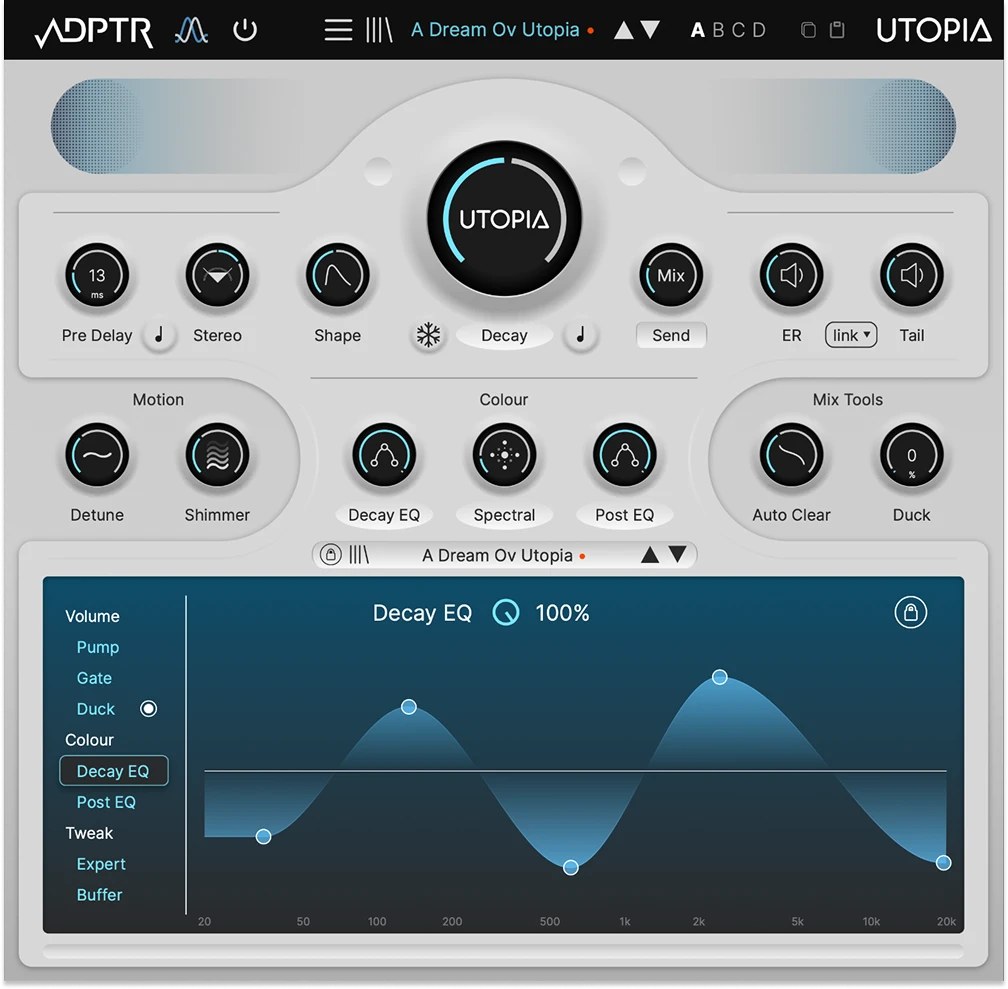
ADPTR AUDIO's Utopia is a reverb plug-in built on a spectral reverb approach. Reverb creates the sense of a room or space around a sound. Conventional reverbs are based on delay lines or convolution, recordings of real spaces, while Utopia breaks sound into its frequency components and rebuilds it, according to the maker.
The reverb engine is an original algorithm designed by Geraint Luff of Signalsmith Audio. The maker presents it as a reverb for going beyond real-world spaces, where space, time and texture blend together. Controls such as detune, shimmer, shape and spectral colour are said to take on distinctive characteristics.
To keep it usable in a mix, there is an Auto Clear control that favours newer signals and gently reduces clashing frequencies in older reverb tails, preventing mud between chord changes. The Decay EQ and Post EQ each have a 5-band node-based editor.
It also offers Buffer Reset, which stops and restarts the reverb buffer for repeatable effects, and ducking, gating and pumping, including BPM-synced volume shaping, all available as an insert. The maker names electronic music producers, composers and sound designers as its audience.
Key features
Spectral reverb engine
An original engine that rebuilds sound from its frequency components, described as unlocking sounds not available with delay-line or convolution reverbs.
Detune and shimmer
Spectral detune can shift the highs more than the bass, and the shimmer is described as having a unique voice that can sound like a choir or a ghostly whisper.
Auto Clear
It prioritises the newer signal and reduces clashing frequencies in the tail, so chords do not turn muddy.
5-band node EQs
The Decay EQ and Post EQ are 5-band node editors with curve shapes from gentle slopes to sharp peaks, and frequency can even be set by MIDI note.
Buffer Reset
One trigger (BPM sync, manual or MIDI note) stops and restarts the reverb buffer for clean, repeatable effects like a sample loop.
Duck, gate and pump
Volume shaping can be triggered from audio, MIDI note, side-chain input or synced to the DAW timeline, so you can pump a reverb on an insert.
Specifications
| Item | Details |
|---|---|
| Type | Reverb (spectral) |
| Reverb engine | Original algorithm designed by Geraint Luff of Signalsmith Audio |
| Main controls | Detune, Shimmer, Shape, Spectral colour, Auto Clear, Buffer Reset |
| EQ | Decay EQ and Post EQ (5-band node editors each) |
| Dynamics | Duck, gate and pump (BPM sync, MIDI, side-chain) |
| Price (maker) | Regular $150 (the sales page shows a sale price) |
What is included and system requirements
- Utopia plug-in
- Presets
- Formats and system requirements: check the maker's page
How to use it
- Install it and rescan plug-ins in your DAW.
- Insert Utopia on a send or insert; ducking and pumping let it work as an insert too.
- Choose a preset close to the sound you want.
- Set the onset and length of the reverb with Shape and Decay.
- Add character with Detune and Shimmer.
- Use Auto Clear to reduce mud on chord changes and shape the bands with the EQs if needed.
Where it may come in handy
Ambient and electronic textures
The maker's page highlights long, lush reverbs.
Pianos, synths and strings
Some users quoted on the maker's page use it on pianos, synths and strings.
Sound design and rhythmic effects
Buffer Reset and pumping can make the reverb move with the rhythm.
Who it may suit
- People looking for distinctive reverb textures in electronic music, composing or sound design
- People who want to move a reverb with the rhythm as an insert
Good to know before you buy
- Check the maker's page for formats and system requirements.
- Prices change with sales.
- Expressions on the maker's page such as setting a new standard are the maker's own claims.
- This article is based on the maker's product pages. Check the maker or retailer pages for the latest specifications and prices.
Price
Please check the official page for the price.
See Utopia on the product page
More of the same kind
We have introduced 112 reverbs. Here are some of the others.
- LiquidSonics Lustrous Plates
- Eventide Temperance Lite
- IK Multimedia CSR Plate Reverb
- Acon Digital Verberate Immersive 2
- iZotope Aurora
- UJAM UFX Reverb 2
We have introduced 1 other product from ADPTR AUDIO.
For a side-by-side comparison scored on the same criteria, see our comparison of reverbs.
See the full list in Product database: Effects.
Sources: adptraudio.com (checked 2026-11-09)









Comments