
Disclosure: This page may contain affiliate links. Prices were checked on the date shown and may change.
An introduction to Veena Studio Veena, based on information from the maker and distributors: what it does, how to use it and who it may suit. It is not scored.
Veena is an AI DAW with a personal music producer built in.
— Veena Studio official site
What is Veena?
Veena is a browser-based DAW (a program for composing, recording and mixing music). The maker describes it as an AI DAW with a personal music producer built in. There is nothing to install: you sign in with a Google account and the studio opens.
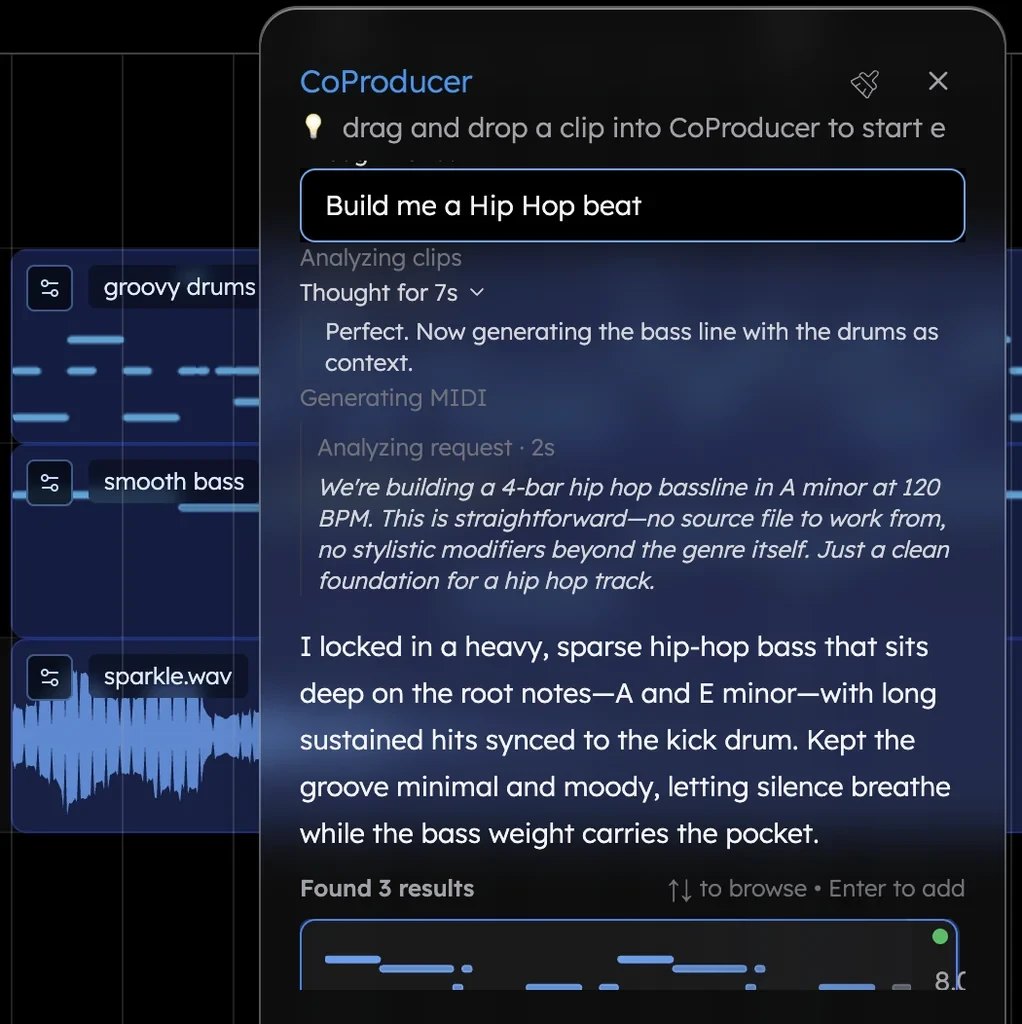
The built-in AI is called CoProducer. You describe the song you want in words, and it picks a tempo and key, then writes drums, bass, chords and melody one part at a time, each on its own track. Every part comes with three options to choose from or swap out.
CoProducer produces editable MIDI and audio tracks, not a finished audio file. You can keep working the usual DAW way: fix notes in the piano roll, balance levels in the mixer, and so on.
There are two plans: a free plan with the whole studio, and Veena Pro at $20 a month. The maker's pricing page says the free plan is not a trial and has no end date. What Pro adds is more CoProducer usage, not more studio features.
Key features
CoProducer (AI producer)
Describe the song you want and it sets tempo and key, lays out sections and writes each part to its own track, as the maker explains. Each part gets three options, so you keep the one you like.
A full studio in the browser
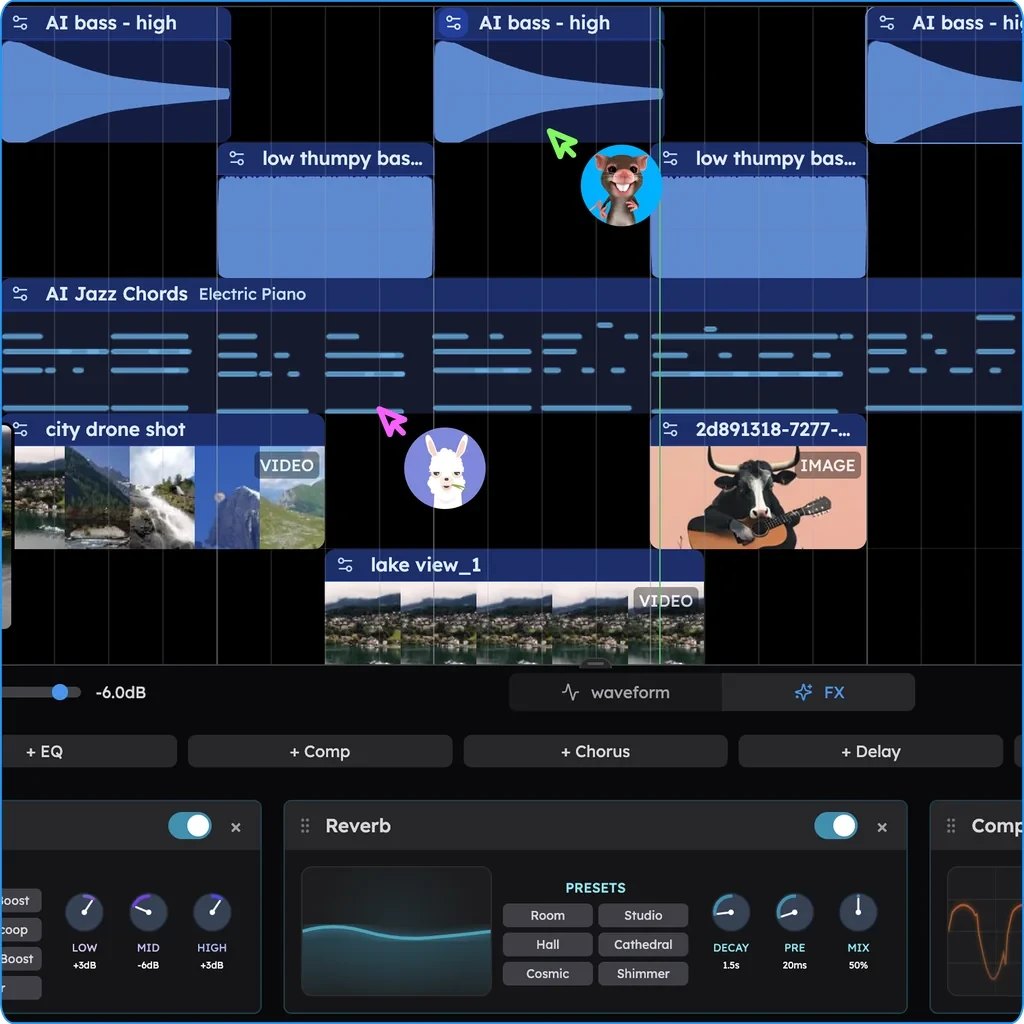
A multitrack timeline, a piano roll with velocity editing, a step-sequencer Beat Maker, a 16-pad sampler and a mixer are included. Nothing is installed, and the same project is said to open on a computer or a Chromebook.
Instruments and effects
The maker lists 61 instrument presets (39 of them Veena's own synths), 8 drum kits and 17 built-in effects. Because source sounds come with it, you may be able to start without adding other instruments.
Recording and stem separation
You can record vocals or instruments with input level and latency adjustment, count-in and loop recording. Any track can be split into four stems: vocals, drums, bass and other, as the maker describes.
Your own VST3 and AU plug-ins
With a small helper app called Veena Bridge, AU and VST3 plug-ins on Mac and VST3 on Windows can be played inside Veena, according to the maker. This may help if you want to bring familiar effects into a browser studio.
Real-time collaboration
Send an invite link and others can join the same session and build a song together in real time. The maker says this is available on every plan.
Pocket Studio for phones
Opened in a phone browser, it becomes a thumb-friendly Pocket Studio, as the maker explains. You might capture an idea on the go and continue it in the same project on a computer.
Specifications
| Item | Details |
|---|---|
| Type | Browser-based DAW with built-in AI |
| Supported environment | Latest browsers on Windows, Mac, Linux, Chromebook and phones (no native app) |
| Sign-in | Google account |
| Instruments, drums, effects | 61 instrument presets (39 are Veena's own synths), 8 drum kits, 17 built-in effects |
| Sampler | 16 pads |
| Stem separation | 4 stems (vocals, drums, bass, other) |
| External plug-ins | Via Veena Bridge: AU and VST3 on Mac, VST3 on Windows |
| Export | WAV (24-bit/48 kHz), MP3 (320 kbps), MIDI and stems; the pricing page says no caps and no watermark |
| Free plan | The whole studio; CoProducer with a daily allowance of requests |
| Veena Pro | $20 a month, billed monthly; removes the daily cap and unlocks premium models |
| Company | Veena Studio Inc. |
What is included and system requirements
- In the free plan: timeline, piano roll, mixer, recording, stem separation, VST3 and AU plug-ins, collaboration and export (CoProducer has a daily allowance)
- Added by Veena Pro: no daily cap and access to premium models (monthly usage is said to be larger and to roll over while subscribed)
- Pro members can top up CoProducer usage from $5 (top-ups do not expire)
- The terms of service state: "you own the Output you generate through your use of the Service"
How to use it
- Open the Veena studio (daw.veena.studio) in your browser.
- Sign in with your Google account.
- Write the song you want in the CoProducer panel (genre, tempo, key, instruments and structure help).
- Listen to the three options for each part and keep the one you like.
- Record vocals or instruments with a microphone, and fix details by asking in words or editing the piano roll yourself.
- To use your own plug-ins, install Veena Bridge and connect it.
- Export the full mix or individual tracks as WAV, MP3 or MIDI.
Where it may come in handy
Sketching a song foundation quickly
You tell it the genre and tempo, let it lay down drums, bass and chords, then edit from there.
Adding accompaniment to your recording
The maker describes importing your own recording and having new parts written to match its tempo. It may be worth trying when you want accompaniment for a vocal take.
Making music where you cannot install software
Since it runs in a browser, it may let you start on a school or work computer or a Chromebook where installing is hard.
Building a song with a friend
An invite link lets someone join the same session, which may suit arranging with someone in another place.
Who it may suit
- People who want to try composing through export without spending on a DAW
- People who find a blank timeline hard to start from
- People who want to work in a browser on any computer, including Chromebooks
- People who also want to use their own VST3 and AU plug-ins
Good to know before you buy
- It is browser-only with no native app, and needs an internet connection. AI processing runs on Veena's servers.
- CoProducer on the free plan has a daily allowance, which the maker says resets at midnight UTC.
- Using your own plug-ins requires the Veena Bridge helper app for Mac or Windows.
- Veena Pro is billed monthly only; there is no annual plan.
- Claims such as being a top DAW are the maker's own statements.
- This page is based on the maker's published information.
Price
Please check the official page for the price.
A free plan with the whole studio is available. Veena Pro is $20 a month (maker's official site, checked November 22, 2026).
For other free DAWs, see our free DAW roundup.
More of the same kind
Other introduction articles of the same kind.
- Shark LabsBogdan Sharkov Clownfish Voice Changer
- Digital Brain Instruments Podcaster
- Tracktion StageBox
- Elgato Wave Link
- VB-Audio Voicemeeter Banana
- Stagecraft Software Universal Plug
See the full list in Product database: Streaming and recording software and others.
Sources: veena.studio (checked 2026-11-22)








Comments