
This sale ended on October 25, 2026. The prices, discounts and end dates below are the information we checked before it ended. Check the store page for the current price.
See also our latest deals.
Zynaptiq’s pitch-editing plug-in PITCHMAP is 46% off at Plugin Boutique: $79 instead of $149 (USD). The product page says the offer runs until October 25.
Disclosure: This article contains affiliate links. If you buy through them, SoundBounty may earn a commission at no extra cost to you. Prices are as of the date we checked them and can change.
The deal
| Product | Regular price | Sale price | Discount | Ends |
|---|---|---|---|---|
| PITCHMAP | $149 | $79 | 46% off | Oct 25 |
Prices are in US dollars as shown on Plugin Boutique, checked on October 24, 2026. The discount and end date come from the Plugin Boutique product page. Taxes, fees and availability can vary by country, so check the checkout page.
Where to buy
- PITCHMAP: View at Plugin Boutique
What is PITCHMAP?
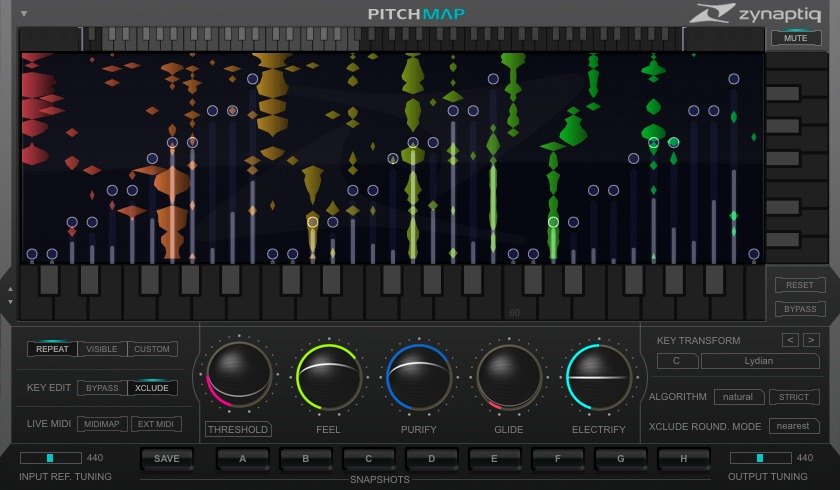
PITCHMAP is a pitch-editing plug-in from Zynaptiq. It can change the pitch of individual notes inside mixed audio (for example, a finished song) in real time. You can also change the melody and harmony of a recording to follow what you play on a MIDI keyboard (per the manufacturer).
Besides correcting off-pitch notes, it can reduce or pull out particular sounds from a mix, and it offers synth-like tone shaping (Purify and Electrify, and Glide, which links notes smoothly). Because a voice sounds very different from an instrument, a “Natural Mode” is provided that detects the vocal parts and processes them separately (per the manufacturer).
Features
Real-time pitch processing of individual notes inside a mix
Zynaptiq describes it as the world’s first plug-in that can process the pitch of individual notes inside already mixed audio in real time. Its distinguishing point is that you can work on the pitch of a particular note even after the mix.
Change melody and harmony by playing them
You can change the melody and chords of already recorded audio by playing your own melody on a MIDI keyboard or by drawing a “pitch map” on screen (per the manufacturer). It can correct off-pitch notes at the same time.
Reduce particular sounds in a mix
It also has a function to reduce particular sounds in a mix. Zynaptiq says it is a precision tool for correction that can also be played like an instrument.
Synth-like sound transformation
You can apply advanced, synthesizer-like transformations to recorded sound (per the manufacturer).
30-day free trial
The manufacturer’s official site offers a 30-day free trial, so you can try it on your own material before buying.
Specifications and system requirements
- The official site mentions a 30-day free trial
- See “specifications” on the official page for system requirements and supported formats
After you buy: installation and activation
This is the flow for Zynaptiq products bought at Plugin Boutique (you receive an activation code by entering a registration code). Steps and screen names can change when the manufacturer updates its software.
You need first: a free iLok account (an iLok USB key is optional).
- Enter the “Registration Code” you receive from the store on Zynaptiq’s registration page (zynaptiq.com/register). Even if the store calls it a “serial number” or “activation code”, at Zynaptiq it is a registration code.
- The email you receive has the download URL of the latest installer and the “Activation Code” that activates the software.
- Run the installer to install it.
- Enter the code from “Activate” in the plug-in’s wizard, or register the code with “Redeem Code” in iLok License Manager, to activate.
Before you buy
- The end date is the one shown on Plugin Boutique. Offers can change, so confirm on the product page before you buy.
- Check the supported operating systems, plug-in formats (VST3, AU, AAX and so on) and the licensing method on the product page before buying.
Where to buy
- PITCHMAP: View at Plugin Boutique









Comments