
Disclosure: This page may contain affiliate links. Prices were checked on the date shown and may change.
An introduction to Antelope Audio Tape Delay, based on information from the maker and distributors: what it does, how to use it and who it may suit. It is not scored.
Tape Delay delivers the unmistakable sound of analog tape delay—with all the warble, saturation, and depth that define vintage echo hardware
— Antelope Audio official site
What is Tape Delay?
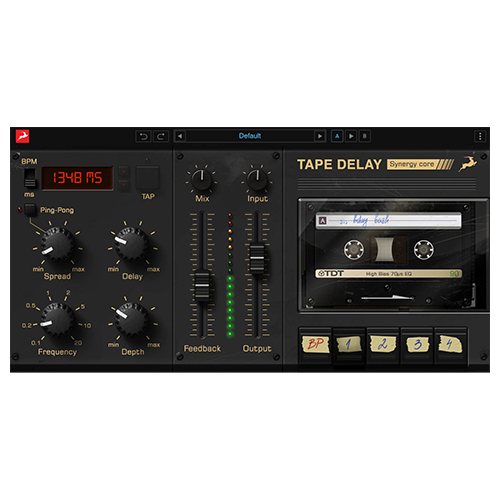
Tape Delay is a tape-delay style plug-in from Antelope Audio. It aims for the warble, saturation and depth of vintage tape echo hardware, with modern features such as tempo sync and stereo control.
Four tape types can be switched, each described as having its own saturation, tone and texture. This lets you change how the repeats sit.
Delay time can be set in BPM or milliseconds, and a Tap Tempo button is included, so you can match the feel without typing numbers.
Ping-Pong mode alternates repeats left and right, and Spread adjusts the stereo width. It is a native plug-in and needs no extra hardware.
Key features
Tape character
Described as adding subtle pitch modulation, saturation and analog-style imperfection.
Four tape types
Each type has its own saturation, tone and texture; switch to suit the track.
Tempo sync and milliseconds
Sync to BPM or set the time manually in milliseconds.
Tap Tempo
Tap a button to set the delay time.
Ping-Pong and Spread
Repeats alternate left and right, and Spread narrows or widens the stereo field.
Clear interface
A vintage-inspired interface for quickly dialing in tight slaps to ambient tails.
Specifications
| Item | Details |
|---|---|
| Type | Tape delay plug-in |
| Format | Native (macOS / Windows, no hardware required) |
| Tape types | 4 |
| Delay time | BPM sync / milliseconds / Tap Tempo |
| Stereo | Ping-Pong, Spread |
| Availability | Part of Antelope Cosmos (75+ native plug-ins), 14-day free trial |
What is included and system requirements
- Native plug-in (macOS / Windows)
How to use it
- Create an Antelope Audio account and buy or start the 14-day trial.
- Install the plug-in through Antelope's software.
- Restart your DAW and insert Tape Delay on a send or track.
- Choose one of the four tape types.
- Select BPM sync or milliseconds.
- Use Tap Tempo if needed.
- Adjust Ping-Pong and Spread, then set the mix.
Where it may come in handy
Vocal echo
Tempo-synced tape-style repeats may fit the song.
Width for guitars and synths
Ping-Pong and Spread may add stereo depth.
Dub-leaning effects
It may suit repeats with a build-up feel.
Who it may suit
- People who want tape-echo flavor in a plug-in
- People who want both tempo sync and tap tempo
- People who want to explore Antelope's plug-in collection
Good to know before you buy
- The maker says joining Antelope Cosmos unlocks 75+ native plug-ins.
- The single-purchase price shown is the one confirmed at Plugin Boutique.
- System requirements are linked from the maker's page.
How it differs from similar products
We do not pick a winner; the official figures are placed side by side.
Halo
Both are native Antelope Audio delays. Tape Delay offers four tape types and Ping-Pong, while Halo offers up to 16 taps and three decay curves. At Plugin Boutique, Tape Delay is $159 and Halo is $119.
Price
$159 (Plugin Boutique, checked 2026-10-27). Prices can vary by region and promotion, so check the official page before buying.
Also available as part of Antelope Cosmos, which unlocks 75+ native plug-ins (check the maker's page for pricing).
See Tape Delay on the product page
More of the same kind
We have introduced 62 delays. Here are some of the others.
- Waves Manny Marroquin Delay
- Rob Papen RP-Delay
- PSP Audioware PSP stompDelay
- BLEASS BLEASS Tides
- W. A. Production SphereDelay 2
- Nomad Factory ECHOES
We have introduced 54 other products from Antelope Audio.
- Antelope Audio Halo
- Antelope Audio VEQ-HA32C
- Antelope Audio NEU-W492
- Antelope Audio Edge Go
- Antelope Audio Antelope Audio VEQ-1A
For a side-by-side comparison scored on the same criteria, see our comparison of delays.
See the full list in Product database: Effects.
Sources: en.antelopeaudio.com pluginboutique.com (checked 2026-10-27)










Comments