
Disclosure: This page may contain affiliate links. Prices were checked on the date shown and may change.
An introduction to Antelope Audio VEQ-56, based on information from the maker and distributors: what it does, how to use it and who it may suit. It is not scored.
The venerable VEQ-56 originates from a line of American mixing desks made throughout the ’60s and ’70s.
— Antelope Audio official site
What is VEQ-56?
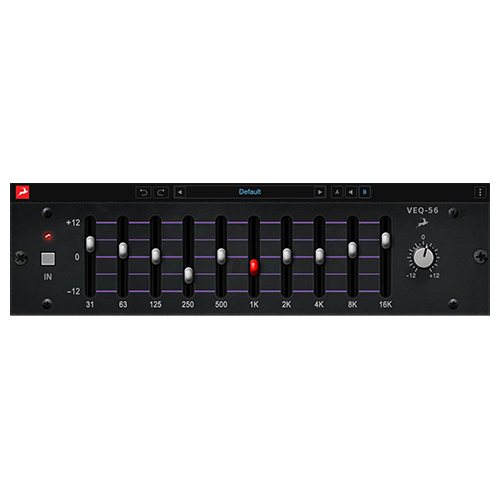
VEQ-56 is a 10-band graphic EQ plug-in from Antelope Audio, based on an EQ from American mixing consoles made in the 1960s and 70s. It is presented as a faithful recreation of the feel and operation of the 1969 unit.
Its automatic Q adjustment changes the filter bandwidth as you move the faders. According to the maker, the bandwidth is wider at small boosts or cuts and narrower at larger ones.
Ten bands run from 31 Hz to 16 kHz with up to 12 dB of boost or cut per band. The maker describes it as an EQ that can serve both musical shaping and corrective work.
Both a native version and a Synergy Core version are included. The native one runs inside a DAW without extra hardware, and the Synergy Core one runs in real time on compatible devices.
Key features
10-band graphic EQ
Bands sit at 31, 63, 125, 250, 500 Hz, 1, 2, 4, 8 and 16 kHz, each moved with a fader.
12 dB boost/cut per band
Each band can be boosted or cut by up to 12 dB.
Automatic Q
Bandwidth changes with fader movement: wider for small changes and narrower for large ones, as the maker explains.
Recreation of a 1969 unit
Antelope's engineers reproduced the feel and operation of the original 1969 console EQ.
Native and Synergy Core
The same EQ is available as a native plug-in and as a real-time version for compatible devices.
Bypass button
A bypass button lets you compare before and after.
Specifications
| Item | Details |
|---|---|
| Type | 10-band graphic EQ |
| Bands | 31 Hz to 16 kHz (10 bands) |
| Boost/cut | 12 dB per band |
| Versions | Native / Synergy Core |
| Original | 1969 American console EQ |
What is included and system requirements
- Native plug-in (runs on Mac or PC without extra hardware)
- Synergy Core version for real-time use on compatible Synergy Core devices
- The maker says joining Antelope Cosmos (subscription) unlocks 75+ native plug-ins
Where it may come in handy
Overall mix balance
It may suit cases where you want to adjust several bands at once in a graphic EQ layout.
Vintage-style correction
You could try it when you want the behavior of an old console EQ.
With Synergy Core devices
If you own a compatible device, it may be used in real time while tracking.
Who it may suit
- People who want to adjust visually with a graphic EQ
- People interested in old console EQ behavior
- People who use Antelope Audio devices
Good to know before you buy
- The native version runs on Mac or PC without additional hardware.
- The Synergy Core version is for real-time use on compatible Antelope Audio devices.
- Joining the maker's Antelope Cosmos subscription gives access to other native plug-ins.
- Check the maker's system requirements page for exact supported environments.
How it differs from similar products
We do not pick a winner; the official figures are placed side by side.
Antelope Audio VEQ-HLF
VEQ-56 is a 10-band graphic EQ with 12 dB boost/cut per band, while VEQ-HLF is a pair of passive low-cut and high-cut filters with 10 selectable frequencies each.
Price
about $111 (converted from €99.00) (Antelope Audio official site, checked 2026-10-27). Prices can vary by region and promotion, so check the official page before buying.
See VEQ-56 on the product page
More of the same kind
We have introduced 122 EQs. Here are some of the others.
- Pulsar Audio Pulsar 8200
- IK Multimedia T-RackS Linear Phase Equalizer
- Boz Digital Labs David Bendeth's The Hoser 2
- IK Multimedia IK Multimedia EQ 73
- Waves Manny Marroquin EQ
- McDSP 4020 Retro EQ
We have introduced 54 other products from Antelope Audio.
- Antelope Audio VEQ-STU 169
- Antelope Audio VEQ-STU 089
- Antelope Audio NEU-W492
- Antelope Audio Antelope Audio VEQ-55B
- Antelope Audio MG4+
For a side-by-side comparison scored on the same criteria, see our comparison of EQs.
See the full list in Product database: Effects.
Sources: en.antelopeaudio.com pluginboutique.com (checked 2026-10-27)










Comments