
Disclosure: This page may contain affiliate links. Prices were checked on the date shown and may change.
An introduction to Apogee HypeMiC, based on information from the maker and distributors: what it does, how to use it and who it may suit. It is not scored.
USB Microphone with Studio Quality Analog Compression
— Apogee official site
What is HypeMiC?
The Apogee HypeMiC is a USB condenser microphone with a built-in studio-quality analog compressor. A compressor reduces loud peaks and evens out the volume, and because it sits inside the microphone itself, voices and instruments can be recorded with a more consistent level without any extra setup on the computer or phone.
The Japanese distributor Media Integration describes it as four devices in one compact body: a microphone, an analog compressor, a microphone preamp and A/D and D/A converters. A preamp raises a small signal to a workable level, and the converters translate between sound and digital data.
It connects with a single cable to iPhone, iPad, Mac and Windows. It records at up to 24-bit/96 kHz, and the headphone output has a Blend control that lets you balance the microphone signal against computer playback with zero-latency monitoring. A tripod, a pop filter and a carrying case are included.
It sits above the maker's MiC+ USB microphone by adding the analog compressor. The distributor's comparison table lists the HypeMiC as released in January 2019 and the MiC+ in November 2017; the compressor is the main difference between the two.
Key features
Built-in analog compressor
A studio-quality analog compressor is built into the body. It holds back loud peaks so that voices and instruments are recorded at a more even level, which can reduce the work of leveling them later.
Three compression settings
A knob on the front panel selects light, medium or heavy compression. The light setting suits vocals and instruments, the medium setting evens out speech for streams and interviews, and the heavy setting is aimed at broadcast-style voice recording.
24-bit/96 kHz PureDIGITAL connection
The PureDIGITAL connection supports recording at up to 24-bit/96 kHz. It is powered over USB, so no separate power supply is needed.
High-quality cardioid capsule
Cardioid means the capsule mainly picks up sound from the front and less from behind. The capsule is a condenser type with a maximum SPL of 130 dB (1% THD at 1 kHz), so it is designed to handle loud sources such as brass and drums.
Zero-latency monitoring with Blend
The 3.5 mm stereo headphone output lets you balance the direct microphone signal and computer playback with no delay, which helps when you want to hear yourself while singing.
Analog output
The distributor also describes feeding the signal from the HypeMiC analog output into a mixer, an audio interface or a hardware recorder, so the compressed sound can be sent to other gear.
Accessories included
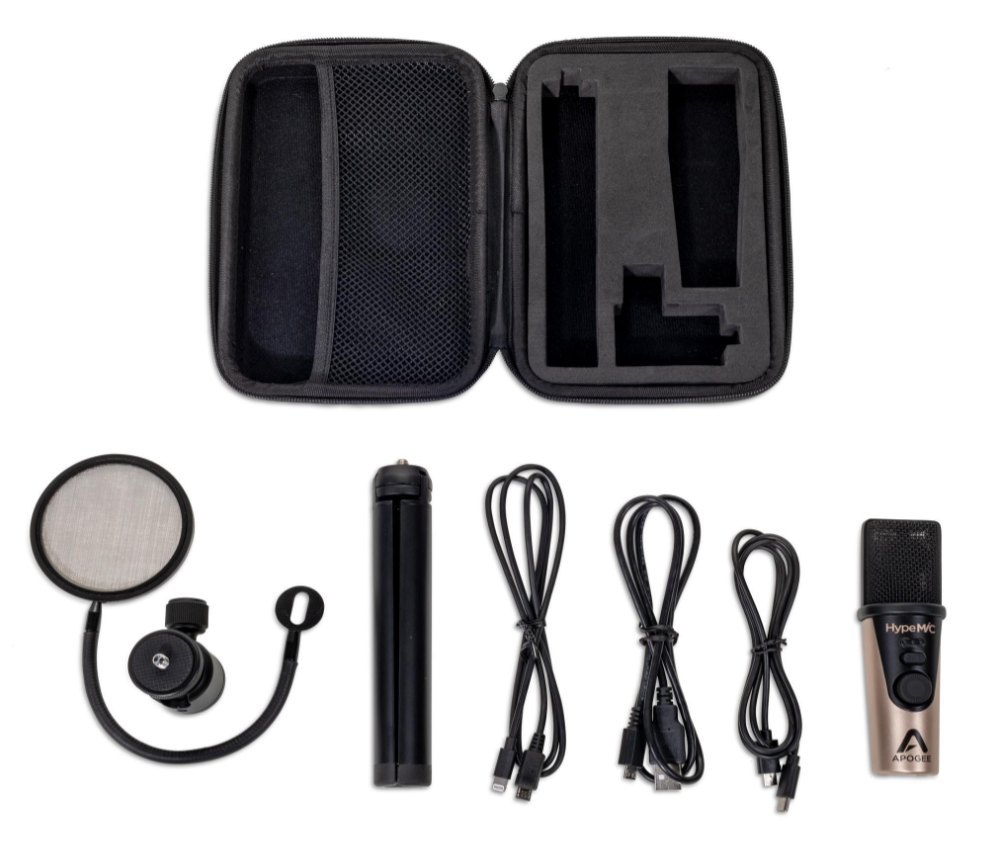
The package includes a desktop tripod, a mic stand adapter, a pop filter, a carrying case, a quick-start guide and three cables (Micro-USB to USB-C, USB-A and Lightning).
Specifications
| Item | Details |
|---|---|
| Type | USB condenser microphone with built-in analog compressor |
| Connection | Micro USB input; Lightning, USB Type-C and USB Type-A cables included |
| Sample rate | Up to 24-bit/96 kHz |
| Max SPL | 130 dB (1% THD at 1 kHz) |
| Sensitivity | -36 dBFS (94 dB SPL, 1 kHz) |
| Noise level | -108 dBFS (A-weighted, 0 dB gain) |
| Max preamp gain | 46 dB |
| Size | 124 mm long, 38 mm wide, 38 mm high |
| Weight | About 200 g (0.45 lb) |
| Release | January 2019 (per the distributor's comparison table) |
What is included and system requirements
- HypeMiC microphone
- Desktop tripod
- Mic stand adapter
- Pop filter
- Carrying case
- Micro-USB to USB-C cable
- Micro-USB to USB-A cable
- Micro B to Lightning cable
- Quick-start guide
- Supported systems: Mac (macOS 10.9 or later, Intel processor, 2 GB RAM or more), Windows 10 or later (Intel/AMD x86-64, 4 GB RAM or more; ASIO4ALL driver required for professional applications), iOS 9 or later (Lightning connection)
How to use it
- Choose the cable that fits your device from the included USB-C, USB-A and Lightning cables.
- Connect the HypeMiC to your computer, iPhone or iPad. It is powered by the host device.
- Open your recording app and select the HypeMiC as the input device.
- Plug headphones into the 3.5 mm jack and set the Blend control to balance the microphone and playback.
- Set the gain with the front-panel knob and watch the level meter so it does not turn red too often.
- Choose a compression setting: light, medium or heavy.
- Place the microphone on the included tripod or mic stand adapter, attach the pop filter and start recording.
Vocal recording
It may suit you if you want moderate compression applied at the recording stage. The distributor's page describes the analog compression as giving vocals a distinctive texture.
Acoustic instruments
The compression evens out dynamics, so it could be useful for instruments with wide dynamics such as guitar or brass. It is designed to handle loud sources.
Streaming, podcasts and meetings
The medium setting may be handy for evening out the level of speech. Streaming, interviews and remote work are all listed as uses on the distributor's page.
Recording on the go
A Lightning cable is included, so it connects directly to an iPhone or iPad, and the carrying case makes it easy to take along.
Who it may suit
- People looking for a USB microphone with a built-in compressor
- People who want vocals or instruments leveled at the recording stage
- Streamers, podcasters and remote workers who want an even voice level
- People who want one microphone for iPhone, iPad and computers
Good to know before you buy
- The distributor notes that compression tends to emphasize room noise, so a quiet room suits it best.
- The microphone input level also affects how the compression behaves.
- On Windows, professional applications need the ASIO4ALL driver.
- This page is based on the Japanese distributor's information. Check the maker or retailer pages for the latest specs and supported devices.
How it differs from similar products
We do not pick a winner; the official figures are placed side by side.
Apogee MiC+
The distributor's comparison table lists both with 24-bit up to 96 kHz, a headphone output with Blend and a digital encoder knob. The differences are that the HypeMiC adds analog compression and includes a carrying case and pop filter.
Price
Please check the official page for the price.
See HypeMiC on the product page
More of the same kind
We have introduced 100 microphones. Here are some of the others.
- ZOOM ZDM-1PMP Podcast Mic Pack
- Roland CS-10EM
- HyperX QuadCast S
- Sennheiser MKH 416
- sE Electronics V7
- Sennheiser PROFILE USB Microphone
We have introduced 9 other products from Apogee.
- Apogee ClipMic digital 2
- Apogee MiC Plus
- Apogee Jam X
- Apogee Symphony Studio
- Apogee Pultec FX Bundle
For a side-by-side comparison scored on the same criteria, see our comparison of microphones.
See the full list in Product database: Microphones and accessories.
Sources: minet.jp (checked 2026-10-27)









Comments