
Disclosure: This page may contain affiliate links. Prices were checked on the date shown and may change.
An introduction to Waves eMo F2 Filter, based on information from the maker and distributors: what it does, how to use it and who it may suit. It is not scored.
So many issues need only a simple high or lowpass filter.
— Waves official site
What is eMo F2 Filter?
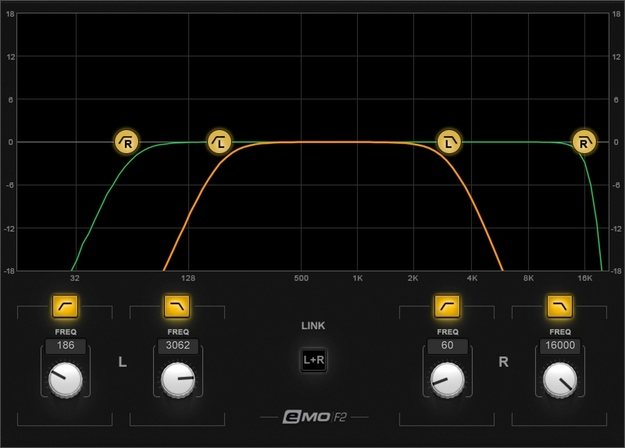
eMo F2 Filter is a two-band high-pass / low-pass filter from Waves, designed for quickly handling problems that need only a simple filter, such as bass build-up, hiss, low frequencies feeding a reverb, amp-sim harshness and mic pops.
Each filter rolls off at 18 dB per octave. The idea is to avoid digging through multiple parametric EQ stages when a simple high or low cut is enough.
With a touch-friendly interface, it can be used as a separate plug-in or as part of the channel strip of the eMotion LV1 live mixer. It has zero latency and very low CPU use, and is optimized for live sound mixing.
It runs in mono, dual mono or linked stereo, and the left and right sides can be filtered independently or linked. Settings can be made by turning controls, dragging the graphic curve, or entering values.
Key features
Two-band HPF / LPF
A high-pass and a low-pass filter, each at 18 dB/oct, focused on cutting unwanted lows and highs.
Zero latency
With no latency it is easy to place in a live monitoring path.
Low CPU use
Its light processing is described as suitable for many channels.
Mono, dual mono, linked stereo
Choose per channel setup; sides can be set independently or linked.
Multiple ways to control
Controls, dragging the curve and numeric entry are supported, plus multi-touch.
eMotion LV1 integration
Usable as part of the eMotion LV1 channel strip.
Specifications
| Item | Details |
|---|---|
| Type | High-pass / low-pass filter |
| Slope | 18 dB/oct each |
| Modes | Mono / dual mono / linked stereo |
| Latency | Zero |
| Mac OS | macOS Monterey 12 to Sequoia 15 |
| Windows OS | Windows 10+ |
| Formats | Mac: VST / AU / AAX; Windows: VST / AAX |
What is included and system requirements
- eMo F2 Filter plug-in
- Mac: VST / AU / AAX
- Windows: VST / AAX
How to use it
- Install via Waves Central.
- Insert it on the track to filter.
- Set the high-pass cutoff where unwanted lows disappear.
- Use the low-pass to cut unwanted highs.
- Unlink the sides if left and right need different settings.
- Compare with bypass on and off.
- Drag the graphic curve for fine adjustment if needed.
- Save your settings.
Where it may come in handy
Reducing vocal pops
The high-pass may help reduce low-frequency blasts.
Keeping lows out of reverb
A high-pass around the reverb may reduce low-end build-up.
Taming amp-sim harshness
The low-pass could soften harsh highs.
Live streaming and live sound
Zero latency and light CPU load may suit real-time use.
Who it may suit
- Those who want quick, simple high- and low-pass filtering
- Live or streaming users who need low CPU load
- eMotion LV1 users
- People who prefer to avoid complex EQ setups
Good to know before you buy
- Waves products are managed through Waves Central.
- It offers only the two filters (HPF and LPF), not bell-style EQ bands.
Price
Please check the official page for the price.
See eMo F2 Filter on the product page
More of the same kind
We have introduced 34 filters. Here are some of the others.
- Kuassa EFEKTOR WF3607 Wah Filter
- MeldaProduction MCombMB
- Soundtoys FilterFreak
- Sugar Bytes WOW2
- Eventide EQ65
- Cherry Audio Filtomika
We have introduced 215 other products from Waves.
- Waves MetaFilter
- Waves OneKnob Filter
- Waves C4 Multiband Compressor
- Waves MDMX Distortion Modules
- Waves S1 Stereo Imager
See the full list in Product database: Effects.
Sources: pluginboutique.com (checked 2026-10-27)










Comments