
Disclosure: This page may contain affiliate links. Prices were checked on the date shown and may change.
An introduction to Auburn Sounds Panagement 2, based on information from the maker and distributors: what it does, how to use it and who it may suit. It is not scored.
Panagement is the spatialization laboratory that has found its way to thousands of studios around the world.
— Auburn Sounds official site
What is Panagement 2?
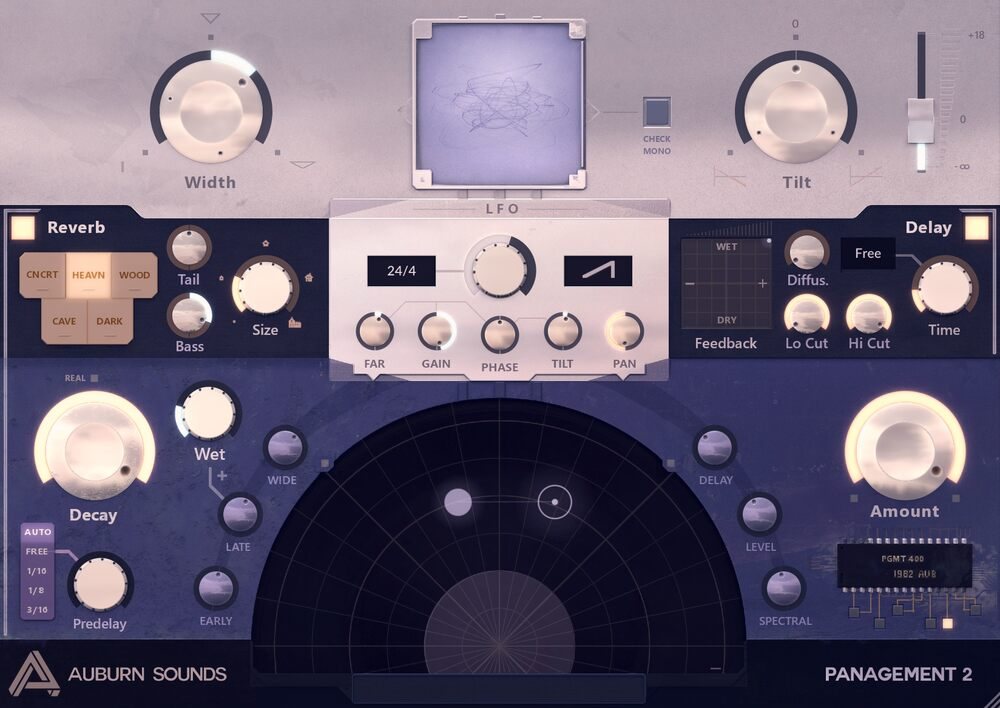
Panagement 2 is a spatialization plug-in from Auburn Sounds. It combines binaural-style panning with an integrated reverb and delay.
A source can be positioned in the sound field with one operation, and distance can be suggested so a sound appears to move away or come closer. Distance modeling uses a reverb that adds early and late reflections automatically.
Width and Tilt change the stereo spread and balance, and an LFO adds tempo-synced movement. Auburn Sounds also mentions using the LFO for effects such as reverb ducking.
A Free Edition and a Full Edition with every feature are offered. It is a spatial tool for people who want to build depth into a mix.
Key features
Binaural Distance Panner
A panner that places a source anywhere in the sound field, handling distance as well as left-right position. It is worth checking the placement on headphones while adjusting.
Distance-linked reverb
The reverb adds early and late reflections automatically to support distance modeling. Auburn Sounds says it is sparse like a real space instead of overly diffuse, covering small rooms through large halls.
Binaural Delay
Each delay tap can be placed binaurally. Late reflections can be injected into the delay loop so that repeats seem increasingly distant, according to the maker.
Width and Tilt
Controls for stereo width and for tilting the left-right balance, used alongside positioning when you want to change how a mix opens up.
Movement from the LFO
The LFO provides tempo-synced movement, and the maker lists uses such as reverb ducking. There is a single modulation source, so complex motion might need other tools alongside.
PGMT-400 chip mod
The Full Edition comes with the PGMT-400 chip mod. The Free Edition includes everything except the Delay and the PGMT-400 chip, according to the maker.
Specifications
| Item | Details |
|---|---|
| Type | Spatial effect (binaural panner, reverb, delay) |
| Plug-in formats | VST2 / VST3 / AU / AAX / LV2 |
| Supported OS | macOS 10.12 or later (M1 native) / Windows 7 or later / Linux |
| Editions | Free Edition / Full Edition |
What is included and system requirements
- Panagement 2 plug-in (VST2 / VST3 / AU / AAX / LV2)
- Binaural Distance Panner
- Reverb and binaural delay
- LFO, Width and Tilt
- PGMT-400 chip mod (Full Edition)
How to use it
- Try the Free Edition on the official site, or buy the Full Edition.
- Run the installer and restart your DAW.
- Load Panagement 2 on the track whose placement you want to adjust.
- Move the panner position to decide where the source should sit.
- Change distance to hear how close or far it feels.
- Adjust the reverb amount to set the impression of room size.
- Add Width, Tilt, delay or the LFO as needed.
- Compare the result on headphones and speakers.
Where it may come in handy
Depth for backing vocals and crowd voices
It may help when placing background sounds at different distances.
Orchestral sources
Setting different distances per instrument could build depth in the layout.
Effect-style delay
The maker demonstrates a polyrhythmic binaural ping-pong delay.
Who it may suit
- People who want to adjust distance and depth in a mix
- Those who care about placement on headphones
- Anyone who prefers to try a free version first
Good to know before you buy
- The maker notes there is a learning curve because of the amount of control.
- The Free Edition omits the Delay and PGMT-400 chip.
- The official page sometimes shows sale pricing, so check the current price before buying.
How it differs from similar products
We do not pick a winner; the official figures are placed side by side.
Panagement Free Edition
The Free Edition has every feature except the Delay and PGMT-400 chip, while the Full Edition has everything (per the maker).
Price
Please check the official page for the price.
See Panagement 2 on the product page
More of the same kind
We have introduced 18 stereo and imaging tools. Here are some of the others.
- Austrian Audio StereoCreator
- Harrison Tremolo Panner
- W. A. Production Dynawide
- NUGEN Audio Stereoizer
- Mastering The Mix STEREOVAULT
- W. A. Production Pumper 3
We have introduced 2 other products from Auburn Sounds.
See the full list in Product database: Effects.
Sources: auburnsounds.com pluginboutique.com (checked 2026-10-27)










Comments