
Disclosure: This page may contain affiliate links. Prices were checked on the date shown and may change.
An introduction to Boz Digital Labs T-Bone 2, based on information from the maker and distributors: what it does, how to use it and who it may suit. It is not scored.
Add weight, clarity, or sparkle with a few quick tweaks, then use the intensity control to rein it in or push it harder.
— Boz Digital Labs official site
What is T-Bone 2?
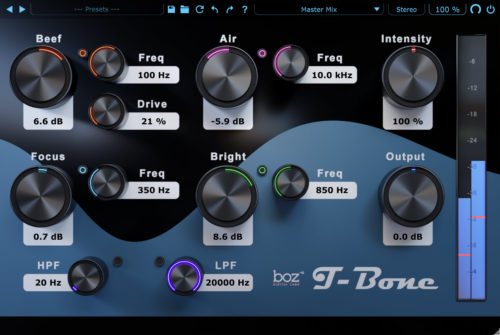
Boz Digital Labs T-Bone 2 is a simple tone-shaping EQ for tracks or the mix bus. The maker presents it as a way to make quick tonal decisions before ear fatigue sets in.
Rather than detailed frequency control, it uses plainly named controls: Beef, Focus, Air and Brightness.
An Intensity control lets you dial back or push all of those moves together, useful when you feel you have overdone it.
Its filters were designed to stay smooth up to the Nyquist limit without oversampling, which the maker says keeps CPU use low.
Key features
Four essential tone bands
Beef, Air, Focus and Brightness give quick access to low-end weight, air, clutter and overall brightness.
Brightness control
A simple tonal tilt that brightens or darkens without changing volume.
Focus for tightness
Cuts clutter in the 200 to 500 Hz range for a clearer mix, according to the maker.
Adjustable frequencies
Frequencies for Brightness, Focus and Beef can be fine-tuned.
High and low pass filters
Quickly remove unwanted lows or highs.
Intensity control
A single knob dials back or enhances all moves to avoid over-processing.
Specifications
| Item | Details |
|---|---|
| Formats (Windows) | AAX Native / VST2 / VST3 (64-bit) |
| Formats (Mac) | AAX Native / VST2 / VST3 / AU (64-bit) |
| OS | Windows 7 or higher / macOS 10.13 or higher (Intel or Apple Silicon) |
| License | Perpetual (offline registration with serial) |
| Trial | Available (parameters reset on project open; presets cannot be saved) |
What is included and system requirements
- T-Bone 2 plugin
- Formats: AAX Native / VST2 / VST3 (plus AU on Mac)
- Requirements: Windows 7 or higher (64-bit), macOS 10.13 or higher
- Perpetual license, offline registration with serial
- Trial available
How to use it
- From your Plugin Boutique account, go to the Boz Digital Labs code redemption page.
- Create a Boz Digital Labs account, complete the order and download the installer.
- Run the installer and choose the formats.
- Load T-Bone 2 in your DAW and enter your username and serial.
- Move Beef and Air a little to set the general direction.
- Use Focus for clutter and Brightness for overall tone.
- Set the overall amount with Intensity.
Where it may come in handy
Final tonal tweak on a mix
On the mix bus it may let you quickly adjust overall brightness and low-end weight.
Correcting recorded material
When a recording sounds dark or muddy, a few moves may shift its direction.
Balancing material from others
When received tracks have too much low end or too little top, it may help to balance quickly.
Who it may suit
- Those who value quick tonal adjustment over detailed EQing
- Those prone to ear fatigue while mixing
- Those who prefer tone-control style EQing
Good to know before you buy
- The maker's product page (URL t-bone) describes T-Bone 2.
- Plugin Boutique's page reuses some wording from the original T-Bone.
- The trial resets parameters each time the project is opened.
Price
$49 (Boz Digital Labs official site, checked 2026-10-27). Prices can vary by region and promotion, so check the official page before buying.
See T-Bone 2 on the product page
More of the same kind
We have introduced 122 EQs. Here are some of the others.
- Waves SSL G-Equalizer
- Waves V-EQ4
- Sonnox Oxford EQ
- Solid State Logic SSL X-DynEQ
- Three-Body Technology Brit 73
- Kuassa EFEKTOR Paten Graphic Equalizer
We have introduced 9 other products from Boz Digital Labs.
- Boz Digital Labs David Bendeth's The Hoser 2
- Boz Digital Labs Imperial Delay
- Boz Digital Labs Pan Knob
- Boz Digital Labs Panther Stereo Manipulation
- Boz Digital Labs Manic Compressor
For a side-by-side comparison scored on the same criteria, see our comparison of EQs.
See the full list in Product database: Effects.
Sources: bozdigitallabs.com pluginboutique.com (checked 2026-10-27)










Comments