
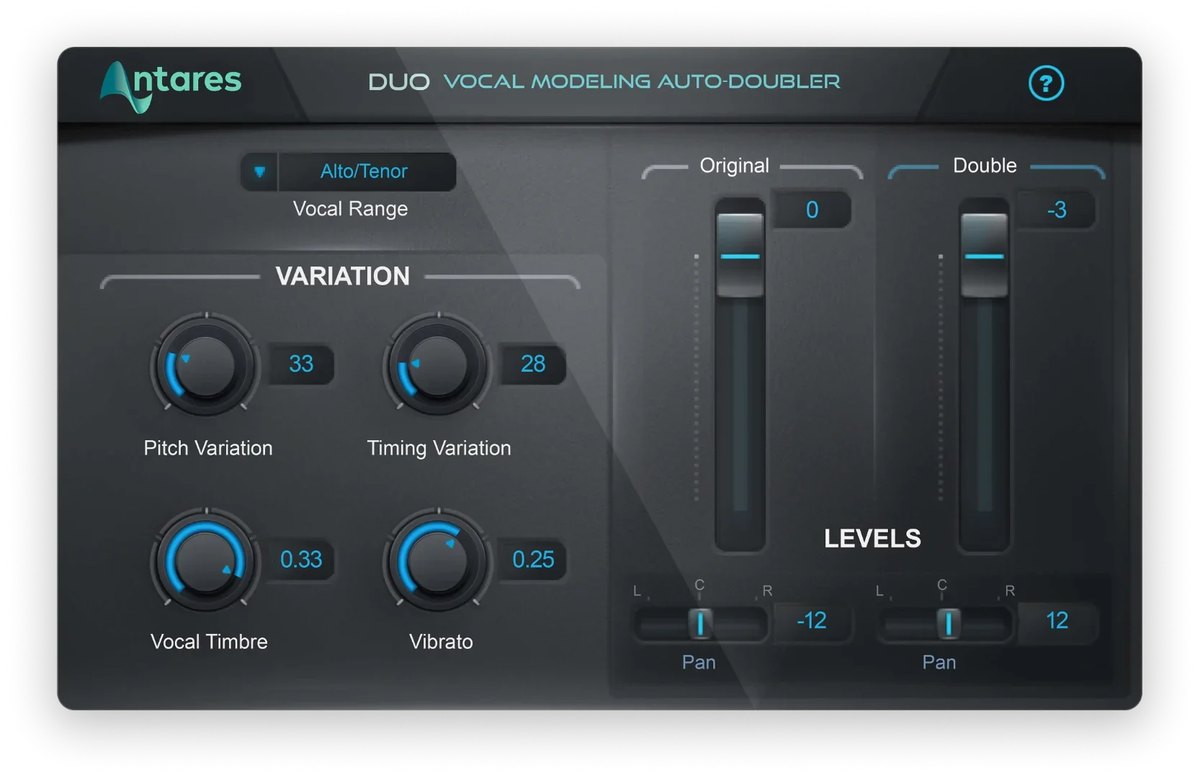
Antares’ Duo is a plug-in that automatically makes a “doubling” part, as if the vocal had been recorded twice, from the vocal you recorded. The volume and pan of the original voice and the created voice can be adjusted separately.
A harmony and doubling plug-in makes harmonies from a single vocal, or gives it the thickness of several people singing.
In this article we compare Duo with 10 harmony and doubling plug-ins and rate how well it serves its purpose on three criteria. The basis is official manufacturer information.
Disclosure: This article contains affiliate links. If you buy through them, SoundBounty may earn a commission at no extra cost to you. Prices and sale information are as of the date we checked them and can change.
Score 4.0 / 5 (average of the 10 products compared: 3.6)
- Specs last checked
- 2026/09/25
- Range of effects
- Doubling, stereo
- Speed
- Automatic doubling
- Per-voice adjustment
- Per-voice volume, pan, tone
- Price (store, date)
- Not listed
Image: from the Antares official website (product image)
Summary
Among the 10 harmony and doubling plug-ins, Duo is rank A. The ranks run S, A, B and C, and A is second from the top. Averaging the scores for the three criteria (out of 5) gives 4.0.
Strengths
- Speed (5 points): you can get an effect quickly just by choosing, or from automatic creation.
- Per-voice adjustment (4 points): you can adjust each created voice in detail to finish naturally.
Who it suits: people who want to thicken a voice quickly without recording it twice.
Main features of Duo
Make a double-tracked voice automatically from the vocal you recorded
Doubling is a recording technique in which you sing the same phrase twice and layer the takes, which gives a voice thickness and presence. Duo is a plug-in that automatically makes this second voice from the vocal you recorded. The manufacturer describes it as the quickest and easiest way to make a double-tracked sound.
Change the tone of the created voice
The tone of the created voice can be made almost the same as the original or changed to sound like a different person singing. The amount of variation can also be adjusted, which helps keep it from sounding mechanical.
Volume and pan, separately
The volume and pan of the original voice and the created voice can each be adjusted. You can pan them left and right to make a vocal with stereo width.
Video: “Tutorial: Introduction to Duo with Wavy Wayne” (official AutoTune YouTube channel; narration in English) Watch on YouTube
Where it is useful
- Adding the thickness of double-tracking to a song you recorded only once
- Adding doubling to only the chorus to build excitement
- Panning the original voice and the created voice left and right to add width
Rating by criterion
Range of effects: 3 / 5
We check how many of harmonies, same-pitch voice layering (doubling), choir and stereo width it can make.
It makes a part as if recorded twice from the recorded voice, and the original and created voices can be placed left and right. It cannot make harmonies at different pitches.
Speed: 5 / 5
We check whether you can get an effect quickly, for example by choosing or automatic creation.
It automatically makes the doubling part from the recorded vocal (the official page advertises it as the “quickest and easiest”).
Per-voice adjustment: 4 / 5
We check whether you can make the created voices sound natural (for example by shifting the timing or tone of each voice).
The volume and pan of the original and created voices can be adjusted separately, and the tone and wobble (variation) of the created voice can also be adjusted.
How we score (Harmony and doubling plug-ins)
| Criterion | Basis | 5 pt | 4 pt | 3 pt | 2 pt | 1 pt |
|---|---|---|---|---|---|---|
| Range of effects | Which of harmonies, same-pitch voice layering (doubling or choir) and stereo width are officially described | All three | — | Two of the three | One of the three | — |
| Speed | How quickly you can get an effect (automatic creation, just choosing, presets) | Parts can be created automatically (harmonies that follow the key or chord, or doubling from the original voice) | The effect is decided just by choosing the number or type of voices | Choose from presets | Detailed settings are needed | — |
| Per-voice adjustment | Features that make the created voices sound natural | Tone, vibrato, pan and more can be changed for each voice | Variation between voices, or per-voice volume and pan, can be adjusted | The tone and wobble of the whole effect can be adjusted | Volume and pan only | — |
Each criterion is scored from 1 to 5 on how well the product serves one goal: adding harmonies, thickness and width to a vocal. Scores follow the conditions in the table above. So that products that make harmonies and products that double (layer the same pitch) can be compared by the same standard, there are three criteria: "Range of effects", "Speed" and "Per-voice adjustment". The basis is official manufacturer information. The naturalness of the sound has not been compared by ear, so it is not part of the score. Price is not part of the score. Features that cannot be confirmed from the manufacturer's or a retailer's description are scored as if absent. The "OBS (streaming)" column in the table shows whether the official page lists the VST2 format that the streaming software OBS Studio can use (○). OBS does not support the VST3 format. It is not part of the score.
Duo system requirements and getting started
| Operating system | Windows 10 and 11 / Mac (macOS 14 or later) |
|---|---|
| Plug-in formats | VST3, AU, AAX |
| Other | Available as a one-time purchase and also included in Auto-Tune Unlimited (a subscription) |
| Trial | Free to try (official site) |
| OBS (streaming) | Does not work as it is (VST3 only). It can be loaded through a bridge plug-in |
Checked on the manufacturer’s official pages on September 27, 2026.
Compared with other harmony and doubling plug-ins
Click a heading to sort. On a phone, the table scrolls sideways.
| Product | RankAvg. score | Range of effects | Speed | Per-voice adjustment | OBS (streaming) | Price (store, date) |
|---|---|---|---|---|---|---|
| AntaresHarmony Engine | S 5.0 | Harmony, choir, width | Pick a chord, automatic | Tone, wobble, pan per voice | × (VST3 only) | $125 (sale; regular $250) [Official, checked Oct 26] |
| AntaresChoir | A 3.7 | Choir, width | Just choose the number | Amount of variation | × (VST3 only) | Not listed |
| AntaresDuo | A 4.0 | Doubling, stereo | Automatic doubling | Per-voice volume, pan, tone | × (VST3 only) | Not listed |
| EventideQuadravox | B 3.3 | Harmony, width | 60+ presets | Per-voice volume, pan, offset | ○ | $49 [PB, checked Oct 26] |
| EventideMicroPitch | B 3.0 | Thickness, width | Presets | Tone, wobble | ○ | $99 [PB, checked Oct 26] |
| SoundtoysMicroShift | B 3.0 | Width | Choose from 3 types | Focus, amount of shift | ○ | $99 [PB, checked Oct 26] |
| WavesWaves Harmony | S 4.3 | Harmony, thickness | Pick a chord, automatic | Tone, pan, wobble per voice | △ (via Waves' StudioRack) | Not listed |
| WavesWaves Doubler | B 3.3 | Doubling, width | 50+ presets | Per-voice delay, wobble, pan | △ (via Waves' StudioRack) | Not listed |
| EventideOctavox | B 3.3 | Harmony, width | 70+ presets | Per-voice pan, delay, detune | ○ | $99 [Official, checked Oct 26] |
| EventideH910 Harmonizer | B 3.0 | Harmony, doubling | Many presets | Delay output and feedback | ○ | $144 (sale; regular $149) [Official, checked Oct 26] |
Features checked on each manufacturer's official website on September 25, 2026. Check the store page behind the buy button for the price.
Read next
- Choir: features and rating (rank A)
- Harmony Engine: features and rating (rank S)
- Quadravox: features and rating (rank B)
- MicroPitch: features and rating (rank B)

Comments