
Disclosure: This page may contain affiliate links. Prices were checked on the date shown and may change.
An introduction to Harrison MPC Spectral Compressor, based on information from the maker and distributors: what it does, how to use it and who it may suit. It is not scored.
It offers 18 spectral bands of dynamic range control allowing you to sculpt the sound of each band individually or use the global controls to adjust the overall tone of your mix.
— Harrison official site
What is MPC Spectral Compressor?
Harrison MPC Spectral Compressor is an 18-band spectral compressor derived from the processing of Harrison's MPC large-format film console. It was originally developed for demanding film and post-production work.
It divides the spectrum into many narrow bands and controls dynamics in each. Smoothing harsh frequencies, boosting the low end, or brightening the highs can be done with the global controls or band by band.
The maker lists uses such as a de-esser, a drum bus processor, and a subtle enhancer for vocals and instruments. It is one of the Harrison "Post" plugin suite (MPC Channel, MPC Compressor, MPC Console EQ, MPC Spectral Compressor, and MPC Expander Gate).
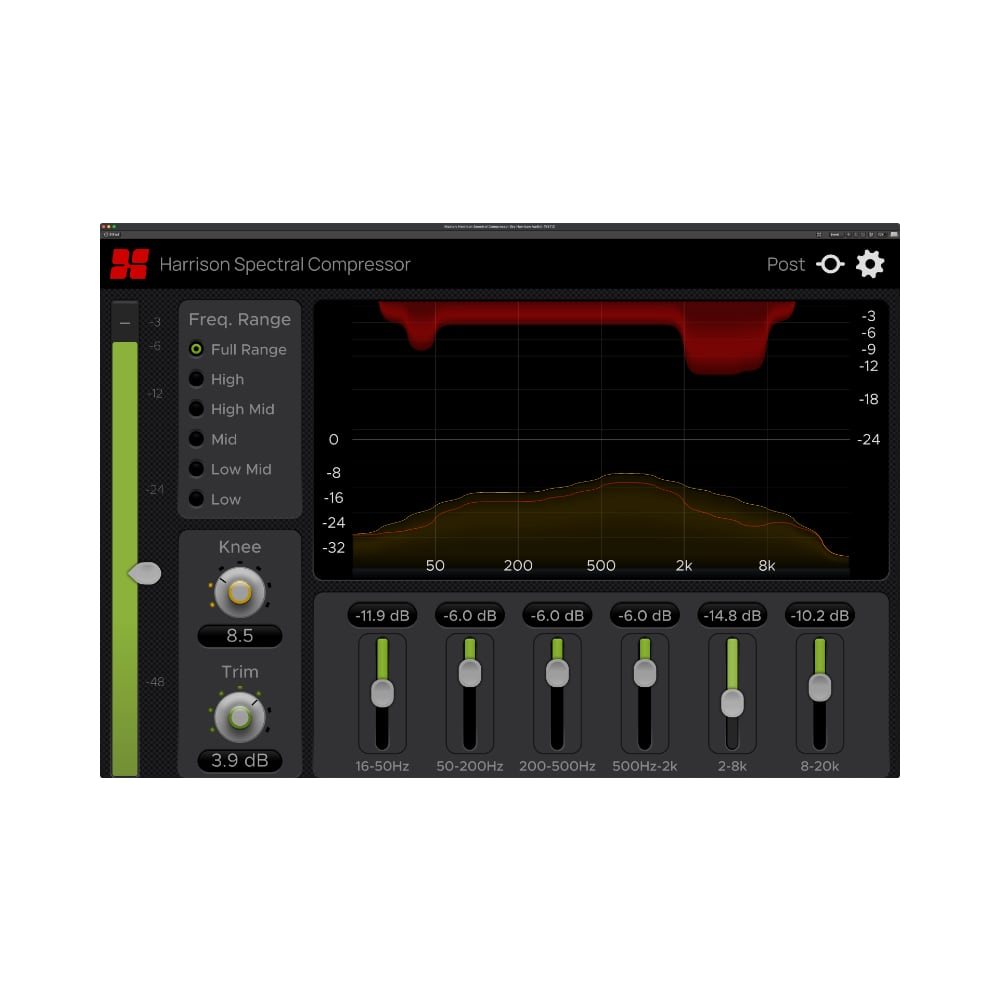
The main controls are Threshold, Frequency Range, six Depth sliders, Knee, and Output Trim. A gain reduction graph shows which bands are being reduced and by how much.
Key features
18-band spectral processing
Eighteen bands are controlled together. Six Depth sliders each control three of the bands, with the frequency range shown beneath each slider.
Frequency Range selection
Choose Full Range (16 Hz-20 kHz), High, High Mid, Mid, Low Mid, or Low; the 18 bands are spread across the chosen range. Selecting Mid concentrates them within 180 Hz-7 kHz for finer control.
Depth sets maximum reduction
Depth ranges from -24 to 0 dB and sets the maximum gain reduction for each group of bands. At 0 dB no attenuation occurs in that range.
Threshold and Knee
Threshold (-60 to 0 dB) sets where overall compression begins. Knee ranges from 1 to 30; lower values make compression start more abruptly.
Output Trim
The output level can be adjusted from -10 to +10 dB for gain compensation.
Gain reduction graph
A red curve shows gain reduction above an orange-yellow input curve, indicating where along the spectrum reduction is applied and by how much.
Specifications
| Item | Details |
|---|---|
| Type | Spectral compressor |
| Bands | 18 |
| Depth | -24 to 0 dB |
| Threshold | -60 to 0 dB |
| Knee | 1 to 30 |
| Output trim | -10 to +10 dB |
| Frequency ranges | Full 16 Hz-20 kHz / High 3k-20 kHz / High Mid 200 Hz-18 kHz / Mid 180 Hz-7 kHz / Low Mid 12 Hz-8 kHz / Low 15 Hz-500 Hz |
| License | iLok |
What is included and system requirements
- MPC Spectral Compressor plugin
- Windows and Mac installers
How to use it
- Create an iLok account and install the iLok License Manager.
- After purchase, register the license and install the plugin.
- Insert MPC Spectral Compressor on a track or bus in your DAW.
- Choose a Frequency Range: Full Range for the whole spectrum, or Mid and so on for a specific range.
- Move the Threshold to set where overall compression starts.
- Move the six Depth sliders to set how much each range is reduced.
- Adjust the Knee while watching the gain reduction graph.
- Use Output Trim to compensate for level changes and compare with bypass.
Where it may come in handy
De-esser style use
Choosing the High range and adjusting Depth on a harsh band may let it work like a de-esser, which the maker lists as one use.
Shaping drum buses
Smoothing a wide range with Full Range, or reducing a specific band deeply, may offer flexible control.
Balancing a whole mix
Using Full Range to adjust overall tone band by band is one possible use; the maker also mentions it for mastering a mix.
Dialogue and narration
Because it was built for film post-production, it may be worth trying to balance ranges in dialogue or narration.
Who it may suit
- People who want to control dynamics in many fine bands
- Users who want to try de-essing and tonal balancing in one plugin
- Those working in video and post-production
- Anyone interested in Harrison's large-format console processing
Good to know before you buy
- Licensing is managed through iLok.
- It is one product in Harrison's Post suite and is separate from MPC Compressor and the others.
How it differs from similar products
We do not pick a winner; the official figures are placed side by side.
Harrison Multi-Band Compressor
MPC Spectral Compressor has 18 bands with Depth from -24 to 0 dB. Multi-Band Compressor has four bands with up to 12 dB of reduction per band (both from Harrison's pages).
Price
Please check the official page for the price.
See MPC Spectral Compressor on the product page
More of the same kind
We have introduced 85 compressors. Here are some of the others.
- Solid State Logic SSL G3 MultiBusComp
- BLEASS BLEASS Multiband Compressor
- McDSP SPC2000 Serial/Parallel Compressor Native v7
- Solid State Logic SSL Blitzer
- Slate Digital SD-3A
- Mellowmuse CP1A Compressor
We have introduced 5 other products from Harrison.
- Harrison Multi-Band Compressor
- Harrison Mastering EQ
- Harrison FasTrack
- Harrison Legacy EQ
- Harrison Tremolo Panner
For a side-by-side comparison scored on the same criteria, see our comparison of compressors.
See the full list in Product database: Effects.
Sources: store.harrisonaudio.com pluginboutique.com harrisonaudio.com (checked 2026-10-27)










Comments