
Disclosure: This page may contain affiliate links. Prices were checked on the date shown and may change.
An introduction to Harrison Mastering EQ, based on information from the maker and distributors: what it does, how to use it and who it may suit. It is not scored.
The Mastering EQ has been specifically designed for mastering your mixes.
— Harrison official site
What is Mastering EQ?
Mastering EQ is an EQ plug-in from Harrison, known for large-format consoles, built specifically for finalizing mixes. The official description calls it an ultra-fidelity equalizer based on Harrison's XTool plug-ins for digital consoles.
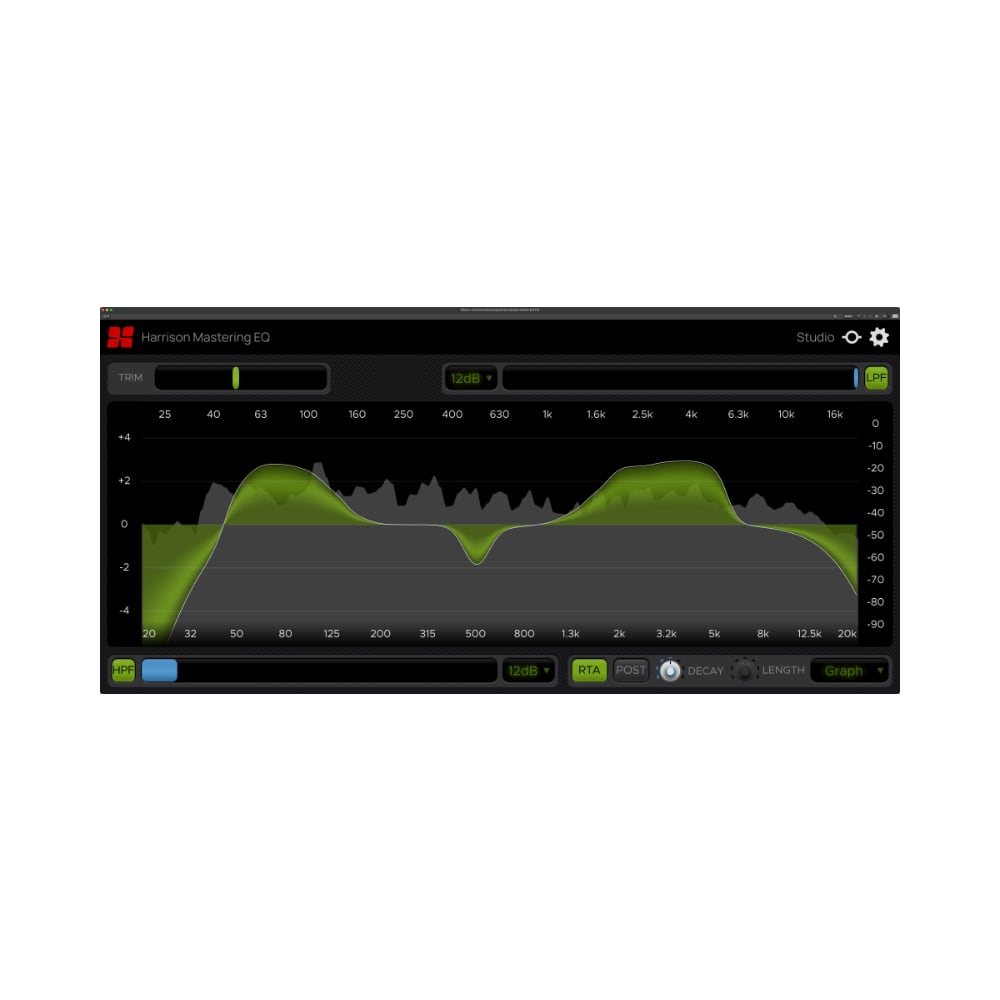
Its signature is a 'flat top' behavior: when two adjacent bands are adjusted, the curve stays flat across the band edges instead of forming discrete peaks and valleys. It uses a filter shape originally developed for speaker management, aimed at broad changes that keep the harmonic balance of the mix.
It has 31 bands from 20 Hz to 20 kHz in 1/3-octave steps. The display defaults to a +/-4 dB scale and expands automatically up to +/-14 dB as you push a band further. High-pass and low-pass filters can use 6 dB/oct or 12 dB/oct slopes, and there is an output trim.
Built-in RTA analysis includes a 'Graph' mode at 1/10-octave resolution and a 'Lightning' mode showing average levels with flashes for transient peaks. Installers are provided for Windows and Mac.
Key features
Flat-top curves
Adjacent bands join with a flat top rather than separate bumps and dips, which may suit smooth, broad tonal moves.
31-band graphic control
31 bands in 1/3-octave steps from 20 Hz to 20 kHz, adjusted by dragging. Right-click resets a band and Shift-drag smooths bumps between neighboring bands.
Auto-zoom scale
The display starts at +/-4 dB and expands to +/-14 dB when you exceed 4 dB. Dragging the dB scale lets you lock it manually.
High-pass and low-pass filters
Gentle high-pass and low-pass filters offer 6 dB/oct or 12 dB/oct slopes, with frequency set by sliders above and below the curve.
Two RTA analyzer modes
'Graph' uses equally spaced 1/10-octave bands for low-frequency accuracy, while 'Lightning' shows average level and transient peak flashes. They may help spot imbalances while listening.
Momentary bypass and themes
Hold the ear icon to hear the unaffected signal. The gear menu offers resizing and themes, including a 'Vintage' theme using Harrison's large-format console colors.
Specifications
| Item | Details |
|---|---|
| Type | 31-band graphic mastering EQ |
| Bands | 20 Hz to 20 kHz in 1/3-octave steps, 31 bands |
| Range | +/-4 dB default view, up to +/-14 dB |
| Filters | High-pass / low-pass (6 or 12 dB/oct) |
| Analyzer | RTA (Graph and Lightning modes) |
| Other | Output trim, momentary bypass, theme selection |
| OS | macOS 10.9 or later, Windows 7 or later |
| DAW support | Pro Tools 10.3.5+ (Windows) / 11+ (Mac), Logic (AU), Cubase (VST/VST3) and others |
What is included and system requirements
- Mastering EQ plug-in (Windows / Mac installers)
- User guide (PDF)
- Formats: AAX, AU, VST (selected at install)
How to use it
- At install, enable AAX, AU or VST to match your DAW.
- Insert Mastering EQ on the master bus or a mastering track.
- Drag across the frequency axis to move broad bands.
- Hold Shift while dragging to smooth bumps between neighboring bands.
- Right-click a band to reset it to zero.
- Set the high-pass and low-pass slope and frequency as needed.
- Hold the ear icon to hear the unaffected signal and check the change.
- Set the output level with the trim control.
Where it may come in handy
Final tonal adjustment in mastering
Designed for broad, smooth curves, it may suit tilting the overall balance at the finishing stage.
Small corrections on the mix bus
It may fit moments when you want gentle moves in band balance on the mix bus.
Checking against the spectrum
With a built-in RTA, it may help you correct imbalances while seeing the spectrum.
Who it may suit
- People doing mastering or mix finishing at home
- Those who like adjusting by tracing across the frequency range
- Users looking for an EQ whose adjacent bands blend smoothly
- Anyone wanting an EQ with a built-in analyzer
Good to know before you buy
- Supports macOS 10.9 or later and Windows 7 or later. Harrison no longer develops Linux plug-ins; legacy installers are pointed to separately.
- Pro Tools needs 10.3.5+ on Windows and 11+ on Mac, with AAX enabled at install; Logic needs AU; Cubase needs VST and/or VST3.
- Its control style differs from conventional EQs, so it may take a little time to get used to.
Price
$49 (Harrison official site, checked 2026-10-27). Prices can vary by region and promotion, so check the official page before buying.
See Mastering EQ on the product page
More of the same kind
We have introduced 122 EQs. Here are some of the others.
- Kuassa Kuassa EVE-AT4 Equalizer
- Boz Digital Labs David Bendeth's The Hoser 2
- Cockos ReaEQ ReaPlugs
- Antelope Audio Antelope Audio VEQ-1A
- Waves SSL G-Equalizer
- Waves GEQ Graphic Equalizer
We have introduced 5 other products from Harrison.
- Harrison Legacy EQ
- Harrison FasTrack
- Harrison Multi-Band Compressor
- Harrison MPC Spectral Compressor
- Harrison Tremolo Panner
For a side-by-side comparison scored on the same criteria, see our comparison of EQs.
See the full list in Product database: Effects.
Sources: store.harrisonaudio.com pluginboutique.com (checked 2026-10-27)










Comments