
Disclosure: This page may contain affiliate links. Prices were checked on the date shown and may change.
An introduction to Harrison Legacy EQ, based on information from the maker and distributors: what it does, how to use it and who it may suit. It is not scored.
The Legacy EQ is a plugin that recreates the sound and feel of our classic MPC digital equalizer
— Harrison official site
What is Legacy EQ?
Legacy EQ is an equalizer plug-in from Harrison, the American console maker. It recreates the sound and feel of the digital equalizer found in Harrison's MPC mixing console and is used to shape the tone of individual tracks and buses.
According to the product page, the original EQ was designed as an analog circuit with digital control and later became a fixture in post-production and film studios. Each band has a limited range chosen to match the original analog knob, and the Q is tuned for each frequency.
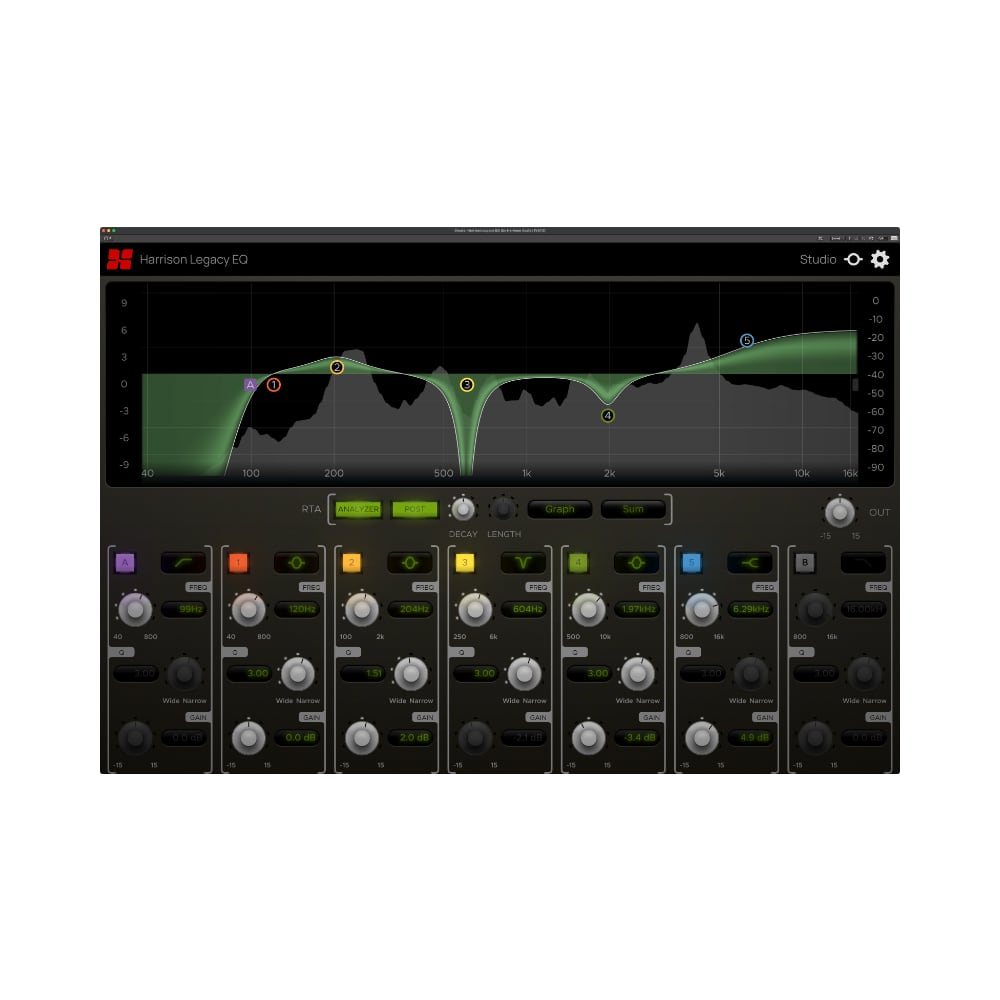
The main screen is a frequency-response graph. You drag a band's icon to set frequency and gain, and use the mouse wheel or a two-finger drag to change Q. A real-time analyzer (RTA) can be shown behind the curve, and you can choose whether it displays the signal before or after the EQ.
The plug-in has five parametric bands and two filters. Each band offers six shapes (bell, low/high shelf, low/high cut, notch and band-pass) with a gain range of plus or minus 15 dB. It is priced at 49 US dollars and sold through Harrison's own store and Plugin Boutique.
Key features
Recreates the MPC console's digital EQ
The plug-in recreates the feel and sound of the digital equalizer in Harrison's MPC console. It may be an option if you want to try an EQ that carries on the workflow of that hardware.
Ranges matched to the original knobs
Each band's range is limited to match the original analog knob, and Q is optimized for each frequency. This may suit anyone who prefers controls that do not stray too far.
Six band shapes
Every band can be set to bell, low/high shelf, low/high cut, notch or band-pass. Gain spans plus or minus 15 dB and Q runs from wide to narrow, which suits both broad tone shaping and removing unwanted tones.
Five parametric bands
Five bands can be switched on and adjusted freely. You can boost lows, cut highs, notch out a problem frequency or sweep a filter, all inside a single plug-in.
Two filters with four slope options
The two filter bands let you choose shape and slope from four options. The product page says a wide notch and a band-pass can isolate or remove specific frequencies with adjustable Q width.
High-precision RTA analyzer
The analyzer shows the bass and sub-bass range in detail. You can choose pre or post EQ and adjust display speed and trim, which helps you check low-end balance by eye while you work.
Specifications
| Item | Details |
|---|---|
| Type | Equalizer plug-in |
| Bands | 5 parametric bands plus 2 filters |
| Gain range | +/-15 dB |
| Band shapes | Bell / low and high shelf / low and high cut / notch / band-pass |
| Analyzer | RTA (switchable pre or post EQ) |
| Operating systems | macOS 10.9 or newer / Windows 7 or newer (a demo is suggested for Linux) |
| Plug-in formats | VST / VST3 / AU / AAX |
| Pro Tools | 10.3.5 or newer on Windows, 11 or newer on Mac |
| Price | 49 USD |
What is included and system requirements
- Legacy EQ plug-in with Windows and Mac installers
- Formats: VST, VST3, AU and AAX (select the ones you need during installation)
- User guide (listed on Harrison's store)
- Pro Tools: version 10.3.5 or newer on Windows, 11 or newer on Mac
How to use it
- Buy it from Harrison's store or Plugin Boutique and collect your license details.
- Download the installer for your operating system, Windows or Mac.
- During installation, tick the plug-in formats your DAW uses (VST, VST3, AU, AAX).
- Enable AAX for Pro Tools, AU for Logic Pro, or VST/VST3 for Cubase.
- Authorize the license following the instructions from the store where you bought it.
- Open your DAW and load Legacy EQ on an insert of a track or bus.
- Drag a band on the graph to set frequency and gain, and use the wheel to adjust Q.
- Switch the RTA between pre and post EQ to check the range you care about.
Where it may come in handy
Tone shaping on vocals and instruments
You might lift a band slightly with a bell or shelf, or tidy the low end with a low cut. Because each band has a limited range, it may be easier to make adjustments without going too far.
Voice-over and post-production
The original EQ is described as a staple in film and post-production studios. You might try the plug-in for tidying dialogue or broadcast voices.
Removing a problem frequency
A notch or band-pass can take out a specific band while the RTA shows the change. This may help with boxy or resonant spots.
Bus and mix finishing
With a gain range of plus or minus 15 dB, it could be placed lightly on a bus or the whole mix to balance lows and highs.
Who it may suit
- People who want to try the operation of a console-derived digital EQ.
- People looking for an EQ whose bands and shapes are easy to see at a glance.
- People who like to check an RTA while they listen.
- People who want to use Harrison or SSL-family plug-ins together.
Good to know before you buy
- The way a license is authorized depends on where you buy it. Plugin Boutique's guide includes an iLok procedure, so check the instructions you receive.
- Harrison's store also mentions a subscription from 14.99 US dollars a month covering every SSL plug-in and selected Harrison plug-ins.
- There is no Linux version; the page suggests trying the demo.
- You need to enable AAX for Pro Tools or AU for Logic Pro during installation.
How it differs from similar products
We do not pick a winner; the official figures are placed side by side.
TDR SlickEQ M
Legacy EQ has five parametric bands and two filters, with six shapes per band and a gain range of plus or minus 15 dB. TDR SlickEQ M has six parametric bands plus high-pass and low-pass filters, each with four slopes.
Price
$49 (Harrison official site, checked 2026-10-27). Prices can vary by region and promotion, so check the official page before buying.
See Legacy EQ on the product page
More of the same kind
We have introduced 122 EQs. Here are some of the others.
- Mellowmuse Mellowmuse EQ3V
- Waves API 560
- Tokyo Dawn Labs TDR VOS SlickEQ GE
- Newfangled Audio EQuivocate
- Pulsar Audio Pulsar Poseidon
- Antelope Audio VEQ-HA32C
We have introduced 5 other products from Harrison.
- Harrison Mastering EQ
- Harrison Multi-Band Compressor
- Harrison FasTrack
- Harrison MPC Spectral Compressor
- Harrison Tremolo Panner
For a side-by-side comparison scored on the same criteria, see our comparison of EQs.
See the full list in Product database: Effects.
Sources: store.harrisonaudio.com pluginboutique.com (checked 2026-10-27)










Comments