
Disclosure: This page may contain affiliate links. Prices were checked on the date shown and may change.
An introduction to IK Multimedia MixBox, based on information from the maker and distributors: what it does, how to use it and who it may suit. It is not scored.
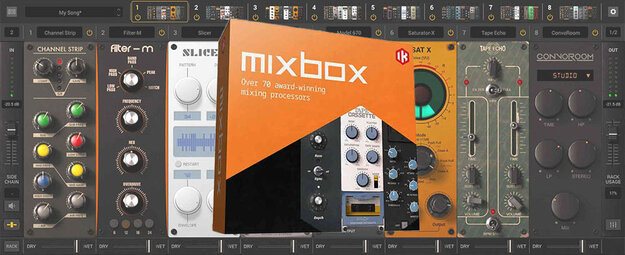
MixBox packs over 70 award-winning mixing processors and creative effects derived from T-RackS, AmpliTube and SampleTank into a convenient 500-series style plug-in.
— IK Multimedia official site
What is MixBox?
MixBox is a rack-style multi-effect from IK Multimedia. It is described as gathering more than 70 processors derived from T-RackS, AmpliTube and SampleTank into a single 500-series style plugin.
Each rack has eight slots. You drag and drop effects to build a channel strip or multi-effect chain, then save it and recall it later.
The processors cover amps, channel strips, delays, distortion, dynamics, EQ, filters, modulation, reverbs and saturation. Four reverb types, hall, room, plate and inverse, are described as newly built algorithms.
It runs as a plugin and as a standalone application. In standalone mode it is described as a mixing environment handling up to eight racks of eight processors each.
Key features
More than 70 processors
The effects derive from T-RackS, AmpliTube and SampleTank. Because the range covers compressors, EQs, amps and modulation, it may be useful when you want to build most of a track's processing inside one plugin.
Eight-slot rack
Each rack has eight slots and effects are rearranged by drag and drop. Whole chains can be saved so a favourite combination is a recall away.
600+ presets
Both single-processor presets and whole-chain presets are included. The page lists more than 600, which can serve as starting points.
New reverb algorithms
Hall, room, plate and inverse are described as new algorithms. The effect list also names ConvoRoom, Ambience and Spring Reverb.
Sidechain input
An additional sidechain input lets a second signal trigger processors such as compressors. The page gives tightening kick and bass, or pumping a bus, as examples.
Per-processor gain and dry/wet
Every processor has its own gain and dry/wet controls. The page describes this as allowing hardware-style gain staging between stages.
Multi-rack standalone
Standalone mode handles up to eight racks. A main panel is described as controlling rack presets, sidechain and input/output for all racks.
Specifications
| Item | Details |
|---|---|
| Type | Rack-style multi-effect |
| Processors | 70+ |
| Racks | 8 slots per rack (up to 8 racks in standalone) |
| Presets | 600+ |
| Formats (Mac) | Audio Units, VST 2, VST 3, AAX (64-bit) |
| Formats (Windows) | VST 2, VST 3, AAX (64-bit) |
| Requirements (Mac) | macOS 10.13 or newer, Intel Core 2 Duo, 4 GB RAM (8 GB suggested) |
| Requirements (Windows) | Windows 7 or newer, Intel Core 2 Duo or AMD Athlon 64 X2, 4 GB RAM (8 GB suggested) |
| Other | OpenGL 2 compatible graphics adapter required |
What is included and system requirements
- Plugin and standalone application (64-bit)
- 70+ processors (amps, channel strips, delays, distortion, dynamics, EQ, filters, modulation, reverbs, saturation)
- 600+ presets
- Supported OS: macOS 10.13 or newer, Windows 7 or newer
How to use it
- Install and authorize the license.
- Load MixBox on a DAW track.
- Drag and drop effects into empty slots.
- Adjust each processor's gain and dry/wet.
- To start from a preset, open a chain preset.
- For sidechain use, send another signal to the sidechain input.
- Save a setup you like as a chain.
- Launch the standalone application when you want several racks.
Where it may come in handy
Vocal processing
Channel strip, compressor, EQ and de-esser can be lined up in one rack and saved as a vocal chain.
Guitar and bass tones
Amp and cabinet processors derived from AmpliTube may be combined with saturation.
Live recording and mixing
The page envisions using several racks in standalone mode, fed from an audio interface.
Sound design
Filters, modulation and delays in series may suit reshaping source material.
Who it may suit
- People who want to handle mix processing in one plugin
- Those interested in effects derived from T-RackS and AmpliTube
- Users who want to save chains and reuse them across songs
- Anyone who wants several racks in standalone mode
Good to know before you buy
- The IK Multimedia product page could not be confirmed; this relies on the Plugin Boutique product page.
- System requirements are taken from Plugin Boutique and may be dated. Check the latest information before buying.
How it differs from similar products
We do not pick a winner; the official figures are placed side by side.
Serato Hex FX
MixBox lists 70+ processors in eight-slot racks, while Serato Hex FX lists 50 effects. MixBox includes amp and compressor models; Hex FX highlights performance effects such as bit crushers and brakers.
Price
Please check the official page for the price.
See MixBox on the product page
More of the same kind
Other introduction articles of the same kind.
- Arturia Tape MELLO-FI
- BOOM Library ENRAGE
- Lese Fletcher
- Waves Scheps Parallel Particles
- Lunatic Audio Narcotic
- Serato Hex FX
We have introduced 45 other products from IK Multimedia.
- IK Multimedia Classic T-RackS Clipper
- IK Multimedia Mic Room
- IK Multimedia AmpliTube Metal
- IK Multimedia T-RackS Sunset Sound Studio Reverb
- IK Multimedia ReSing MAX
See the full list in Product database: Effects.
Sources: pluginboutique.com (checked 2026-10-27)










Comments