
Disclosure: This page may contain affiliate links. Prices were checked on the date shown and may change.
An introduction to Karanyi Sounds Cloudmax 3, based on information from the maker and distributors: what it does, how to use it and who it may suit. It is not scored.
Turn any audio into rhythmic patterns, harmonic layers, or musical textures.
— Karanyi Sounds official site
What is Cloudmax 3?
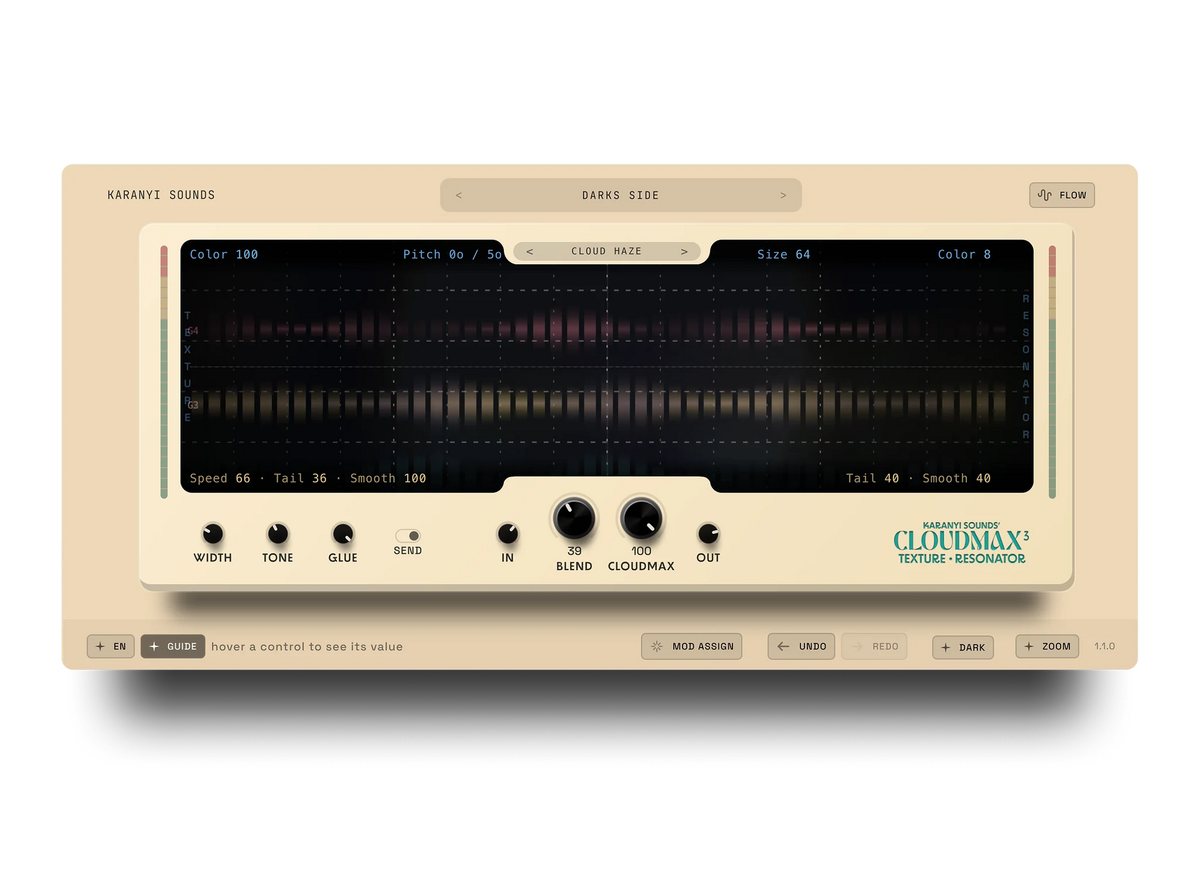
Cloudmax 3 is a texture resonator from Karanyi Sounds. It aims to turn any audio into rhythmic patterns, harmonic layers or musical textures.
At its core is granular processing with four parallel grain engines. Pitch can be set in semitones or continuously, and grain length ranges from 1/64 to infinite.
A single macro moves texture, motion and space together, and Landscape mode shows every parameter on one canvas.
It supports VST3 and AU (Mac) on Mac and Windows. It is a perpetual license, with free updates through 1.x.
Key features
4-engine granular core
Four grain engines run in parallel, layering up to four grains that can be detuned and modulated independently to build thick textures from the input.
Three texture pitch modes
DUAL stacks 2×2 grains for octave-pair textures, SNAP locks to musical intervals and FREE allows continuous detune and microtonal pitch.
Reverb engine
CIRRUS (vast cinematic tails) and STRATOS (a flexible plate) switch per patch, with upgraded DSP.
8 Cloud Models
These models move grains, resonator, modulation and space together. Cloud types suit long soundscapes and Drift types suit rhythmic patterns.
Designable LFO
Drag to set rate, depth and shape. It can be assigned to length, filter, resonator pitch and more, and syncs to tempo.
Browser and AI tagging
Presets can be filtered by tag combinations, and AI tagging adds mood, character and motion tags automatically.
Flow update (v1.1.0)
The maker's page says v1.1.0 added Flow, an AI-assisted sound generator that analyzes your audio and suggests two variations.
Specifications
| Item | Details |
|---|---|
| Maker | Karanyi Sounds |
| Type | Texture / granular |
| Formats | VST3 / AU (Mac) |
| Mac | macOS 11 Big Sur or later (Universal: Intel + Apple Silicon) |
| Windows | Windows 10 or later (x64) |
| License | Perpetual, 3 machine activations |
| UI | Dark / Bright, 18 languages |
What is included and system requirements
- Extensive preset library (drums, synths, vocals, guitars, sound design and more)
- 3 machine activations with self-service deactivation
- Free updates through 1.x
- A 7-day trial is advertised
How to use it
- Buy or get the trial from the maker's site.
- Insert it on a track in your DAW.
- Pick a close Cloud Model.
- Move the macro to explore texture, motion and space.
- Choose a pitch mode (DUAL, SNAP or FREE).
- Assign the LFO to length or filter and save in the browser.
Where it may come in handy
Making vocals huge
Layered under a recorded vocal, it could add a breath-like layer.
Turning drum loops into new rhythmic patterns
Drift-type models may turn a loop into a different pattern.
Building atmospheres from field recordings
Stretching a recording could give a cinematic bed.
Who it may suit
- People working on ambient music or sound design
- People who want to add texture to vocals or piano
- People who prefer exploring through presets
Good to know before you buy
- The maker showed a launch price of $59 (regular $79).
- Cloudmax 3 is also included in MAX: Collectors' Edition.
Price
$79 (Karanyi Sounds official site, checked 2026-10-27). Prices can vary by region and promotion, so check the official page before buying.
See Cloudmax 3 on the product page
More of the same kind
Other introduction articles of the same kind.
- Leapwing Audio RootOne
- LANDR LANDR FX Beats
- NUGEN Audio Jotter
- IK Multimedia Classic T-RackS Clipper
- Waves Greg Wells ToneCentric
- MeldaProduction MAutoVolume
We have introduced 1 other product from Karanyi Sounds.
See the full list in Product database: Effects.
Sources: karanyisounds.com pluginboutique.com (checked 2026-10-27)










Comments