
Disclosure: This page may contain affiliate links. Prices were checked on the date shown and may change.
An introduction to iZotope Neutron 5 Elements, based on information from the maker and distributors: what it does, how to use it and who it may suit. It is not scored.
Neutron 5 Elements is an easy-to-use audio mixing plugin to bring balance to your tracks, fast.
— iZotope official site
What is Neutron 5 Elements?
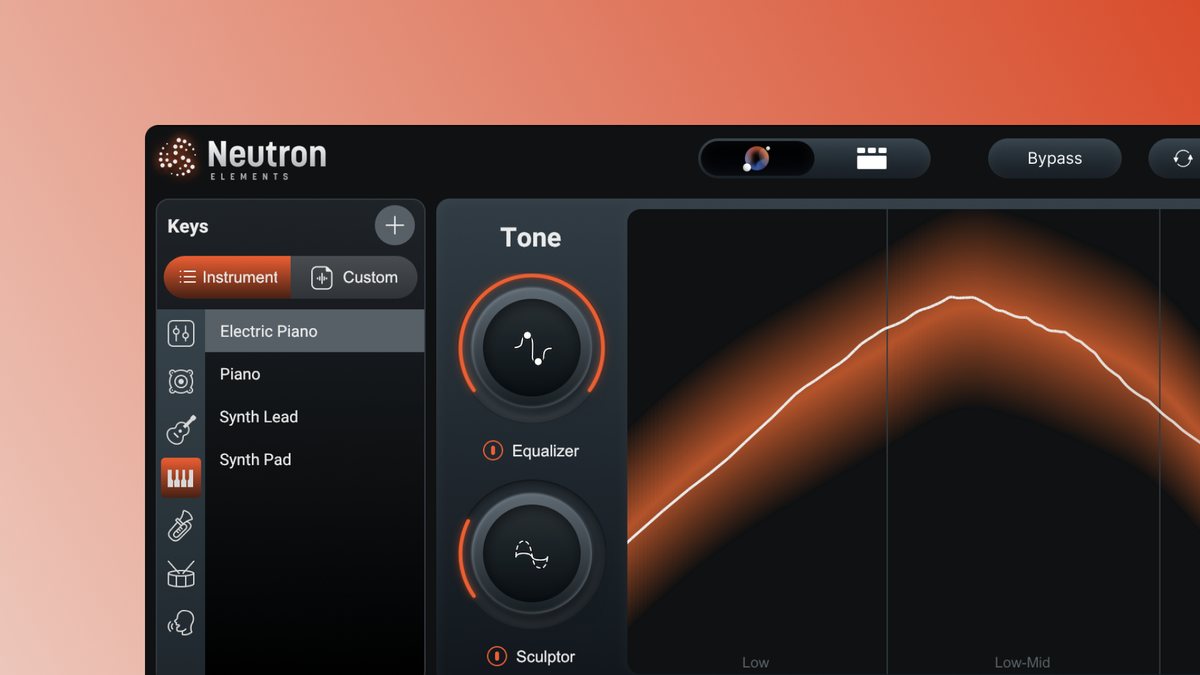
Neutron 5 Elements is the entry edition of iZotope's mixing plug-in. The official description calls it an easy-to-use mixing plug-in that brings balance to tracks quickly. While Neutron 5 is a suite with ten modules, Elements is built around assistive functions.
At its center is the AI-powered Mix Assistant, which analyzes a track to create a starting point. The official page says Neutron 5's Mix Assistant is also available in Elements. In the Neutron 5 description, the assistant builds a signal chain for the audio that can be refined with instrument profiles, references and macro controls.
Plugin Boutique's description lists an improved Assistant View, integration with Audiolens, improved Mix Assistant processing and metering with a Tonal Balance curve. The official specification table lists essential EQ, compression and transient shaping as key features.
Formats are AAX, AU (Mac only) and VST3, all 64-bit, and VST2 is not supported. Mac requires macOS Ventura (13.6.9) or later with native Apple silicon support, and Windows 10 to 11. It is sold as an immediate download on the official site.
Key features
Mix Assistant
An AI-powered function that analyzes a track and creates a starting point automatically. It can be used to produce a rough base when it is unclear where to begin.
Improved Assistant View
The result of the assistant can be checked and adjusted in the Neutron 5 interface, helpful when fine-tuning while seeing what was applied.
Audiolens integration
It works with iZotope's Audiolens app, which may be tried when processing should follow the tendencies of a reference song.
Tonal Balance metering
A meter with a Tonal Balance curve shows the overall frequency balance, useful for a visual check alongside listening.
Essential EQ, compression and transient shaping
The official specifications list essential EQ, compression and transient shaping as key features, for those who want basic tidying without complicated settings.
Step up to Neutron 5
The maker says users who want to adjust every parameter can step up to Neutron 5, which has modules such as Clipper, Density, Phase and Unmask.
Specifications
| Item | Details |
|---|---|
| Type | Assistive mixing plug-in |
| Key features | AI Mix Assistant; essential EQ, compression and transient shaping |
| Formats | AAX, AU (Mac only), VST3 (64-bit only) |
| macOS | macOS Ventura (13.6.9) or later (native Apple silicon) |
| Windows | Windows 10-11 (64-bit) |
| Note | VST2 is not supported |
| Delivery | Download |
What is included and system requirements
- Neutron 5 Elements plug-in
- Formats: AAX, AU (Mac only), VST3 (64-bit)
- macOS Ventura (13.6.9) or later, Windows 10-11
- Mix Assistant and improved Assistant View
- Metering with Tonal Balance curve
How to use it
- Buy from the iZotope site or Plugin Boutique and download the installer.
- Install and authorize the license with your account.
- Insert Neutron 5 Elements on a track in the DAW.
- Open the Assistant View and choose the type of instrument.
- Run Mix Assistant while the audio plays.
- Review the resulting processing and refine it with macros.
- Check the frequency balance with the Tonal Balance meter.
- Compare with bypass at matched levels to decide.
Where it may come in handy
Creating a mix starting point
When it is unclear where to start, Mix Assistant may be used to create a rough base.
Tidying home-recorded vocals
It may be used when the tone and level differences of a vocal need basic processing.
Comparing with a reference song
Audiolens and the Tonal Balance meter could be used to see differences from a reference.
Learning
It may serve as an entry point for learning mixing by looking at what the assistant creates.
Who it may suit
- People who want help getting a mix started
- People who want basic EQ and compression quickly
- People who want to compare frequency balance with a reference
- People who want to try before moving up to Neutron 5
Good to know before you buy
- VST2 is not supported, and AU is Mac only.
- Neutron 5 is $299 on the official site. See the official comparison table for the feature differences with Elements.
- macOS Ventura (13.6.9) or later is required.
- Mix Assistant creates a rough base, so final decisions are best made by ear.
How it differs from similar products
We do not pick a winner; the official figures are placed side by side.
iZotope Neutron 5
Officially, Neutron 5 Elements is $55 and Neutron 5 is $299. Neutron 5 includes the modules Clipper, Density, Phase, Unmask, Sculptor, Transient Shaper, Exciter, Gate, Compressor and Equalizer, plus Visual Mixer and Relay.
Price
$55 (iZotope official site, checked 2026-10-27). Prices can vary by region and promotion, so check the official page before buying.
See Neutron 5 Elements on the product page
More of the same kind
Other introduction articles of the same kind.
- AudioThing Wave Box
- Positive Grid BIAS X
- IK Multimedia AmpliTube SVX 2
- Waves InPhase LT
- NUGEN Audio Halo Upmix
- UJAM Finisher NEO
We have introduced 15 other products from iZotope.
- iZotope Vinyl
- iZotope Neutron 5
- iZotope Aurora
- iZotope Tonal Balance Control 3
- iZotope iZotope Mix & Master Bundle Standard
See the full list in Product database: Effects.
Sources: izotope.com pluginboutique.com (checked 2026-10-27)










Comments