
Disclosure: This page may contain affiliate links. Prices were checked on the date shown and may change.
An introduction to MNTRA QUASAR-106, based on information from the maker and distributors: what it does, how to use it and who it may suit. It is not scored.
A Juno-inspired filter, chorus, and drive plugin for adding motion, width, and analog color to any source.
— MNTRA official site
What is QUASAR-106?
QUASAR-106 is an effect plug-in from MNTRA inspired by the signal path of the Roland Juno-106: its filter, drive and BBD chorus. It is not a synthesizer; it processes existing audio to add motion, width and analog colour.
The filter offers a Juno-style 24 dB/oct four-pole mode and a 12 dB/oct two-pole mode that the original hardware did not have. The chorus has three modes (Mode I slow and deep, Mode II fast and tight, and I+II together), and stereo width opens up to 2.5 times at maximum.
MNTRA describes its Anima Circuits technology as modeling the behaviour of components such as resistors, capacitors and transistors. The aim is to avoid digital harshness even when resonance is raised to self-oscillation.
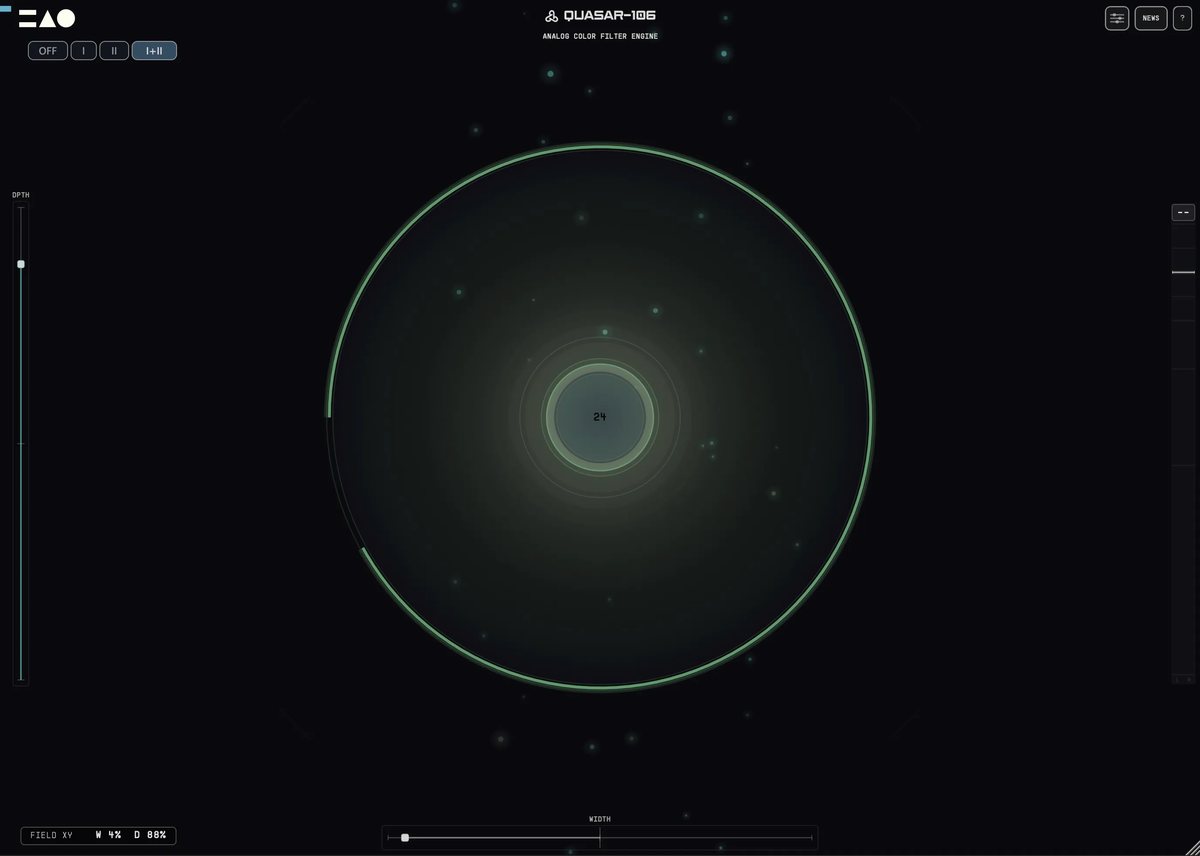
The main screen is the Perform View, where an iris ring (cutoff and resonance), a background field (chorus depth and width) and a centre circle (filter slope) are used like an instrument. An Advanced panel exposes CUT, RES, DRV, VINT, FILT and CHO for precise control.
Key features
24 dB and 12 dB filter
A Juno-style four-pole contour and a smoother two-pole mode can be switched, so a sweep can be made sharper or softer without changing plug-ins.
Three BBD chorus modes
Mode I is slow and deep, Mode II fast and tight, and I+II combines both. Stereo width reaches 2.5 times, which may suit pads and chords that need width.
Vintage-style drive
A saturation stage before the filter, from subtle warmth to strong harmonics, can add body or edge to a clean source.
Vintage control
One control changes chorus drift, high-end darkening, noise floor and resonance wobble together. At zero it is clean and modern; raised, it moves toward an aged circuit.
Perform View and Advanced panel
The iris and field move cutoff, resonance, chorus depth and width together, and all parameters are automatable in the DAW.
OSC Safe Mode
Self-oscillation at high resonance is musical but can be risky live. Safe Mode is meant to keep it under control, and the manufacturer mentions stage use.
Specifications
| Item | Details |
|---|---|
| Maker | MNTRA |
| Type | Filter / chorus / drive effect |
| Filter | 24 dB/oct four-pole, 12 dB/oct two-pole |
| Chorus | BBD, three modes (I, II, I+II), stereo width up to 2.5x |
| Formats | VST3, AU, AAX (macOS, Windows) |
| Windows | Windows 10 or newer |
| Mac | Apple Silicon only (M1 or newer); Plugin Boutique states Intel Macs are not supported |
| Disk / RAM | At least 250 MB free, 8 GB RAM recommended |
| Authorization | MNTRA account (no iLok or dongle); internet needed for first activation; 30-day offline grace window |
What is included and system requirements
- QUASAR-106 plug-in (VST3, AU, AAX)
- Perform View and Advanced panel
- A PDF manual is offered on the manufacturer page
- A demo (which mutes periodically) is offered on the manufacturer page
- Also listed in the MNTRA FX Bundle
How to use it
- Buy from the MNTRA page or Plugin Boutique and sign in with a MNTRA account to authorize.
- Insert the plug-in on a source track in the DAW.
- Choose 12 dB or 24 dB with the centre circle in the Perform View.
- Move the iris ring to explore cutoff and resonance.
- Set chorus depth and width with the field and choose a mode (I, II or I+II).
- Adjust the amount of colour with the Vintage and drive controls.
- Fine-tune in the Advanced panel, and check OSC Safe Mode for live use.
Where it may come in handy
Widening soft synths and pads
The chorus modes and stereo width may widen pads and chords.
Colouring drum buses and bass
Combining drive and the filter may add analog edge to an 808 or bass.
Sweeps before a drop
Moving the iris ring to automate cutoff may help build filter sweeps that follow the arrangement.
Vocal bus or stereo mix
A small amount of Vintage may add the wobble of older gear to a part that sounds too tidy.
Who it may suit
- People who want a Juno-style chorus and filter feel on existing sounds
- People who prefer to play filters and chorus visually
- People who want analog-style drift on material quickly
- People who want to combine it with other MNTRA products such as FLTRS
Good to know before you buy
- It is an effect, not a synthesizer.
- Plugin Boutique states Apple Silicon only for Mac, while the manufacturer FAQ mentions Intel Macs too; please check the current official information.
- Authorization uses a MNTRA account; the first activation needs internet, followed by a 30-day offline window.
- The demo mutes periodically.
How it differs from similar products
We do not pick a winner; the official figures are placed side by side.
FLTRS
Both use MNTRA's Anima Circuits engine. QUASAR-106 is a single focused Juno-style filter, chorus and drive, while FLTRS is described as a system of 37 filter circuits.
Price
$49 (MNTRA official site, checked 2026-10-27). Prices can vary by region and promotion, so check the official page before buying.
See QUASAR-106 on the product page
More of the same kind
We have introduced 46 modulation effects. Here are some of the others.
- Harrison Consoles Harrison Consoles Stunning Phaser
- Universal Audio Brigade Chorus Pedal
- Eventide Instant Flanger Mk II
- BLEASS BLEASS Phaser
- BLEASS BLEASS Chorus
- Valhalla DSP ValhallaSpaceModulator
We have introduced 2 other products from MNTRA.
See the full list in Product database: Effects.
Sources: shop.mntra.io pluginboutique.com (checked 2026-10-27)










Comments