
Disclosure: This page may contain affiliate links. Prices were checked on the date shown and may change.
An introduction to BLEASS BLEASS Phaser, based on information from the maker and distributors: what it does, how to use it and who it may suit. It is not scored.
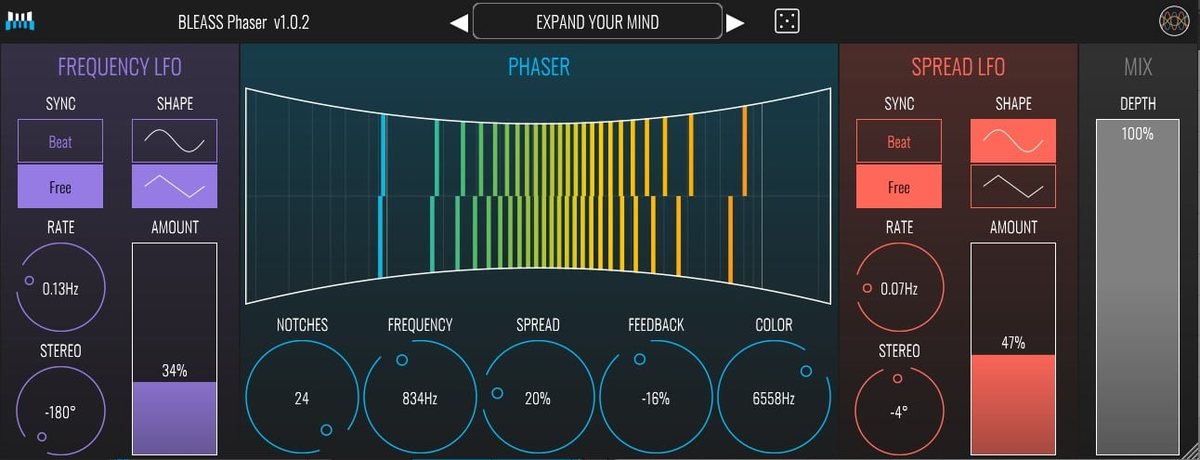
BLEASS Phaser has two LFO modulation sources. The first modulates the notch filter cutoff frequencies, the second modulates the spread of notch frequencies around the initial centre frequency.
— BLEASS official site
What is BLEASS Phaser?
BLEASS Phaser is a phaser effect plugin from BLEASS. The maker describes it as covering gentle movement, resonant swirls and wide atmospheric textures. It supports desktop and iPad / iPhone.
Most of the interface is a colored display of the notch frequencies that create the phasing. You can see where the notches sit, and the maker says this helps make the process easy to understand while adjusting.
A phaser uses all-pass filters to change phase by frequency and overlays the result on the original to create notches. Several filters produce a complex comb-filter pattern, and modulating them gives the sweeping motion.
There are two LFO sources: the first modulates the center frequency of the notches and the second modulates their spread. This allows regular repeating phasing as well as notch patterns that keep shifting.
Key features
Notches, Frequency and Spread
Notches sets the number of notch filters, Frequency the center, and Spread the range across which they are distributed. More notches make the effect more complex and pronounced. These three form the basic shape.
Two LFO sources
The frequency LFO moves the phaser center frequency and the second moves the spread. Setting different rates may produce evolving patterns rather than a simple back-and-forth.
Beat sync and stereo phase
BEAT mode syncs the LFO to the tempo and FREE sets it in Hz. Stereo offsets the LFO between channels, and at 180 degrees the left rises while the right falls.
Feedback and wave shape
Feedback sets how strongly the notch filters are fed back. The LFO shape is sine or triangle. It may help for adding resonance or changing the character of the sweep.
Visual notch display
Notch positions are drawn in a colored graph, so you can read from the screen what a setting is changing in the sound.
Efficient processing
The maker says BLEASS processing is efficient and the visualization does not burden system resources, which suggests it should be manageable across multiple tracks.
Specifications
| Item | Details |
|---|---|
| Type | Phaser (plugin) |
| LFOs | Two (frequency and spread) |
| LFO shapes | Sine / triangle |
| Windows | Windows 8 or later (64-bit), VST3 |
| Mac | macOS 10.9 or later (64-bit only, M1 supported), VST3 / Audio Unit |
| Note | iPad and iPhone versions available |
What is included and system requirements
- Phaser plugin (VST3 / Audio Unit)
- Supports Windows 8 or later and macOS 10.9 or later (64-bit)
- Works in VST3 or Audio Unit compatible DAWs
How to use it
- After installing, open BLEASS Phaser on a DAW track.
- Set Notches to around four and listen to how the notch count affects the sound.
- Move Frequency to find the band where the effect stands out.
- Change Spread to hear how the spacing of the notches changes the tone.
- Set the speed and size of the sweep with the frequency LFO Rate and Amount.
- Switch Sync to BEAT if you want it locked to the tempo.
- Raise Stereo to add movement at different timing on each side.
- Raise Feedback gradually to add resonance and finish.
Where it may come in handy
Flavor on guitar and keys
A light amount of phasing may add movement to guitar or keyboard parts. Fewer notches would give a gentler sweep.
Texture on vocals and bass
Adjusting Feedback and Spread may add a resonant swirl to vocals or bass. Choosing the center frequency to suit the input lets you place the effect.
Ambient and sound design
Setting the two LFOs to different rates to create shifting notch patterns may suit atmospheric backgrounds. You could also turn off tempo sync for a free-running speed.
Who it may suit
- People who want to understand the phaser while watching the notch positions
- People who want a range from gentle motion to resonant swirls in one plugin
- People who want the same phaser on Mac / Windows and iPad / iPhone
Good to know before you buy
- It requires a VST3 or Audio Unit host rather than running standalone.
- The iPad and iPhone versions are offered separately.
- The price shown on store pages can vary with the currency or region displayed, so check the store page before buying.
How it differs from similar products
We do not pick a winner; the official figures are placed side by side.
BLEASS Chorus
BLEASS Phaser is controlled with notch count, center frequency and spread, with LFOs for frequency and spread. BLEASS Chorus uses up to four delay lines and shifts phase with Offset and Width.
Price
Please check the official page for the price.
See BLEASS Phaser on the product page
More of the same kind
We have introduced 46 modulation effects. Here are some of the others.
- D16 Group Antresol
- Waves Kaleidoscopes
- AudioThing AudioThing Phase Motion 2
- UVI UVI Shade
- Eventide Instant Flanger Mk II
- Waves MondoMod
We have introduced 16 other products from BLEASS.
- BLEASS BLEASS Chorus
- BLEASS BLEASS Motion EQ
- BLEASS BLEASS Flanger
- BLEASS BLEASS Spectral Reverb
- BLEASS Megalit
See the full list in Product database: Effects.
Sources: bleass.com pluginboutique.com (checked 2026-10-27)










Comments