
Disclosure: This page may contain affiliate links. Prices were checked on the date shown and may change.
An introduction to Pulsar Audio VM-COMP, based on information from the maker and distributors: what it does, how to use it and who it may suit. It is not scored.
Pulsar VM-Comp is also designed and built to complement our industry standard tube compressor plug-in, Pulsar MP-EQ.
— Pulsar Audio official site
What is VM-COMP?
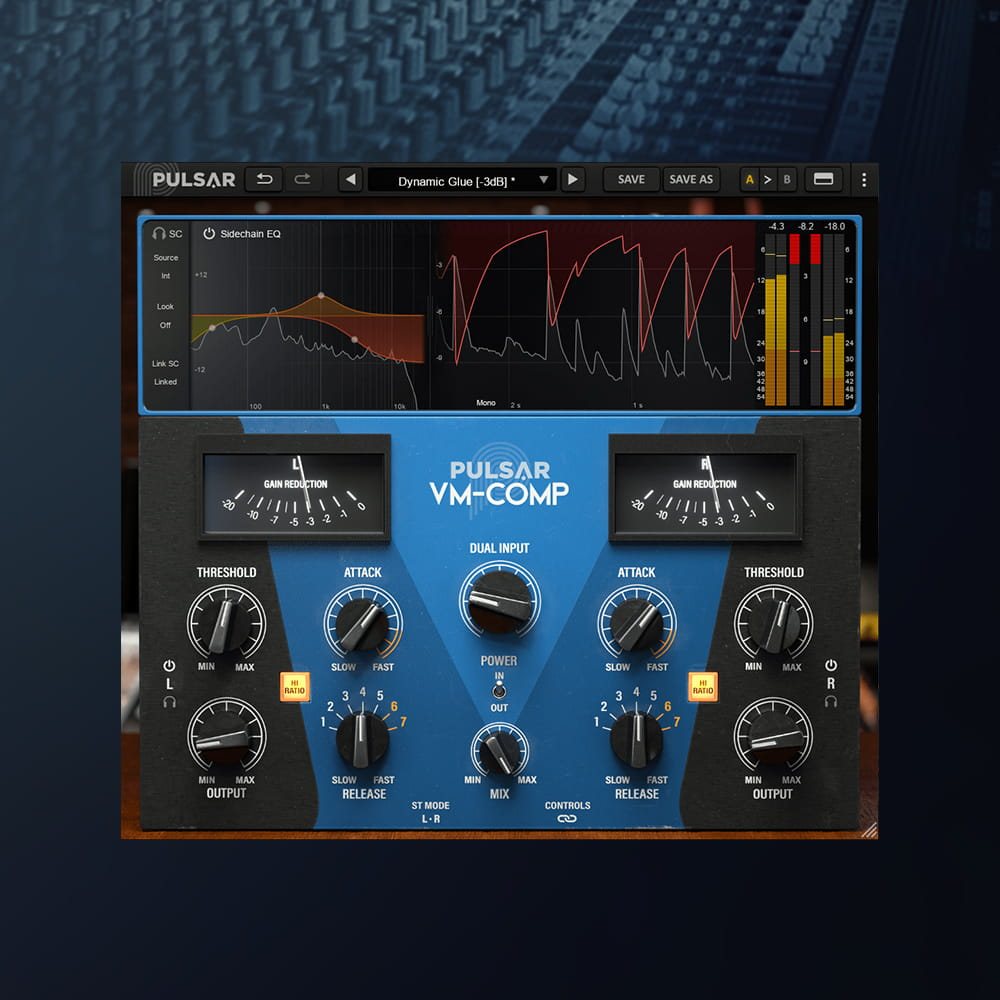
Pulsar Audio VM-COMP is a tube compressor/limiter plug-in from Pulsar Audio. It reproduces the behavior of a variable-bias tube compressor, and the company points to smoothly gluing buses, mixes and masters.
The original hardware is expensive and difficult to integrate into in-the-box workflows. Pulsar says its Topology Preservation Technology reproduces everything from the magnetic saturation of the transformers to the tube response and tiny calibration defects.
It is a stereo compressor that works in Left/Right or Mid/Side modes. It is designed for mixing and mastering, and Pulsar says it is flexible enough for tracking too.
It also has additions beyond the hardware: on-screen sidechain EQ editing, look-ahead and look-behind, and faster attacks and releases.
Key features
Topology Preservation Technology
This is Pulsar's modelling approach, said to reproduce transformer saturation, tube response and the effects of tiny calibration defects. A technical article is available on Pulsar's website.
Mid/Side processing
Built-in M/S encoding and decoding lets you process mono and stereo information with different settings. Listen buttons let you hear Mid or Sides in isolation.
Sidechain EQ
Five filter types, band solo and sidechain audition are provided, with an on-screen curve editor. You can steer the detection away from the lows or toward a particular band.
Look-ahead and look-behind
You can shift the timing of gain reduction before or after the input. Look-ahead reacts before transients arrive, and look-behind lets fast transients through before reduction starts.
Metering
A scrolling gain-reduction display, VU-style meters and LED input/output/gain-reduction displays are included. The original's SIFAM metering is also reproduced.
Extended attack and release
Faster attacks and releases than the original unit are available, allowing a more aggressive, mid-forward sound.
External sidechain and low CPU use
An external sidechain input enables ducking and de-essing, and Pulsar says it is optimized for low CPU consumption.
Specifications
| Item | Details |
|---|---|
| Maker | Pulsar Audio |
| Type | Tube compressor/limiter |
| Processing modes | L/R, M/S |
| Plug-in formats | AAX Native / AU / VST 2.4 / VST 3 (64-bit only) |
| Supported OS | Windows 10/11 (64-bit), macOS 10.11 or later (Apple silicon supported) |
| Memory | 4 GB RAM |
| Disk | 1 GB free |
| Required | iLok account (PACE) |
| Demo | 14 days, full-featured |
| Latest version | 2.0.7 |
What is included and system requirements
- The VM-COMP plug-in
- Manuals (PDF, English and French)
- Installers for Windows and Mac
- A 14-day full-featured trial
- Formats: AAX Native, AU, VST 2.4, VST 3
How to use it
- Create an iLok account and download the installer from Pulsar's site.
- Start the 14-day trial and insert VM-COMP on a bus or track in your DAW.
- Choose L/R or M/S processing.
- Set input, attack and release to decide how strongly it compresses.
- Use the sidechain EQ to narrow the band you want it to react to.
- Adjust look-ahead or look-behind to control how it reacts to transients.
- Pick a metering view to check the amount of compression.
- Match levels before and after and compare.
Where it may come in handy
Finishing in mastering
The Plugin Boutique description says mastering is the most classic use: as a leveller with long attack and release, as glue with slow attack and fast release, or as a limiter with fast attack and release.
Drum bus
Gluing a drum bus while respecting transients, even a kick's, is described. Used in parallel, it can also bring back room ambience.
Acoustic guitar
Light compression to liven up a stiff guitar track is mentioned. In M/S mode you can also widen or narrow the stereo image.
Who it may suit
- People who want soft cohesion on mixes and masters
- People who want to compress the center and sides separately
- People who want detailed sidechain control
- People who want digital-only features such as look-ahead
Good to know before you buy
- A PACE iLok account is required.
- A full-featured 14-day trial is available.
- At the time of checking, the official site showed $149 reduced to $49. The regular price is listed here.
- It is designed to pair with other Pulsar products such as MP-EQ.
How it differs from similar products
We do not pick a winner; the official figures are placed side by side.
SSL Native Bus Compressor 2
VM-COMP models a tube compressor and offers L/R and M/S modes, five sidechain EQ filter types and look-ahead/look-behind. SSL Native Bus Compressor 2 is based on the G Series bus compressor and has 2x and 4x oversampling.
Price
$149 (Pulsar Audio official site, checked 2026-10-27). Prices can vary by region and promotion, so check the official page before buying.
See VM-COMP on the product page
More of the same kind
We have introduced 27 limiters and maximizers. Here are some of the others.
- PSP Audioware PSP Flare
- IK Multimedia White 2A Leveling Amplifier
- Waves CLA-76
- Antelope Audio Tube 176
- Orra Audio Orra Cream Limiter
- Audified U73b Compressor
We have introduced 10 other products from Pulsar Audio.
- Pulsar Audio Pulsar 1178
- Pulsar Audio W495
- Pulsar Audio Pulsar Echorec
- Pulsar Audio Pulsar 8200
- Pulsar Audio 8200 Analog Parallel Equalizer
For a side-by-side comparison scored on the same criteria, see our comparison of limiters and maximizers.
See the full list in Product database: Effects.
Sources: pulsar.audio pluginboutique.com (checked 2026-10-27)










Comments