
Disclosure: This page may contain affiliate links. Prices were checked on the date shown and may change.
An introduction to Pulsar Audio W495, based on information from the maker and distributors: what it does, how to use it and who it may suit. It is not scored.
An accurate emulation of the Neumann w495 3-band EQ.
— Pulsar Audio official site
What is W495?
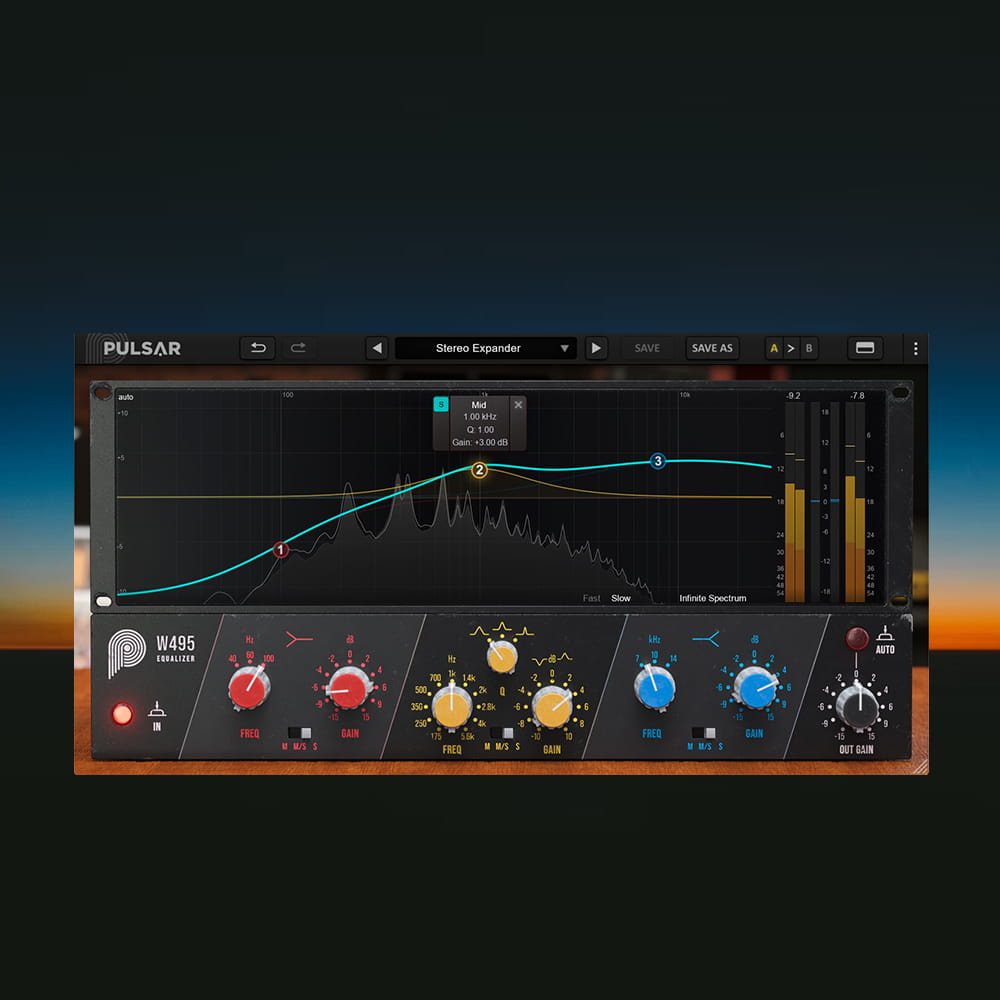
W495 is a three-band, analog-style equalizer plug-in from Pulsar Audio. The maker describes it as an accurate emulation of the Neumann w495 hardware EQ.
According to the maker, the original w495 was used to master about 90 percent of vinyl records made from the 1970s to the 1990s. It is noted for broad curves that can be pushed hard while staying musical, and it is presented as suitable both for individual tracks and for finishing a whole mix.
The plug-in is described as a component-accurate model, preserving details such as light band saturation and the character of the output transformer. A curve editor and spectrum analyzer let you work by number, by eye, or both.
Modern additions include per-band mid/side selection, auto gain, metering, oversampling up to 384 kHz and a resizable interface. The regular price is 99 US dollars and a 14-day free trial is available.
Key features
Simple three-band layout
It consists of a low shelf, a bell and a high shelf. The maker says it suits quick balancing while listening on a bus without overthinking.
Component-accurate model
The model is described as reproducing the original down to component level, including light band saturation and the low-end coloration from the Haufe RK 756 output transformer.
Curve editor and analyzer
Curve controls correspond to the gain, frequency and Q knobs. The real-time spectrum analyzer has fast, slow and infinite modes.
Per-band mid/side
Each band can run on the whole stereo signal, the mid only or the side only. The maker gives examples such as boosting the centre low end or lifting highs on the sides.
Auto gain
Compensates for level changes introduced by the EQ and keeps output close to input. It uses a C-weighting-based algorithm and the amount does not change during playback.
Oversampling and resizing
Oversampling up to 384 kHz is selectable, with higher settings possible at export. The interface can be resized between 67 and 200 percent.
Presets from producers
Presets created with the help of engineers and producers are included as starting points for mixing and mastering.
Specifications
| Item | Details |
|---|---|
| Type | Three-band analog-style EQ |
| Bands | Low shelf / bell / high shelf |
| Functions | Mid/side, auto gain, metering, spectrum analyzer, oversampling up to 384 kHz |
| Formats | AAX Native / AU / VST 2.4 / VST3 (64-bit only) |
| Operating systems | Windows 10 / 11 (64-bit), macOS 10.11 or later (Apple silicon supported) |
| Memory / disk | 4 GB RAM / 1 GB free disk space |
| Authorization | iLok account required |
| Regular price | 99 USD |
What is included and system requirements
- W495 plug-in with Windows and Mac installers
- Manuals in English and French (PDF)
- Presets by producers and engineers
- 14-day free trial with all features
How to use it
- Download the free trial from the maker's site to test every feature for 14 days.
- After purchase, prepare a PACE iLok account (on Windows the installer adds the iLok License Manager).
- Run the installer for your operating system.
- Open your DAW and load W495 on a track or bus.
- Adjust the low-shelf, bell and high-shelf knobs or drag on the curve.
- Turn on auto gain so levels before and after match when you compare.
- Select mid or side for individual bands if needed.
- Switch the spectrum analyzer between fast, slow and infinite to check the changes.
Where it may come in handy
Finishing a mix bus
With only three bands, you might put it on a bus and move low, mid and high balance quickly while listening.
Balancing synths
It may help when a synth sticks out or gets buried, as the maker gives synth use as an example.
Low end on a drum bus
The output transformer is said to add a subtle colour to the low end, so adding body to a kick or air to cymbals is a possible use.
Adjusting stereo width
The maker suggests pushing the high shelf on the sides only to emphasise stereo highs.
Who it may suit
- People who want to balance a mix quickly with few bands.
- People looking for a three-band mastering EQ at a modest price.
- People who want to try mid/side EQ.
- People who want to test every feature for 14 days before buying.
Good to know before you buy
- An iLok account is required for authorization.
- The maker states that it is not affiliated or associated with Neumann in any way.
- The maker's site advertises a Black Friday sale. The price here is the regular price.
- Plugin Boutique's summary of customer reviews says some users find the limited bands and broad curves unsuited to surgical EQ work.
How it differs from similar products
We do not pick a winner; the official figures are placed side by side.
TDR SlickEQ M
W495 has three bands (low shelf, bell, high shelf) with per-band mid/side processing. TDR SlickEQ M has six parametric bands plus a Meta Filter and spectrum matching.
Price
$99 (Pulsar Audio official site, checked 2026-10-27). Prices can vary by region and promotion, so check the official page before buying.
More of the same kind
We have introduced 122 EQs. Here are some of the others.
- Waves eMo Q4 Equalizer
- MeldaProduction MFreeformAnalogEq
- Minimal Audio Morph EQ
- McDSP AE600 Active EQ Native v7
- Three-Body Technology Tube Bell
- Waves RS56 Passive Equalizer
We have introduced 10 other products from Pulsar Audio.
- Pulsar Audio Pulsar Poseidon
- Pulsar Audio MP-EQ
- Pulsar Audio Pulsar MP-EQ
- Pulsar Audio 8200 Analog Parallel Equalizer
- Pulsar Audio Pulsar 8200
For a side-by-side comparison scored on the same criteria, see our comparison of EQs.
See the full list in Product database: Effects.
Sources: pulsar.audio pluginboutique.com (checked 2026-10-27)










Comments