
Disclosure: This page may contain affiliate links. Prices were checked on the date shown and may change.
An introduction to Rhodes V-Rack, based on information from the maker and distributors: what it does, how to use it and who it may suit. It is not scored.
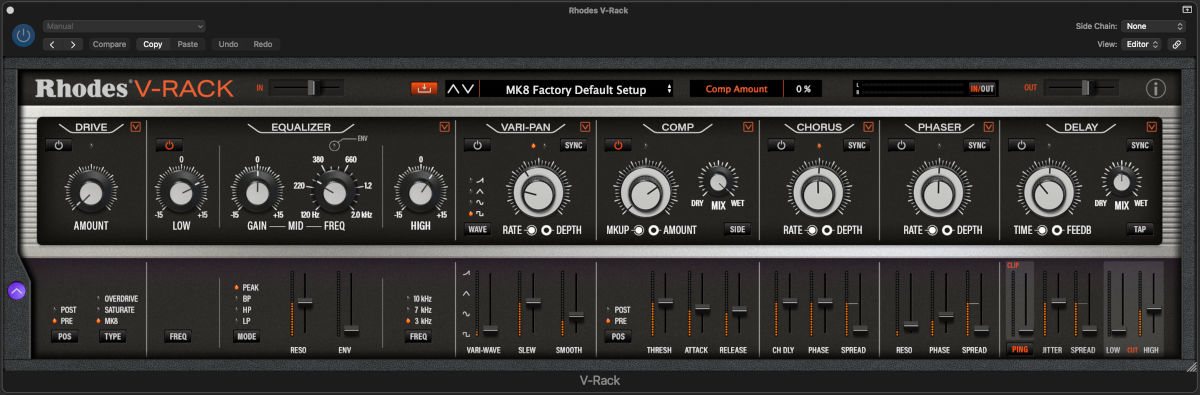
The V-Rack delivers seven classic analogue effect emulations, each with a distinctive sonic character.
— Rhodes official site
What is V-Rack?
V-Rack from Rhodes brings the analogue preamp and effects circuitry of the Rhodes MK8 piano into a software rack for keys, guitars, vocals, beats and other material.
It includes seven analogue effect emulations: a three-mode Drive, a resonant 3-band parametric EQ/filter, Vari-Pan, a VCA compressor with sidechain, a 4-stage VCA phaser, a bucket-brigade chorus and a bucket-brigade delay.
Each module has extended parameters; for example the filter offers low-pass, high-pass, band-pass and peak models, and the delay has Ping-Pong mode and Jitter.
Common features include full channel-strip and per-module preset saving and input/output faders with metering.
Key features
Triple-mode Drive
A diode-based circuit with an Amount control and Pre/Post switch.
Resonant parametric EQ
Low, mid frequency/gain and high controls with selectable centres at 3, 7 and 10 kHz, plus filter models.
Vari-Pan
Rate and depth, four waveshapes, audio-rate modulation and BPM sync for movement.
VCA compressor
Amount and makeup gain plus attack, threshold and release faders and a sidechain input.
Phaser, chorus and delay
The 4-stage phaser, BBD chorus and BBD delay support BPM sync, and the delay has tap tempo.
Global functions
Input/output faders with metering, a mono button, parameter and preset name windows.
Specifications
| Item | Details |
|---|---|
| Type | Analogue effects rack |
| Modules | Drive / EQ-filter / Vari-Pan / VCA compressor / Phaser / Chorus / Delay |
| Mac | macOS Big Sur (11) to Sonoma (14), Intel and Apple Silicon, VST2 / VST3 / AU / AAX |
| Windows | Windows 10 – 11, VST2 / VST3 / AAX |
| Computer | 8 GB RAM minimum, 1.2 GB disk space, 1280 x 960 display minimum (resizable UI) |
| Internet | Required |
What is included and system requirements
- V-Rack plugin (7 modules)
- Supported systems: macOS 11-14 / Windows 10-11
How to use it
- Prepare a Rhodes account and register the serial.
- Download and run the installer.
- Restart the DAW and rescan plugins.
- Insert V-Rack on a track.
- Set the basic tone with Drive and EQ.
- Enable the phaser, chorus, delay or other modules you need.
- Level the sound with the compressor.
- Save the settings as a channel-strip preset.
Where it may come in handy
Colouring keyboards
Drive, chorus and phaser could add warmth to electric pianos or synths.
Guitars and vocals
EQ and delay may add texture and space.
Beats
Drive and filter could add grit to a beat.
Who it may suit
- Keyboardists and synth players
- People who want several analogue-style effects in one plugin
- Beatmakers
Good to know before you buy
- An internet connection is required.
- The maker notes the plugin currently does not work with GarageBand on Intel Macs.
- At least 8 GB of RAM is required.
Price
Please check the official page for the price.
See V-Rack on the product page
More of the same kind
We have introduced 16 preamps. Here are some of the others.
- Kuassa Efektor Bass Cruncher Preamp
- Wave Arts Tube Saturator 2
- Black Rooster Audio VPRE-73
- Arturia Pre V76
- Antelope Audio VPA76
- Three-Body Technology Brit 84
We have introduced 2 other products from Rhodes.
See the full list in Product database: Effects.
Sources: pluginboutique.com (checked 2026-10-27)










Comments