
Disclosure: This page may contain affiliate links. Prices were checked on the date shown and may change.
An introduction to Arturia Pre V76, based on information from the maker and distributors: what it does, how to use it and who it may suit. It is not scored.
Combining the accurately emulated V612 EQ and V76 preamp in one unit, you can enjoy that legendary sound in your virtual studio.
— Arturia official site
What is Pre V76?
Pre V76 is a plugin from Arturia modelled on the vintage Telefunken V76 tube preamp. According to the maker, it is a channel strip combining the V76 preamp and the V612 EQ, aiming for a colour associated with 1960s pop recordings.
Arturia says it studied and modelled an original pair of V76/80 preamps that had been in active service for about 70 years at the Question De Son studio in Paris. Rather than making a carbon copy, it made the gain controls continuous, removed the seldom-used broadcast 3 kHz low-pass switch, and refined the boost and cut range of the EQ.
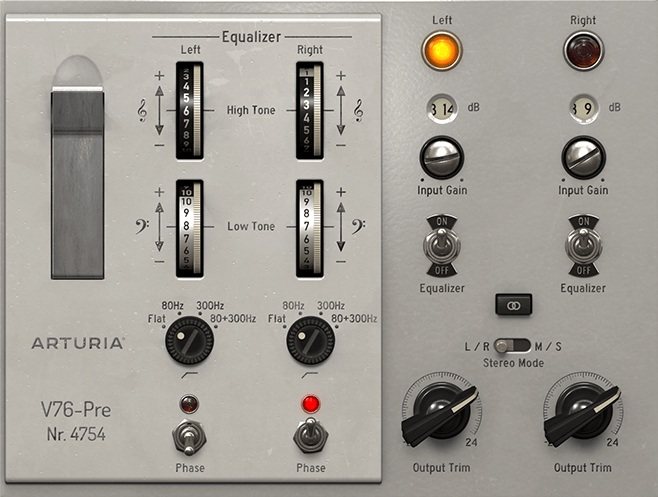
The controls include a continuously variable input gain, an output trim of plus or minus 24 dB, a two-band shelving EQ (high at 5 kHz and low at 100 Hz, each plus or minus 10 dB) and a multi-mode high-pass filter (80 Hz / 300 Hz / both). The maker says the more you raise the gain, the more tube-style soft clipping is added.
Features not found on the original include a Mid/Side mode, automatic gain control, phase inversion, stereo link and a switch between two transformer types. It runs as Standalone, VST, AAX, Audio Unit and NKS, and a trial version is available on the official site.
Key features
V76 preamp and V612 EQ together
A tube preamp and a two-band EQ are combined on one screen. It suits cases where you want to add colour and make simple tonal adjustments to recorded vocals or instruments in one step.
Input gain and soft clipping
The maker says raising the input gain adds more tube-like colour, and pushing further leads to soft clipping rich in harmonics. The gain is continuous, allowing fine adjustment.
Shelving EQ and high-pass
The high shelf (5 kHz) and low shelf (100 Hz) can be adjusted by plus or minus 10 dB. The high-pass can be set to 80 Hz, 300 Hz or both, which is useful for tidying the low end.
Mid/Side mode
Mid/Side processing, absent from the original, can be used without external converters. It is useful when you want to treat the centre and sides of a stereo source separately.
Auto gain control and transformer choice
An automatic level compensation keeps the perceived output similar as you change the gain. You can also switch between two transformer types, Carnill and Marinair.
Presets and meter
A comprehensive set of presets is included, and the output meter offers three sensitivity modes (-18 / -12 / -8 dBFS). Analog clipping is shown in red.
Specifications
| Item | Details |
|---|---|
| Type | Tube preamp + EQ (channel strip) |
| Input gain | Up to 73 dB (continuous) |
| Output trim | +/-24 dB |
| EQ | High shelf 5 kHz +/-10 dB / Low shelf 100 Hz +/-10 dB |
| High-pass | 80 Hz / 300 Hz / 80+300 Hz |
| Formats | Standalone, VST, AAX, Audio Unit, NKS (64-bit DAWs) |
| Supported OS | macOS 10.13 or later / Windows 10 or later (64-bit, Windows ARM not supported) |
| Maker | Arturia |
What is included and system requirements
- Plugin (Standalone / VST / AAX / Audio Unit / NKS)
- 1-channel and 2-channel plugin versions
- Presets
- 4 GB RAM, a 4-core CPU at 3.4 GHz or Apple Silicon
- 1 GB of free disk space and an OpenGL 2.0 compatible GPU
- Authorisation through the Arturia Software Center
How to use it
- Install the Arturia Software Center and activate your purchased licence.
- Install Pre V76 from the Software Center.
- Load it as an insert effect at the start of the chain on a track in your DAW.
- Begin by picking a preset to get a feel for the overall character.
- Raise the input gain little by little and look for the point where the colour increases.
- Shape the tone with the shelving EQ and high-pass, and match the level with the output trim.
- On stereo material, use Mid/Side mode to adjust the centre and sides separately.
- Turn on automatic gain control so it is easier to compare the sound as you change the gain.
Where it may come in handy
Adding warm colour to vocal recordings
You could run recorded vocals through it to add tube-like colour. With modest gain and EQ shaping, you may be able to stay within a natural range.
Distorting guitar or synths
The maker also describes pushing guitars and synths hard and running them through a cabinet simulation. You may try raising the gain to explore the soft-clipping texture.
Adding colour before mixing
You might insert it at the start of each track to add the texture of an analog console. Starting from presets can help you decide on a direction quickly.
Who it may suit
- People who want to try vintage preamp-style colour inside a DAW
- Anyone who wants a preamp and EQ in a single plugin
- Users who like to shape sound with Mid/Side
- Those who already use other Arturia effects
Good to know before you buy
- The licence is authorised and managed through the Arturia Software Center.
- Product names of the original preamp are used to identify the gear being modelled.
- On Windows, ARM processors are not supported.
Price
$49 (Plugin Boutique, checked 2026-10-27). Prices can vary by region and promotion, so check the official page before buying.
See Pre V76 on the product page
More of the same kind
We have introduced 16 preamps. Here are some of the others.
- Slate Digital Virtual Preamp Collection
- Tone Empire EDYN Pre
- Waves Waves Scheps 73
- Black Rooster Audio VPRE-73
- Kuassa Efektor Bass Driver Preamp
- Three-Body Technology Brit 84
We have introduced 45 other products from Arturia.
See the full list in Product database: Effects.
Sources: arturia.com pluginboutique.com (checked 2026-10-27)










Comments