
Disclosure: This page may contain affiliate links. Prices were checked on the date shown and may change.
An introduction to Tracktion Delta-V SpaceCraft, based on information from the maker and distributors: what it does, how to use it and who it may suit. It is not scored.
The hugely popular iOS app by Delta-V Audio has come to the desktop! SpaceCraft Granular Synth is well known for providing instant gratification and inspiring creative flow.
— Tracktion official site
What is Delta-V SpaceCraft?
Delta-V SpaceCraft brings the popular granular synth from Delta-V Audio's iOS app to the desktop as an AU/VST3 plugin. It splits loaded or recorded audio into tiny grains and lets you shape new sounds by controlling their pitch and length.
Two parallel granular engines provide grain frequency and length, an LFO for sample position, stereo reverb/filter, and pitch and ring modulation. A grain pitch sequencer, MIDI/MPE and live sampling are also included.
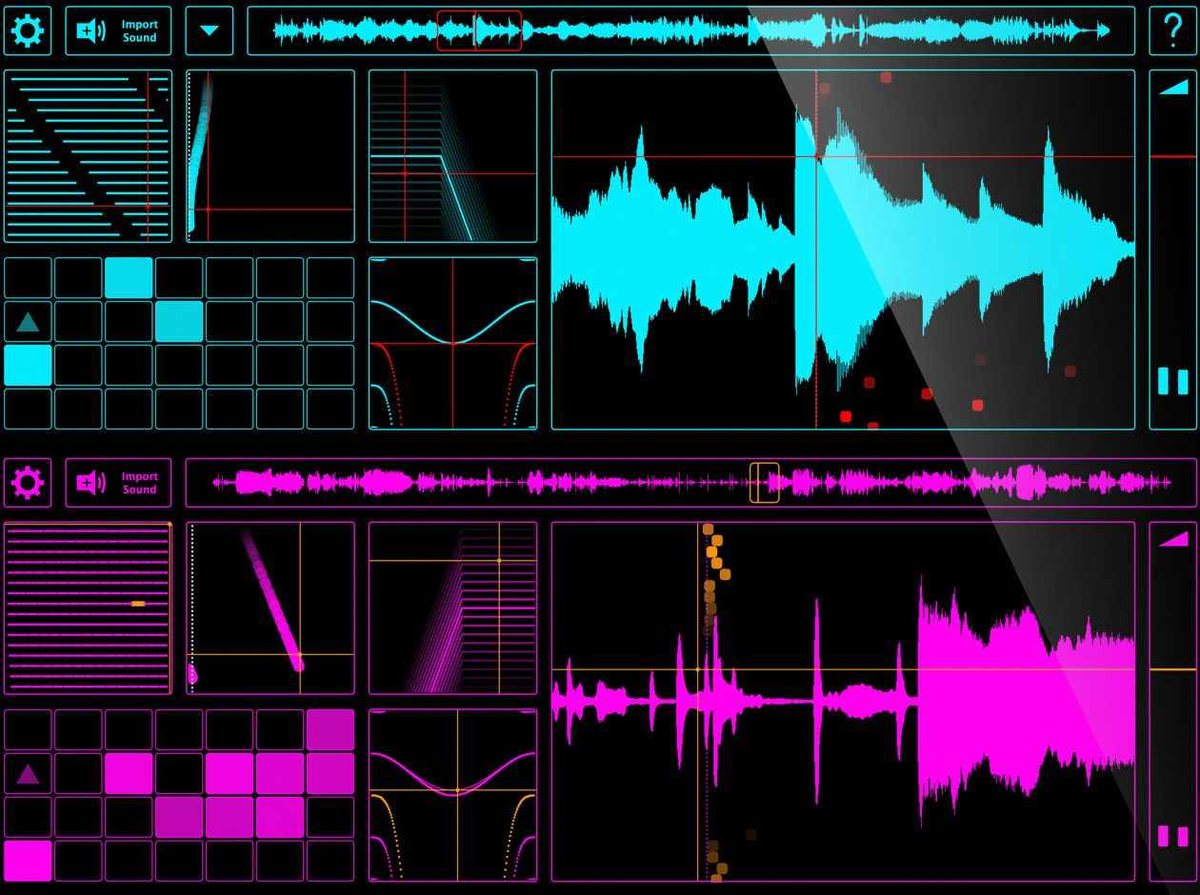
The interface is a single page and samples can be dragged in. A reactive visualizer offers fifteen color themes, and the maker says you can start making sound without fiddling with parameter mappings.
The developer, Mark Watt, is introduced as a guidance, navigation and control engineer on real interplanetary science missions. The prototype is said to have been built in Native Instruments Reaktor.
The main area shows a waveform display for the audio file, the XY pad that moves the grains, and the scale and grain sequencer grid. With few knobs it is easy to read, and may suit people who want to learn by touching it first. The Tracktion site also provides a user manual, learning guides and video tutorials.
Key features
Two granular engines
Two engines run in parallel with controls over grain frequency, length and sample position. The sound changes a lot, which may help when you want several textures from one source.
Grain pitch sequencer
An arpeggiated note/grain sequencer grid sets grain pitch, with over 24 scales to choose from. The grain XY pad lets you morph smoothly from chords and drones to rhythmic sequences.
MIDI and MPE
Any loaded or recorded sample becomes a playable MIDI/MPE instrument with no mapping. It offers 16 voices, per-note pressure, Glide (pitch bend) and Slide (grain position modulation).
Live sampling
You can record audio and turn it into grains immediately. Samples up to 16 minutes are supported, depending on RAM. It may suit anyone who wants to use their own voice or instruments as raw material.
Effects and filter
Stereo reverb/filter, pitch modulation and ring modulation are built in. They may help soften granular sounds or give them a metallic edge.
Single-page GUI
Everything is on one page, with fifteen color themes and a reactive visualizer. Multitouch compatibility may make it easy to try on touchscreens.
Desktop enhancements
Compared with the iOS app, it adds a higher-fidelity granular DSP, up to eight times the number of grains (CPU dependent), samples up to 16 minutes and drag-and-drop loading.
Specifications
| Item | Details |
|---|---|
| Formats | AU / VST3 on macOS, VST3 on Windows |
| Polyphony | 16 voices |
| Sample length | Up to 16 minutes (RAM dependent) |
| Scales | Over 24 |
| Color themes | 15 |
| macOS | 10.11 or later (64-bit), Intel Core 2 Duo 2GHz, 2GB RAM (4GB recommended) |
| Windows | Windows 7/8/10/11 (64-bit), Intel Core 2 Duo 2GHz, 2GB RAM (4GB recommended) |
| Trial | 30-day unlimited trial available |
What is included and system requirements
- The granular synth itself (AU / VST3)
- 30-day unlimited trial available
- Learning guides, user manual and video tutorials
- macOS 10.11+ and Windows 7/8/10/11 (64-bit)
How to use it
- Register your activation code on the Tracktion site after purchase.
- Download and install the product with the Tracktion Download Manager.
- Open SpaceCraft as an instrument in your DAW.
- Drag in an audio file or record with live sampling to load material.
- Play with a MIDI keyboard and move the grain XY pad to change grain pitch and length.
- Set a scale and the grain sequencer to create a flow.
- Add a little reverb/filter or ring modulation to shape the texture.
Where it may come in handy
Ambient and drones
It may be useful for stretching one sound into a wide background.
Post-production and sound effects
Transforming recorded material may help create unusual effects and textures.
Processing vocal material
You could record your own voice, turn it into grains and make a choir-like pad.
Live and touch performance
Multitouch or MPE controllers may suit performances where you shape sound by hand.
Who it may suit
- People who want to try granular synthesis easily
- People who want unique textures from recorded material
- People who know the iOS SpaceCraft and want it on desktop
- People who want expressive playing with MPE controllers
Good to know before you buy
- The Tracktion page shows an on-sale price of $59, while the regular price on Plugin Boutique is $99 (sale prices are not used for the price field).
- License registration and download are handled through a Tracktion account.
- This is based on official descriptions, not hands-on use.
- Tracktion offers many instruments around its DAW, Waveform. SpaceCraft appears in that lineup as a granular synth and can be used in any DAW supporting AU or VST3.
- More grains may mean more CPU load; the maker itself says up to eight times the grains depending on CPU, so trying the free trial on your own system first is reassuring.
Price
$99 (Plugin Boutique, checked 2026-10-27). Prices can vary by region and promotion, so check the official page before buying.
See Delta-V SpaceCraft on the product page
More of the same kind
We have introduced 178 synthesizers. Here are some of the others.
- Applied Acoustics Systems AAS Player
- Rob Papen Albino-3 Legend
- AIR Music Technology Vacuum Pro
- Native Instruments Blocks Primes
- Klevgrand Pipa
- Arturia SQ80 V
We have introduced 19 other products from Tracktion.
- Tracktion SpaceCraft
- Tracktion Tracktion BioTek 3
- Tracktion RetroMod LoFreq Modern
- Tracktion RetroMod FAT
- Tracktion Waverazor
For a side-by-side comparison scored on the same criteria, see our comparison of synthesizers.
See the full list in Product database: Instruments.
Sources: tracktion.com pluginboutique.com (checked 2026-10-27)










Comments