
Disclosure: This page may contain affiliate links. Prices were checked on the date shown and may change.
An introduction to Tracktion Tracktion BioTek 3, based on information from the maker and distributors: what it does, how to use it and who it may suit. It is not scored.
Experience a revolutionized workflow with extensive upgrades to the UI, UX, and audio engine, designed to accelerate your creative process and simplify sound design.
— Tracktion official site
What is Tracktion BioTek 3?
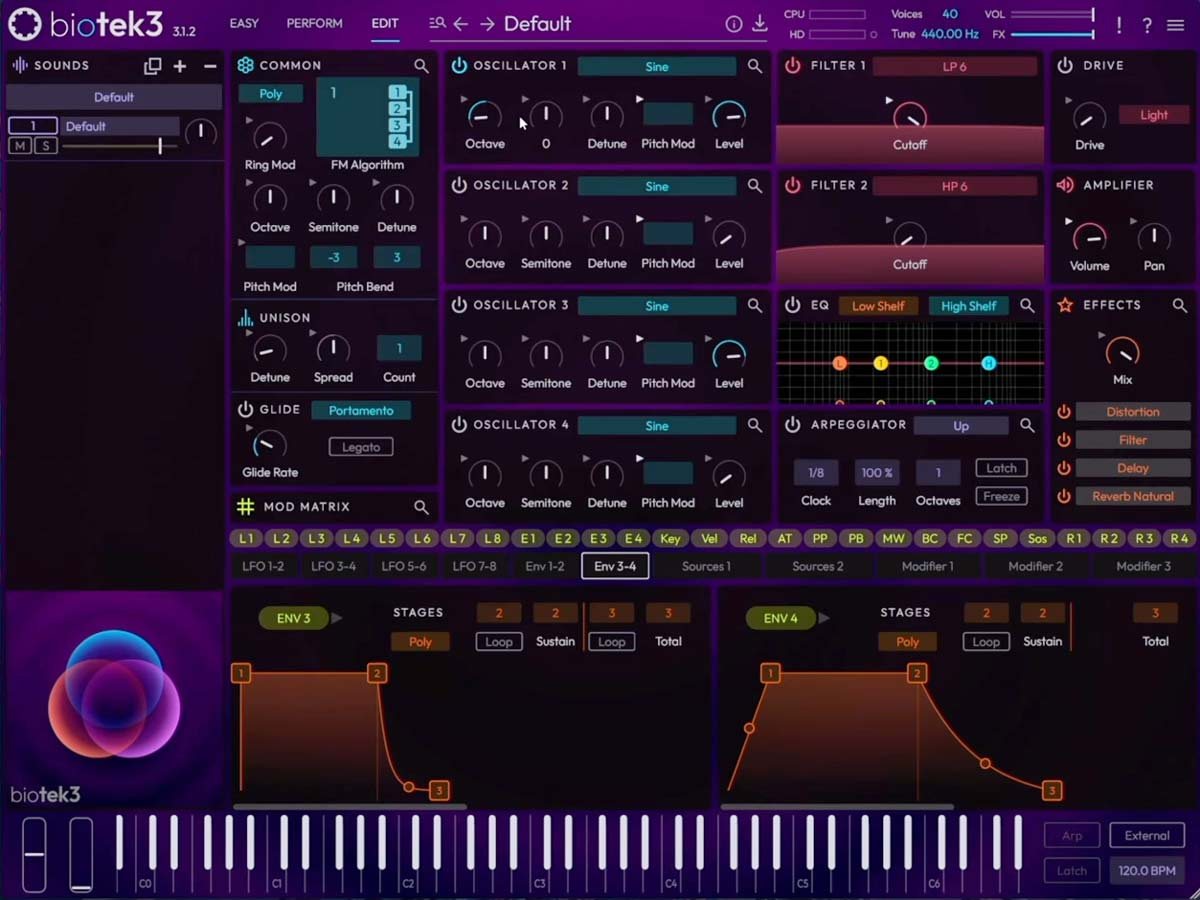
BioTek 3 is a creative synthesizer from Tracktion Software of the United States. Its Japanese distributor, Media Integration, describes it as combining natural and environmental samples with a deep synthesis engine, with uses in ambient, cinematic, electronic, sound design, and film and game music.
The third generation brings big changes to the interface, workflow and audio engine. The new Easy page gathers the main parameters for sound design on one screen. The XY pad in the center moves several parameters at once so the sound morphs continuously while you play.
Oscillator choices include standard waveforms and noise plus a sampler, granular and Spinal Saw. Spinal Saw generates up to 44 oscillators per voice; with up to 16 unison voices and layers, Tracktion counts, in theory, 11,264 oscillators from one note. It is a mechanism for very dense sounds.
There are more than 800 factory presets, 300+ of them new in this version. Nine effects can be loaded into four slots per voice. The new Transistor Ladder and Sallen-Key filters are added. Tracktion says the engine is more efficient and can handle more than 50 instances comfortably.
The Japanese distributor's page recommends it for people who want ambient, cinematic or electronic sounds, those who want to bring in natural and environmental sound, those who want to go deep beyond presets, those who want to change sound with an XY pad, and those looking for an instrument for film, game and score work.
Key features
Easy page
This page gathers key parameters, and you can promote any parameter to build your own control panel. Macros exposed on Easy also appear in the DAW's automation list, which helps follow a song's development.
XY pad
It moves multiple parameters at once to change a timbre continuously, letting you perform pad movement, shifts in tension and changes in texture.
Oscillators including Spinal Saw
Choose among a sampler, granular and Spinal Saw oscillators. Combined with BioTek's own library of natural and environmental samples, they are a starting point for organic textures.
800+ presets
Dark cinematic atmospheres, evolving ambient, pads, keys, bass and percussion are tagged for searching. New presets in this version come from sound designers including Miclop and Databroth.
Filters and nine effects
New Transistor Ladder and Sallen-Key filters join the lineup, and nine effects can be loaded into four slots per voice, so texture, space and distortion can be handled in one instrument.
Expansion pack support
Genre-specific expansion packs are sold separately. The Japanese distributor lists packs such as Shadow Fragments and Pulse.
Specifications
| Item | Details |
|---|---|
| Type | Creative synthesizer |
| Oscillators | Standard waveforms, noise, sampler, granular, Spinal Saw (up to 44 per voice) |
| Unison | Up to 16 voices |
| Presets | 800+ (300+ new in this version) |
| Effects | 9 types, 4 slots per voice |
| Filters | New Transistor Ladder, Sallen-Key and others |
| Formats | AU, AAX, VST3, Linux VST3 |
| Mac | macOS 10.15+ (per the Japanese distributor), 64-bit Intel/Apple silicon |
| Windows | Windows 10/11, 64-bit |
| Linux | Tested on Ubuntu 20.04, 64-bit |
What is included and system requirements
- BioTek 3 (download version)
- 800+ factory presets and a library of natural and environmental samples
- Formats: AU, AAX, VST3, Linux VST3
- A separate upgrade version exists for BioTek 2 owners (Japanese distributor)
- Requirements: macOS 10.15+ on Mac, Windows 10/11 (64-bit)
How to use it
- After purchase, log in with a Tracktion account (internet needed for setup and authorization).
- Register the product, then download and run the installer.
- Open BioTek 3 on an instrument track.
- On the Easy page, step through presets and search tags for a similar mood.
- Drag around the XY pad and listen to how the sound changes.
- Promote frequently used parameters to Easy and use them in DAW automation.
- Add expansion packs if needed (sold separately).
Where it may come in handy
Ambience for film and games
With textures based on natural and environmental sound, it may help create background atmosphere.
Ambient and electronica
It may suit recording slow timbral changes with the XY pad.
Heavy basses and leads
Spinal Saw combined with unison may suit thick leads.
Who it may suit
- People looking for ambient or cinematic sounds
- Those who want to branch out from presets rather than build from scratch
- Those who want to change sounds expressively with an XY pad
Good to know before you buy
- The Japanese distributor notes delivery of Tracktion products takes about a week to ten days after order (store notice).
- Internet access and a Tracktion account are needed for installation, authorization and extra content.
- BioTek 2 owners can use a lower-cost upgrade version.
How it differs from similar products
We do not pick a winner; the official figures are placed side by side.
Waldorf Largo 2
BioTek 3 combines natural-sound samples with granular and other oscillators and has 800+ presets. Largo 2 is a wavetable synth with 68 wavetables and up to 256 voices.
Price
$179 (Plugin Boutique, checked 2026-10-27). Prices can vary by region and promotion, so check the official page before buying.
See Tracktion BioTek 3 on the product page
More of the same kind
We have introduced 178 synthesizers. Here are some of the others.
- Tracktion Dawesome Dawesome KONTRAST
- UJAM Usynth STRANGER
- Arturia Pure SUB
- GForce Software impOSCar3
- AIR Music Technology OPx-4
- Applied Acoustics Systems AAS Player
We have introduced 19 other products from Tracktion.
- Tracktion Atmosia
- Tracktion Delta-V SpaceCraft
- Tracktion RetroMod Lead
- Tracktion F.'em
- Tracktion SpaceCraft
For a side-by-side comparison scored on the same criteria, see our comparison of synthesizers.
See the full list in Product database: Instruments.
Sources: store.minet.jp pluginboutique.com (checked 2026-10-27)










Comments