
Disclosure: This page may contain affiliate links. Prices were checked on the date shown and may change.
An introduction to United Plugins FireMaximizer, based on information from the maker and distributors: what it does, how to use it and who it may suit. It is not scored.
FireMaximizer provides pristine clipper, saturator, limiter and multiband limiter algorithms and allows you to blend between them
— United Plugins official site
What is FireMaximizer?
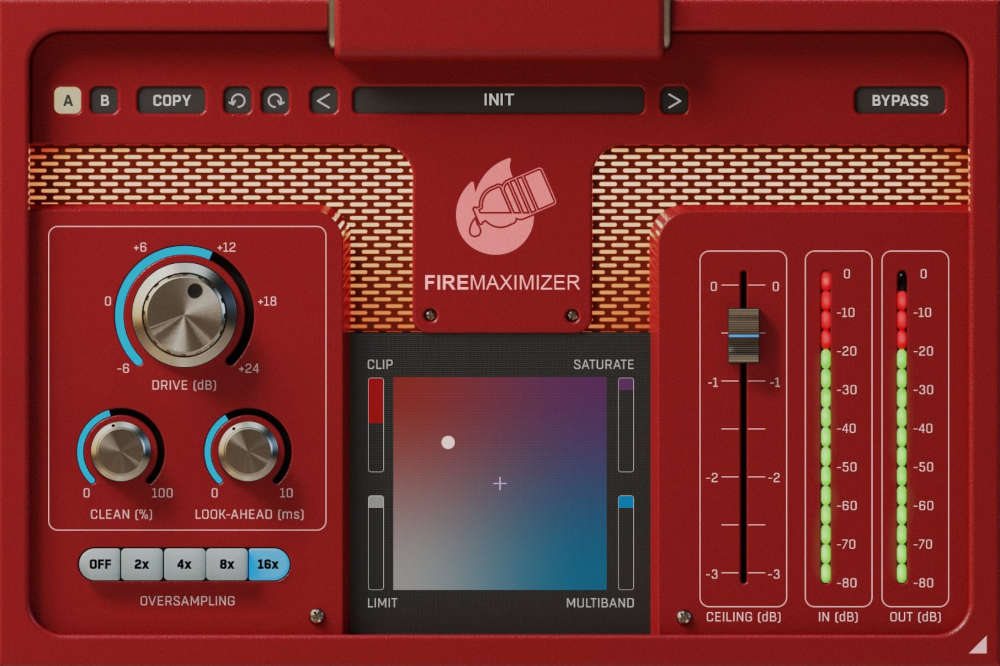
FireMaximizer is a maximizer by FireSonic, sold by United Plugins. It includes four kinds of processing, clipper, saturator, limiter and multiband limiter, and lets you blend between them to set the ratio of digital crispness and analog-style thickness.
The official description says limiters can be too smooth and clippers too aggressive, so the plug-in aims to combine them. It suggests clippers and saturators for punchy styles such as metal and EDM, and limiters for a transparent result in genres such as ambient and pop.
It is mainly intended for the master track, but the maker says it can also be used on drums, acoustic and electric guitars and vocals. It offers up to 16x oversampling and 64-bit internal processing.
Formats are VST2, VST3, AAX and AU. No iLok or dongle is needed; activation uses a license file. A free 15-day trial is available.
Key features
Blend four algorithms
Adjust the proportion of clipper, saturator, limiter and multiband limiter, exploring crispness against transparency in one interface.
16x oversampling
Oversampling up to 16x can be selected. The maker says it raises processing resolution and has an effect on the sound.
Usable on instruments
Not only for the master; it can be used on drums, guitars and vocals, for adjusting the punch of individual tracks.
Resizable interface
A photorealistic interface that can be resized by dragging the arrow at the bottom right to suit your screen.
Smart bypass and sleep
Bypass automation is designed to avoid clicks and compensates for latency, and the plug-in sleeps on silence to save CPU.
Free updates and trial
Updates are described as free, and a 15-day trial without limits allows testing in a real project.
Specifications
| Item | Details |
|---|---|
| Product type | Maximizer (clipper / saturator / limiter) |
| Formats | VST2, VST3, AAX, AU |
| OS | macOS 10.10 or later (64-bit, Apple Silicon supported), Windows 8-11 (32/64-bit) |
| Processing | 64-bit internal, up to 16x oversampling |
| Activation | License file (no iLok) |
| Trial | 15 days |
What is included and system requirements
- The plug-in (VST2 / VST3 / AAX / AU)
- Free updates
How to use it
- Download the trial from the official site, or buy and install.
- Authorize with the license file.
- Insert FireMaximizer on the master track or similar in your DAW.
- Move the clipper, saturator and limiter blend and check the sound.
- Raise the oversampling value if needed.
- Compare with bypass, taking care over loudness differences.
- Listen to the full song and settle the settings.
Where it may come in handy
Finishing the master bus
Clipper, saturator and limiter algorithms could be blended to shape loudness at the final stage.
Drum and guitar tracks
The maker says it can be used on instrument tracks too, so it may be worth trying on drums or guitars for more punch.
Adapting to genre
Settings can range from gentle limiting to clipping, so presets could be chosen to suit the style of a song.
Who it may suit
- People looking for a plug-in to shape final loudness
- People who want clipper and limiter in one tool
- People who prefer license-file activation
Good to know before you buy
- When raising loudness, compare with the original at matched volume.
- VST2 may not work in newer hosts.
Price
Please check the official page for the price.
See FireMaximizer on the product page
More of the same kind
We have introduced 27 limiters and maximizers. Here are some of the others.
- Metric Halo / Make Believe MB Howies179
- McDSP 4040 Retro Limiter
- Klevgrand Korvpressor
- PSP Audioware PSP auralComp
- Universal Audio Teletronix LA-3A Audio Leveler
- Signum Audio SKYE Dynamics Surround
We have introduced 34 other products from United Plugins.
- United Plugins Transmutator
- United Plugins Mirror
- United Plugins QuickBass
- United Plugins UniChannel
- United Plugins Voxessor
For a side-by-side comparison scored on the same criteria, see our comparison of limiters and maximizers.
See the full list in Product database: Effects.
Sources: unitedplugins.com pluginboutique.com (checked 2026-10-27)










Comments