
Disclosure: This page may contain affiliate links. Prices were checked on the date shown and may change.
An introduction to Waves Key Detector, based on information from the maker and distributors: what it does, how to use it and who it may suit. It is not scored.
Key Detector is a time-saving tool for all music makers. Replace manual work with AI-powered key detection, for any sample, track or full mix.
— Waves official site
What is Key Detector?
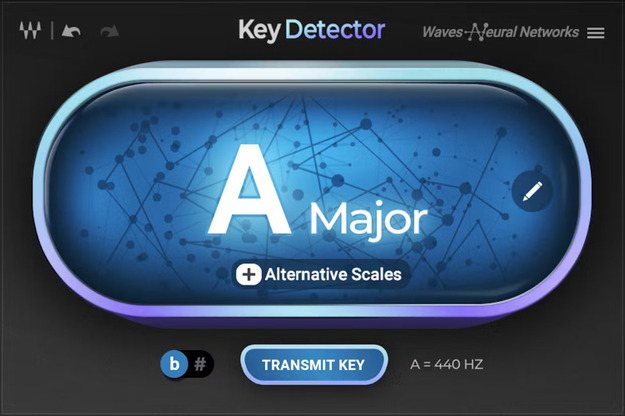
Key Detector is a key-detection plug-in from Waves. It is described as a time-saving tool that replaces manual work with AI-powered key detection for any sample, track or full mix.
Using the Waves Neural Networks engine, it provides a root note, a scale (major or minor) and two likely alternatives.
It is stated to indicate the key even when the pitch is off-tune, and it can analyze complex audio such as full mixes and multi-instrument samples.
It works with Waves vocal plug-ins including Waves Tune Real-Time, Waves Tune, Waves Harmony and OVox: pressing the Transmit button sends the detected key to all active instances. Related plug-ins need to be updated to the latest v14 release for this feature.
Key features
AI key detection
The Waves Neural Networks engine detects the key of audio, which can reduce the effort of finding a key by ear.
Root note and scale
It shows the root note and scale (major or minor) plus two likely alternatives, so you can judge from the candidates when a result is ambiguous.
Complex material
Full mixes and multi-instrument samples can be analyzed, according to the description.
Off-tune audio
The key is indicated even when the pitch is off-tune.
Transmit to vocal plug-ins
The Transmit button sends the key to Waves Tune Real-Time, Waves Tune, OVox and Waves Harmony, saving manual entry.
Ease of use
It is described as intuitive and as replacing manual work.
Specifications
| Item | Details |
|---|---|
| Type | Key detection (AI) |
| Mac | macOS Monterey 12, Ventura 13, Sonoma 14, Sequoia 15 (VST / AU / AAX) |
| Windows | Windows 10+ (VST / AAX) |
| Companion plug-ins | Waves Tune Real-Time, Waves Tune, OVox, Waves Harmony (v14) |
What is included and system requirements
- Key Detector plug-in (Mac: VST / AU / AAX; Windows: VST / AAX)
How to use it
- Insert Key Detector on the track or master whose key you want to know.
- Play the audio so it can be analyzed.
- Check the displayed root note and scale.
- If the result is unclear, compare the two alternatives.
- When using a vocal plug-in, press the Transmit button.
- Make sure the companion plug-ins are updated to v14.
Where it may come in handy
Checking the key of samples
It may be used to check the key of a sample before using it in a track.
Preparing vocal tuning
The key can be sent to Waves Tune and similar plug-ins so the scale matches.
Finding the key of an existing song
It may help when you want to confirm the key of a reference track or mix.
Who it may suit
- People who spend time finding keys by ear
- People who work with many samples
- People who use Waves vocal plug-ins
Good to know before you buy
- The key-transmit feature requires v14 of the supported Waves plug-ins.
- Supported systems: macOS Monterey 12 through Sequoia 15, Windows 10 or later.
Price
Please check the official page for the price.
See Key Detector on the product page
More of the same kind
Other introduction articles of the same kind.
- W. A. Production ChopBeast 2
- Klevgrand Rum
- AudioThing Frostbite 2
- Universal Audio Waterfall Rotary Speaker
- IK Multimedia Mic Room
- MeldaProduction MAutoVolume
We have introduced 215 other products from Waves.
- Waves Vitamin Sonic Enhancer
- Waves Curves Resolve
- Waves C6 Multiband Compressor
- Waves Waves Tune Real-Time
- Waves Eddie Kramer Effects Channel
See the full list in Product database: Effects.
Sources: pluginboutique.com (checked 2026-10-27)










Comments