
Disclosure: This page may contain affiliate links. Prices were checked on the date shown and may change.
An introduction to Waves MaxxBass, based on information from the maker and distributors: what it does, how to use it and who it may suit. It is not scored.
MaxxBass does the seemingly impossible: it gives a strong sensation of bass, even on the smallest speakers.
— Waves official site
What is MaxxBass?
MaxxBass is a bass-enhancement plug-in from Waves. Based on psychoacoustic research, it generates harmonics from the original low end so that the ear perceives deeper bass than is physically present.
The idea is to give a sense of bass even on the smallest speakers, which is relevant for mixes and masters that will be heard on laptops, phones and small systems.
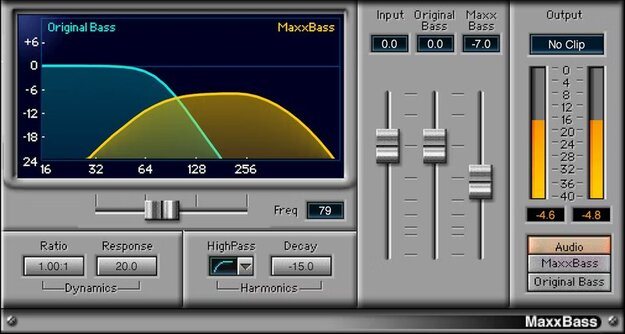
The ratio of original and enhanced bass can be chosen. The plug-in is described as preserving the clarity, character and dynamics of the original bass, with a graphic display to simplify editing. Upward expansion can emphasize the dynamics of the bass harmonics.
The Plugin Boutique listing shows VST / AU / AAX on macOS (Monterey 12 through Sequoia 15) and VST / AAX on Windows 10 or later. Improving perceived bass in hip hop and dance mixes is listed as an application.
Key features
Psychoacoustic bass
Harmonics are generated from the original low end so the ear perceives deeper bass, which is described as different from simply boosting low frequencies.
For small speakers
It is designed with laptops, phones and other systems with limited low-frequency output in mind.
Original/enhanced ratio
The ratio of original to enhanced bass can be selected, so the balance can be set to suit the track.
Clarity preserved
The plug-in is described as preserving the clarity, character and dynamics of the original bass, which allows low-end power to be added to masters.
Graphic display
An informative display shows the state of the processing, which simplifies editing.
Upward expansion
This can emphasize the dynamics of the bass harmonics.
Specifications
| Item | Details |
|---|---|
| Type | Bass enhancer (psychoacoustic) |
| Mac | macOS Monterey 12, Ventura 13, Sonoma 14, Sequoia 15 (VST / AU / AAX) |
| Windows | Windows 10+ (VST / AAX) |
What is included and system requirements
- MaxxBass plug-in (Mac: VST / AU / AAX; Windows: VST / AAX)
How to use it
- Insert MaxxBass on the track or bus where you want more bass.
- Start with the ratio set so the original bass dominates.
- Check the graphic display for the state of processing.
- Compare on small speakers, headphones and other playback systems.
- Try upward expansion if needed.
- Toggle on and off to check the difference and any level change.
Where it may come in handy
Hip hop and dance mixes
Use on bass and kick to add perceived bass, as the listing describes.
Video and film audio
It may be worth trying where depth is needed in video or film content.
Mastering
It may be tried when low-end power is wanted while keeping clarity.
Who it may suit
- People who want mixes whose bass is perceived on small speakers
- People who want to add presence without simply boosting lows
- People working on low end in hip hop and dance
Good to know before you buy
- Supported systems: macOS Monterey 12 through Sequoia 15, Windows 10 or later.
- Formats are VST / AU / AAX on Mac and VST / AAX on Windows.
Price
Please check the official page for the price.
See MaxxBass on the product page
More of the same kind
Other introduction articles of the same kind.
- Blue Cat Audio Blue Cat's Connector
- Sonarworks SoundID VoiceAI
- UJAM Finisher FLUXX
- Solid State Logic SSL SubGen
- Klevgrand DAW LP
- IK Multimedia AmpliTube Fender Collection 2
We have introduced 215 other products from Waves.
See the full list in Product database: Effects.
Sources: pluginboutique.com (checked 2026-10-27)










Comments