
Disclosure: This page may contain affiliate links. Prices were checked on the date shown and may change.
An introduction to Waves Spherix Immersive Compressor & Limiter, based on information from the maker and distributors: what it does, how to use it and who it may suit. It is not scored.
a suite of two plugins, a compressor and a brickwall limiter, designed from the ground up for fast, efficient work on the beds (fixed channels) of immersive 7.1.4/7.1.2 mixing environments
— Waves official site
What is Spherix Immersive Compressor & Limiter?
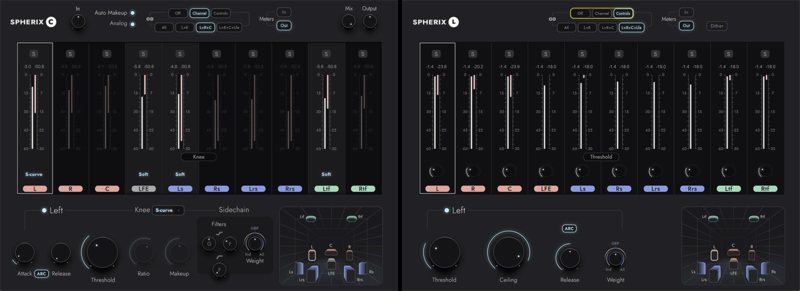
Spherix Immersive Compressor & Limiter is a Waves suite of two plugins, a compressor and a brickwall limiter, for immersive mixing. It is described as designed for fast work on the beds (fixed channels) of 7.1.4/7.1.2 environments such as Dolby Atmos.
With many channels, immersive mixes tend to require matching the same settings repeatedly. Spherix provides workflows such as multi-mono, zone-based control and channel grouping to reduce channel-by-channel manual work.
Channel Linking processes grouped speaker zones together, and Control Linking adjusts multiple channels with one click. Front-wall linking can be set to L+R, L+R+C or L+R+C+LFE.
A Spherix-only Weight knob controls how the sidechain reacts, and multi-channel metering shows levels and gain reduction.
Key features
Compressor and Limiter
Includes Spherix Compressor and Spherix Limiter, so dynamics control and peak limiting may share a consistent workflow.
7.1.4 / 7.1.2 workflows
Dedicated workflows for 7.1.4 and 7.1.2 immersive formats, aimed at bed work in setups such as Dolby Atmos.
Channel Linking
Entire grouped speaker zones can be processed together.
Control Linking
Multiple channels can be adjusted with a single click.
Weight knob and front-wall linking
The Weight knob, which controls sidechain reaction, is described as Spherix-only; front-wall linking offers L+R, L+R+C or L+R+C+LFE.
Multi-channel metering
Levels and gain reduction can be monitored across channels, and quick-access knobs let you work without swapping channels.
Specifications
| Item | Details |
|---|---|
| Contents | Spherix Compressor / Spherix Limiter |
| Target formats | 7.1.4 / 7.1.2 (beds) |
| Formats (Mac) | VST / AU / AAX |
| OS (Mac) | macOS Monterey 12 to Sequoia 15 |
| Formats (Windows) | VST / AAX |
| OS (Windows) | Windows 10+ |
What is included and system requirements
- Spherix Compressor
- Spherix Limiter
How to use it
- Create or log in to a Waves account and register the serial from your Plugin Boutique account.
- Install and open Waves Central.
- Select Spherix in “Install Products” and click “Install & Activate”.
- In an immersive-capable DAW, insert Spherix on a 7.1.4 or 7.1.2 bed track.
- Choose channel linking and front-wall linking (L+R, L+R+C or L+R+C+LFE).
- Use Control Linking to move settings on several channels at once.
- Adjust the sidechain with the Weight knob and check the meters.
Where it may come in handy
Dynamics on Dolby Atmos beds
It may reduce manual setting-matching when processing bed channels together.
Final limiting in an immersive mix
The included limiter may be used to control peaks across the beds.
Per-zone compression balance
Grouping speaker zones may let you set different amounts of compression for front and rear.
Who it may suit
- People who mix in immersive formats such as Dolby Atmos
- Those who want a more efficient multi-channel workflow
- Users looking for dedicated dynamics tools for 7.1.4 / 7.1.2 beds
Good to know before you buy
- The product is intended for immersive formats (7.1.4 / 7.1.2); check supported channel configurations if you work in stereo.
- Installation requires a Waves account and Waves Central.
- A DAW and monitoring setup that supports multi-channel work is needed.
Price
$199 (Plugin Boutique, checked 2026-10-27). Prices can vary by region and promotion, so check the official page before buying.
See Spherix Immersive Compressor & Limiter on the product page
More of the same kind
We have introduced 27 limiters and maximizers. Here are some of the others.
- McDSP ML4000 Mastering Limiter
- Signum Audio SKYE Dynamics Surround
- Antelope Audio Tube 176
- Metric Halo / Make Believe MB Howies179
- McDSP ML8000 Advanced Limiter
- Antelope Audio Antelope Audio x903
We have introduced 215 other products from Waves.
- Waves L3-16 Multimaximizer
- Waves L3 Multimaximizer
- Waves CLA-76
- Waves Eddie Kramer Bass Channel
- Waves Curves Resolve
For a side-by-side comparison scored on the same criteria, see our comparison of limiters and maximizers.
See the full list in Product database: Effects.
Sources: pluginboutique.com (checked 2026-10-27)










Comments