
Disclosure: This page may contain affiliate links. Prices were checked on the date shown and may change.
An introduction to Waves V-Comp, based on information from the maker and distributors: what it does, how to use it and who it may suit. It is not scored.
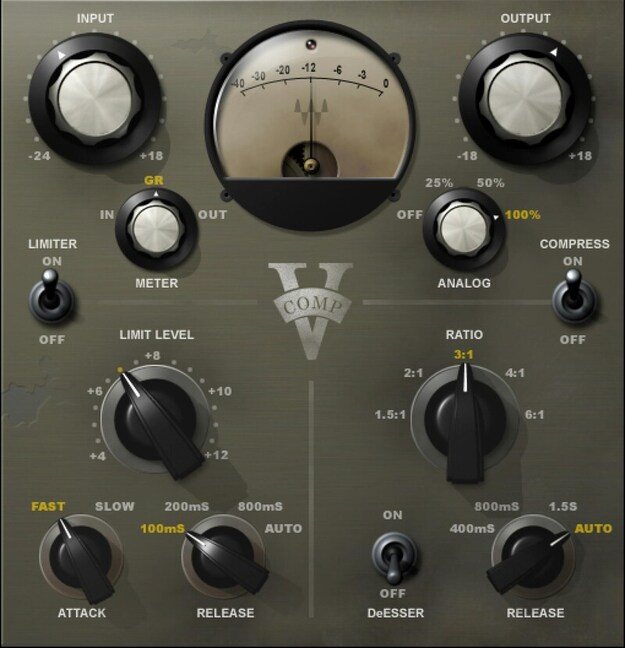
The V-Comp models the 2254’s diode-bridge gain technology and triple-transformer design, at the component level
— Waves official site
What is V-Comp?
V-Comp is a Waves plugin modeled on the 2254 compressor introduced in 1969. It models the diode-bridge gain technology and triple-transformer design at the component level.
The Plugin Boutique page describes the diode-bridge compression as neither opto, FET nor VCA, aimed at bus compressor/limiter sounds associated with the 60s and 70s on digital audio.
Even with dynamics turned off, it is described as adding analog character, and four analog characters are provided. A switch also turns the compressor into a de-esser.
Operation is straightforward, and 37 presets made by mixing engineers are included. Formats are VST, AU and AAX on Mac and VST and AAX on Windows.
Key features
Diode-bridge compressor/limiter
A compressor and limiter modeled on the 2254 bus processor, which may be worth comparing against other compressors for gluing a mix.
Three-transformer modeling
Models the thick, textured sound of three audio transformers.
Four analog characters
Analog coloration is available even with compression off, which may suit color-only use.
De-esser option
A switch turns the compressor into a de-esser.
37 presets
37 presets from mixing engineers are included as starting points.
Straightforward operation
The page says the operation makes it easy to dial in the intended sound.
Specifications
| Item | Details |
|---|---|
| Hardware reference | 2254 (1969) |
| Compression type | Diode bridge |
| Analog characters | 4 |
| Presets | 37 |
| Formats (Mac) | VST / AU / AAX |
| OS (Mac) | macOS Monterey 12 to Sequoia 15 |
| Formats (Windows) | VST / AAX |
| OS (Windows) | Windows 10+ |
What is included and system requirements
- V-Comp plugin
- 37 presets
How to use it
- Create or log in to a Waves account and register the serial from your Plugin Boutique account.
- Install and open Waves Central.
- Select V-Comp in “Install Products” and click “Install & Activate”.
- Insert V-Comp on a mix bus or other track in your DAW.
- Start from a preset and adjust the threshold and other controls.
- Switch the analog characters and compare the coloration.
- On vocals, also try the de-esser option.
Where it may come in handy
Gluing a mix bus
As it is modeled on a bus processor, it may be worth trying on the mix bus.
Coloration without compression
The analog characters may let you add texture without compressing.
De-essing vocals
The de-esser switch may let you tame harsh areas on a vocal.
Who it may suit
- People who want to try a vintage-style bus compressor
- Those who want analog-style coloration without compression
- Waves users who already manage plugins in Waves Central
Good to know before you buy
- Installation requires a Waves account and Waves Central.
- Listed OS support is macOS Monterey 12 to Sequoia 15 and Windows 10 or later.
Price
Please check the official page for the price.
See V-Comp on the product page
More of the same kind
We have introduced 85 compressors. Here are some of the others.
- Pulsar Audio Pulsar 1178
- Relab Development Maselec Maselec MLA-4
- Native Instruments Supercharger GT
- Solid State Logic SSL G3 MultiBusComp
- Solid State Logic SSL autoBUS
- Universal Audio UA 175B & 176 Tube Compressor Collection
We have introduced 215 other products from Waves.
- Waves IDX Intelligent Dynamics
- Waves SSL G-Master Buss Compressor
- Waves CLA-3A Compressor / Limiter
- Waves Waves H-Comp Hybrid Compressor
- Waves OneKnob Pressure
For a side-by-side comparison scored on the same criteria, see our comparison of compressors.
See the full list in Product database: Effects.
Sources: pluginboutique.com (checked 2026-10-27)










Comments