
You recorded a vocal and tidied it with EQ and compression, but somehow the voice sounds thin or flat. Saturation is what you use then. Saturation is an effect that distorts the sound slightly to add thickness and warmth to the voice. This article summarizes the basics of saturation and steps to avoid overdoing it, based on official materials from iZotope, FabFilter and Soundtoys.
Disclosure: This article contains affiliate links. If you buy through them, SoundBounty may earn a commission at no extra cost to you.
Key points
- Saturation was originally the distortion that happens when you put a loud sound into analog gear (tubes, transformers and tape).
- In iZotope’s explanation, saturation compresses the sound and adds harmonics (higher sounds at whole-number multiples of the original) at the same time.
- “Drive” sets the amount of distortion, and “mix” sets the blend with the original sound.
- If you overdo it, grain, blurred lows and harsh “s” sounds appear.
- A de-esser may reduce strengthened “s” sounds more easily if it is placed after the saturation.
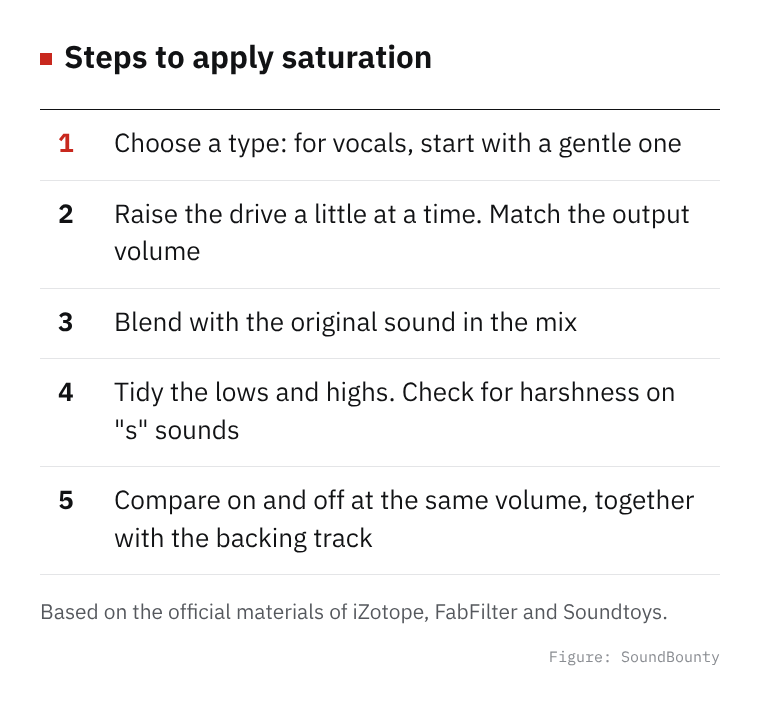
Figure: SoundBounty
What saturation is
iZotope Learn explains saturation as a kind of distortion that happens when you put a loud sound into the components of analog gear. When sound goes through tubes, transformers, tape machines and the like, it sounds pleasant to the ear because these two things are added to the original sound.
- Compression: even if you make the input louder, the output does not get louder by the same amount, so the difference between loud and quiet sounds becomes smaller.
- Added harmonics: sounds at several times the pitch of the original sound (the fundamental) are added. Harmonics include “even-order” ones, at even multiples of the fundamental, and “odd-order” ones, at odd multiples.
iZotope Learn explains that odd-order harmonics add thickness, warmth and richness to a sound, and even-order harmonics add edge and bite. Which harmonics are added, and how much, differs by product and mode.
Source: iZotope Learn (What is audio saturation?)
Typical “types”
Many saturation effects let you choose the type (style or mode) of gear they imitate. Here are examples from official explanations.
Video: “Introduction to FabFilter Saturn 2” (official FabFilter YouTube channel; narration in English) Watch on YouTube
- FabFilter Saturn 2: it has types such as tube, tape, amp and transformer. Tubes are described as ranging from “gentle and clean” to “rough sound”, tape from “gentle” to “extreme”, and transformers from “gentle” to “strongly colored”.
- iZotope Nectar: it has five modes: Tape, Tube, Warm, Analog and Retro. Warm is described as gentle warmth that produces only even-order harmonics, Tube as a mix of even and odd orders with a “distinct” sound, and Retro as centered on odd orders, with a sharp, somewhat aggressive sound.
- Soundtoys Decapitator: it has five styles, A, E, N, T and P, and each is described as made by studying a different piece of analog gear.
Sources: FabFilter Saturn 2 help, iZotope Nectar 2 help, Soundtoys Decapitator user guide
Basic steps
- Choose a type: for vocals, it may be easier to start by trying a gentle type (FabFilter explains that tubes and tape include gentle ones. In iZotope Nectar, Warm is described as “gentle warmth”).
- Raise the drive: Soundtoys explains drive as something like how loud the input to an analog circuit is, where pushing harder distorts more. When you raise the drive, the output volume also rises, so match it with the output knob or use a function that matches it automatically (Auto-Gain). FabFilter explains that Saturn adjusts the output automatically so the overall volume does not run wild when you raise the drive.
- Blend with the original in the mix: the mix is the blend of the original sound (dry) and the distorted sound (wet). iZotope Learn introduces, with a drum example, a way of mixing in a little of a strongly distorted sound to add interest.
- Tone, and cutting lows and highs: see “Tips to avoid overdoing it” below.
- Compare on and off at the same volume: saturation tends to raise the volume too, so match the volume and compare together with the backing track.
Video: “Beginner’s Guide to Saturation” (official FabFilter YouTube channel; narration in English) Watch on YouTube
Tips to avoid overdoing it
- Cut the lows before they are distorted: Soundtoys Decapitator’s “Low Cut” is explained as cutting the lows before distortion, to prevent the “flabbiness” that happens when you distort a sound with a lot of lows.
- Cut the “grain” in the highs: Decapitator’s “High Cut” is explained as cutting the highs after distortion to reduce the “fizz” that distortion produces.
- Tone works on the sound before it is distorted: Decapitator’s “Tone” works before distortion, so it changes which pitches get distorted. The impression of the sound can change a lot, it is explained.
- Use extreme settings only for a moment: Decapitator’s “Punish” is an intense setting that puts in 20 dB more, described as making “everything rough, loud and distorted”. It may be better to think of it as not for using as it is on a vocal.
- Watch for harsh “s” sounds: iZotope Nectar’s help says that when you apply saturation to a voice, the added harmonics can make “s” sounds seem harsh. Nectar provides a filter that lowers the highs only in the distorted sound.
When “s” sounds get stronger, one way is to use a de-esser. How to use one is summarized in How to use a de-esser on vocals.
Sources: Soundtoys Decapitator user guide, iZotope Nectar 2 help
How to choose a product
Saturation effects differ by product in their types, the items you can adjust and the color of the sound. The features of each product are compared in our saturation comparison.
Frequently asked questions
Q. Do I always need saturation?
No. It is one of the tools you try when the voice feels thin or flat.
Q. How is it different from an EQ or a compressor?
An EQ changes the level by pitch. A compressor narrows the difference between loud and quiet sounds. iZotope Learn explains that saturation compresses the sound and adds harmonics at the same time. For how to use an EQ and a compressor, see How to EQ vocals and How to use a compressor on vocals.
Q. Are there fixed settings in numbers?
They change with the voice, the microphone and the song, so we do not give fixed values. Raise the drive a little at a time and decide by listening.


Comments