
Reverb is an effect that adds the “sound of a room” to a voice. Delay is an effect that repeats a voice a little later. In a cover-song mix, if the recorded voice stays “dry” (with no ambience), it can stand apart from the backing track. Adding ambience with reverb or delay blends the voice into the backing. This article explains the basics of vocal reverb and delay, starting with how to apply them.
Disclosure: This article contains affiliate links. If you buy through them, SoundBounty may earn a commission at no extra cost to you. Information is as of the date we checked it and can change.
Key points
- As a rule, do not put reverb directly on the vocal track; put it on a separate track (a send).
- Pre-delay, and EQ on the reverb, keep the voice from blurring.
- When the song is crowded, delay takes up less room than reverb.
- Add ambience little by little.
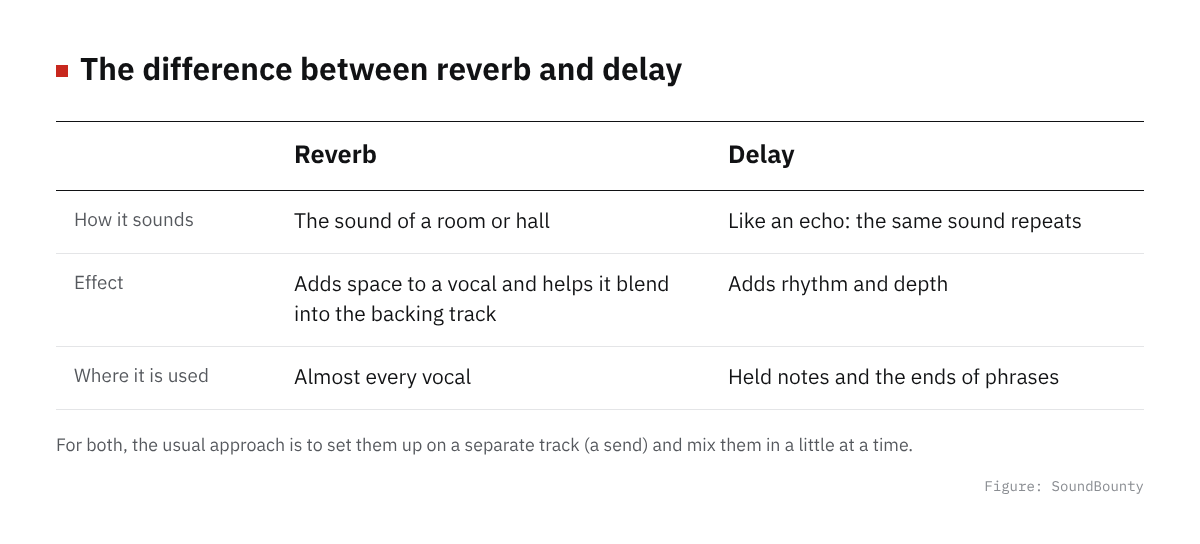
Figure: SoundBounty
The basic approach is a send (a separate track)
Rather than putting reverb directly on the vocal track, a method often used is to put it on a separate track (an auxiliary track) and send signal to it from the vocal. FabFilter lists two advantages of this method.
- It is easier to adjust the blend of ambience and original sound in detail.
- Several tracks can use the same reverb, so the load on the computer (memory and CPU) is lighter.
In this method, you set the reverb on the auxiliary track to ambience only (100% wet). Then you decide how much ambience there is with the “send amount” from the vocal track. Using the same reverb a little on everything brings cohesion to the mix.
However, reverb takes up room in a mix. FabFilter cautions that sending many tracks to many reverbs makes a mix muddy and unclear. In many cases, a way of using it that supports the sound so that you can only just tell it is there, rather than making it clearly audible, suits better.
Source: FabFilter Learn
Choosing a reverb
The main knob of a reverb is “decay” (the time until the ambience fades out). A short decay gives the ambience of a small space, and a long one a large space.
How long suits depends on the song. FabFilter recommends a length that suits the song. A long reverb suits a song with few notes and a slow tempo. A short reverb makes it easier to find room in a song with many notes and a fast tempo.
- Songs with a lot of space, such as ballads: a longer reverb (hall, plate and so on) tends to suit.
- Up-tempo songs and songs with many sounds: a shorter reverb (such as a room) is less likely to blur the voice.
This division is an idea that applies FabFilter’s explanation to cover songs. In the end, decide which suits by listening together with the backing track.
Source: FabFilter Learn
Tips to keep the voice from blurring
Separate the voice and the ambience a little with pre-delay
Pre-delay is the delay between the original sound and the start of the ambience. FabFilter explains that a little pre-delay makes a gap between the original sound and the ambience, so the two clash less and the ambience sounds cleaner. Increasing pre-delay also has the effect of making the original sound seem closer. Setting it to the tempo of the song is also a commonly used method.
Shape the reverb’s ambience with an EQ
Putting an EQ on the reverb’s ambience is a common method. The very low and very high areas are often left open for the sounds you want in front, such as vocals, bass and drums. If much of that range remains in the reverb, the mix gets cluttered easily. Put an EQ before (or after) the reverb and cut the unwanted lows and highs. To decide the frequency to cut, find the point where the effect of the filter is clearly audible, then back off a little from there.
Add ambience little by little
It is important not to add too much ambience at first. Listening to the vocal alone tends to make it feel insufficient, so while listening with the backing track, stop at a point where “if I take it away later, it would feel a little lonely”, and it is less likely to blur.
Source: FabFilter Learn
Video: “Introduction to FabFilter Timeless 3” (official FabFilter YouTube channel; narration in English) Watch on YouTube
How to apply delay
FabFilter explains that because reverb takes up room, in some cases it is better to make a similar sense of space with delay. For example, even if you want a long, soft reverb, in a song with many sounds most of the reverb can end up hidden by other sounds and only clutter the mix. In such cases a ping-pong delay (a delay that bounces alternately left and right) can be used. With a moderate amount of feedback (amount of repeats), you can create the feeling of a large space without taking up room.
The trick is to “make it not sound like a delay”. Setting the delay interval to the tempo of the song, so the voice seems to come back from a natural space, makes it less noticeable as a delay.
Delay, like reverb, is often put on a separate track and adjusted by the send amount.
Source: FabFilter Learn
Frequently asked questions
Q. Should I use reverb or delay?
You do not have to choose one. One way to think about it is delay when the song is crowded and reverb when the song has gaps. Using a little of both is also a method.
Q. Can I apply reverb while recording?
Ambience applied while recording cannot be removed later. In general you record without ambience so you can adjust it in the mix. There is also a method of adding ambience only to the monitor while recording, to make it easier to sing.
Q. Which reverb and delay do you recommend?
We summarize comparisons scored from official information in our reverb plug-in comparison and our delay plug-in comparison.
Q. Are there fixed numerical rules?
The decay length and the pre-delay time change with the tempo and mood of the song, so manufacturers’ materials do not give fixed values for vocals either. Decide by listening.
Read next
- How to mix a cover song (overall flow)
- Reverb plug-in comparison
- Delay plug-in comparison
- The order of plug-ins for a cover-song mix


Comments