
Solid State Logic’s gate plug-in SSL X-Gate is 69% off at Plugin Boutique: $15 instead of $49 (USD). The product page says the offer runs until November 1.
Disclosure: This article contains affiliate links. If you buy through them, SoundBounty may earn a commission at no extra cost to you. Prices are as of the date we checked them and can change.
The deal
| Product | Regular price | Sale price | Discount | Ends |
|---|---|---|---|---|
| SSL X-Gate | $49 | $15 | 69% off | Nov 1 |
Prices are in US dollars as shown on Plugin Boutique, checked on October 24, 2026. The discount and end date come from the Plugin Boutique product page. Taxes, fees and availability can vary by country, so check the checkout page.
Where to buy
- SSL X-Gate: View at Plugin Boutique
What is X-Gate?
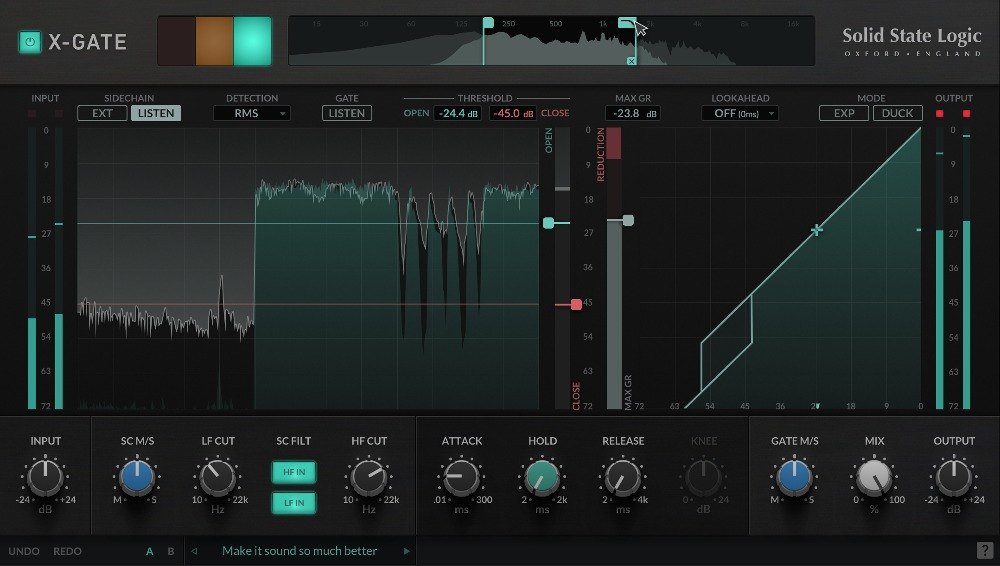
SSL X-Gate is a gate (an effect that cuts quiet sounds to reduce noise and mic bleed) from Solid State Logic. It is highly visual, inspired by the workflow of SSL’s digital broadcast consoles, and offers mid/side processing and separate open and close thresholds (hysteresis), according to the manufacturer.
Requirements: on Mac, macOS 11 to 13 (64-bit only, M1 Macs supported) in AU, VST2, VST3 and AAX Native formats; on Windows, Windows 10 to 11 (64-bit only) in VST2, VST3 and AAX Native formats. A free iLok account is required for authorization (per the manufacturer, from the Plugin Boutique product page).
Features
Set thresholds on a rolling waveform
You set the open and close thresholds while watching the incoming signal as a rolling waveform. A hardware-style traffic-light indicator shows at a glance whether the gate is open, closed or holding (per the manufacturer).
Sidechain filters and mid/side
High-pass and low-pass filters can be applied to the sidechain, and the mid/side balance lets you focus the gate on unwanted sounds (per the manufacturer).
Lookahead
You can choose lookahead times; the lowest setting adds no extra latency. The manufacturer says this suits tracking situations where mic bleed is a problem.
EXPANDER and DUCK modes
EXPANDER mode makes quiet signals quieter for a more transparent result. DUCK mode attenuates the signal only when it exceeds the threshold, and combined with your DAW’s sidechain it can duck music while you speak, for example (per the manufacturer).
After you buy: installation and activation
This is the general flow for products bought at Plugin Boutique. Activation differs by product (serial number, a manufacturer account, iLok and so on), so check the instructions in your library after purchase.
- Log in to your Plugin Boutique account and find the product in “Library”.
- Download the installer (you can switch between the Windows and Mac versions). Depending on the product, you also get a serial number, an unlock code or a key file.
- Product-specific steps are under “…” → “Installation Instructions” next to the product in your library, and also near the bottom of the product page.
Before you buy
- The end date is the one shown on Plugin Boutique. Offers can change, so confirm on the product page before you buy.
- Check the supported operating systems, plug-in formats (VST3, AU, AAX and so on) and the licensing method on the product page before buying.
Where to buy
- SSL X-Gate: View at Plugin Boutique









Comments