
Solid State Logic’s dynamic EQ X-DynEQ is 70% off at Plugin Boutique: $29 instead of $99 (USD). The product page says the offer runs until November 1.
Disclosure: This article contains affiliate links. If you buy through them, SoundBounty may earn a commission at no extra cost to you. Prices are as of the date we checked them and can change.
The deal
| Product | Regular price | Sale price | Discount | Ends |
|---|---|---|---|---|
| X-DynEQ | $99 | $29 | 70% off | Nov 1 |
Prices are in US dollars as shown on Plugin Boutique, checked on October 24, 2026. The discount and end date come from the Plugin Boutique product page. Taxes, fees and availability can vary by country, so check the checkout page.
Where to buy
- X-DynEQ: View at Plugin Boutique
What is X-DynEQ?
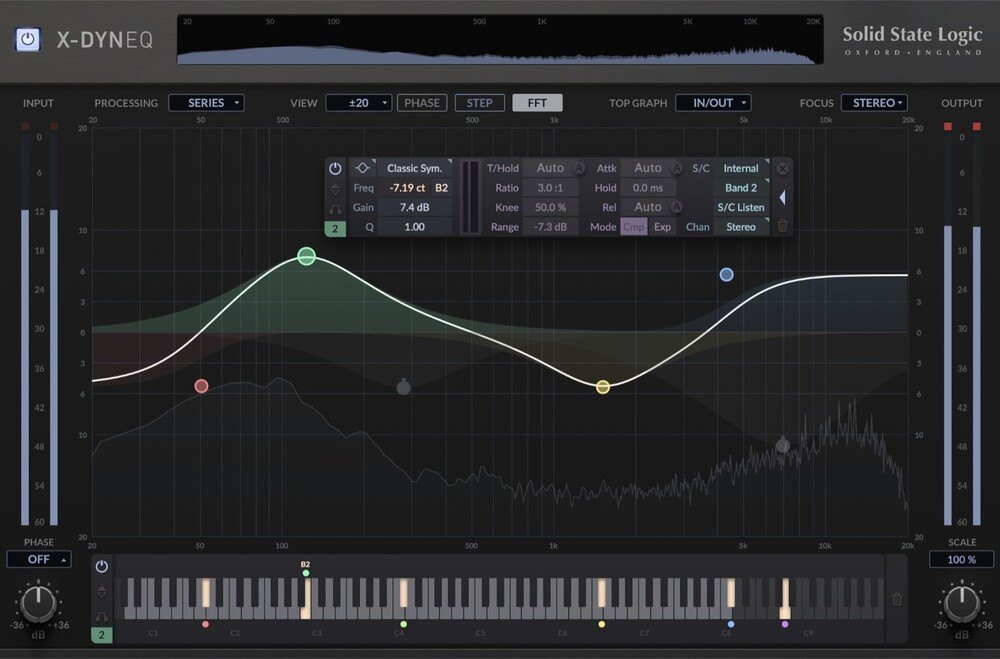
X-DynEQ is a dynamic EQ (an EQ that boosts or cuts frequencies depending on how loud the sound is) from Solid State Logic (SSL). Built on X-EQ 2, the manufacturer calls it the most advanced EQ plug-in SSL has made (per the manufacturer).
Requirements: on Mac, macOS 11 to 13 (64-bit only, M1 Macs supported) in AU, VST2, VST3 and AAX Native formats; on Windows, Windows 10 to 11 (64-bit only) in VST2, VST3 and AAX Native formats. A free iLok account is required for authorization (per the manufacturer, from the Plugin Boutique product page).
Features
Up to 24 dynamic EQ bands
There are 20 EQ types and filter shapes, and each shelf or bell filter can use dynamic processing, including upward and downward compression and expansion (per the manufacturer).
Auto attack, release and threshold
“Auto” settings adapt to the incoming signal, which the manufacturer says reduces manual tweaking.
New filters: notch, bandpass and tilt
Three filter types are new compared with X-EQ 2: notch for precise fixes, bandpass for isolating a range, and tilt for balancing the highs and lows (per the manufacturer).
Per-band stereo processing and sidechain
Each band can process stereo, left, right, mid or side. Dynamic bands can be driven by the internal or external sidechain of any other band (per the manufacturer).
Node-based interface and piano roll view
You double-click to create nodes and adjust them with the keyboard and mouse wheel. A piano roll view shows filter frequencies against musical notes, and presets from X-EQ 2 carry over (per the manufacturer).
After you buy: installation and activation
This is the general flow for products bought at Plugin Boutique. Activation differs by product (serial number, a manufacturer account, iLok and so on), so check the instructions in your library after purchase.
- Log in to your Plugin Boutique account and find the product in “Library”.
- Download the installer (you can switch between the Windows and Mac versions). Depending on the product, you also get a serial number, an unlock code or a key file.
- Product-specific steps are under “…” → “Installation Instructions” next to the product in your library, and also near the bottom of the product page.
Before you buy
- The end date is the one shown on Plugin Boutique. Offers can change, so confirm on the product page before you buy.
- Check the supported operating systems, plug-in formats (VST3, AU, AAX and so on) and the licensing method on the product page before buying.
Where to buy
- X-DynEQ: View at Plugin Boutique









Comments