
Disclosure: This page may contain affiliate links. Prices were checked on the date shown and may change.
An introduction to Waves OneKnob Wetter, based on information from the maker and distributors: what it does, how to use it and who it may suit. It is not scored.
OneKnob Wetter morphs delay, reverb, and brightness in different amounts—from subtle delays that create space, to more reverb for a room sound, to less delay with ever-larger reverb spaces.
— Waves official site
What is OneKnob Wetter?
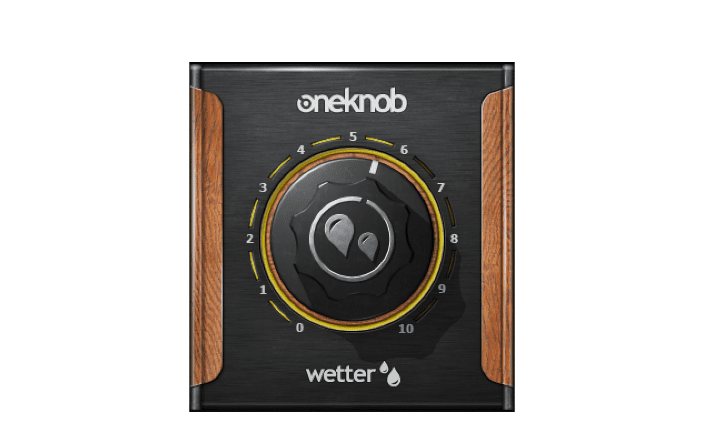
OneKnob Wetter is a space-adding effect plug-in from Waves, part of the company's OneKnob family. As the name suggests, the main control is a single knob, and turning it changes the blend of delay, reverb and brightness together. Instead of adjusting many parameters one by one, you look for a fitting spot on one knob.
The maker describes the range of the knob: from subtle delays that create a sense of space, through more reverb for a room-like sound, to less delay with progressively larger reverb spaces. Low settings are positioned as a way to enhance vocals, while high settings give a gauzy, expansive reverb.
It is not limited to vocals. The maker lists guitar, drums, leads, synthesizers, pianos, hand percussion and anything else that needs depth and spread. It is optimized as an insert effect, so the intended workflow is to load it and start turning the knob.
The maker says the reverb shares its heritage with Waves' higher-end reverbs. It can create a stereo reverb image from a mono source, and it is described as true stereo reverb rather than a mono sum with synthesized stereo. In Japan, Waves products are distributed by Media Integration.
Key features
One knob controls the space
Delay, reverb and brightness amounts move together with a single knob. It may help when you want to settle on a direction before touching any detail.
From intimate rooms to cathedrals
The maker says one knob takes a sound from intimate rooms to cathedral-size spaces. It could be handy when you want to change depth to suit where a part sits in the song.
Stereo image from a mono source
It can create a stereo reverb image from a mono audio source. That may be useful for mono-recorded vocals or guitar that need some width.
True stereo reverb
The maker describes it as true stereo reverb, not a mono sum with synthesized stereo. It may suit material where left-right width matters.
Built for insert use
It is optimized as an insert effect so you can load it and go. This may save time when you would rather not set up a send for every track.
Same heritage as higher-end Waves reverbs
The maker says the heritage of Waves' high-end reverbs is packed into one knob. The control is simple, but the underlying reverb approach follows the company's more elaborate products.
Specifications
| Item | Details |
|---|---|
| Type | Reverb / delay (space effect) |
| Main control | A single knob |
| Formats | Windows: VST / AAX, Mac: VST / AU / AAX |
| OS (per Plugin Boutique) | Windows 10+, macOS Monterey 12 to Sequoia 15 |
| Stereo handling | True stereo reverb (can also build a stereo image from mono) |
What is included and system requirements
- OneKnob Wetter plug-in (perpetual license)
- Formats: Windows VST / AAX, Mac VST / AU / AAX
- Waves products are installed and managed through the Waves Central application after purchase
How to use it
- Choose the track in your DAW that needs some space.
- Load OneKnob Wetter as an insert on that track.
- Start with the knob low and check how the source sounds.
- Raise the knob gradually and listen as the delay-based air turns into wider reverb.
- Try lower settings on vocals and higher settings on parts you want to feel more expansive, such as pads.
- Judge the balance with the whole song playing, and use the track level if you need to adjust it.
- Save a position you like as a preset in your DAW.
Where it may come in handy
Adding natural depth to vocals
A low setting may add a little space while keeping the outline of the voice. The maker also positions low settings as a way to enhance vocals.
Opening up guitar or piano
For instruments that sound a bit flat as recorded, raising the knob could add depth. With so few controls, you may be able to settle on a direction quickly.
Turning mono home recordings into stereo space
Because it can build a stereo reverb image from a mono source, it may be worth trying on parts recorded with a single microphone.
Who it may suit
- People who want to set up space quickly rather than tweak many reverb and delay settings
- People looking for a space effect that is easy to use as an insert
- People who want to add width to mono-recorded material
Good to know before you buy
- With a single knob, products with more parameters may suit you better if you want to set reverb decay or pre-delay individually.
- Waves products are installed through Waves Central.
- Plugin Boutique lists macOS Monterey 12 to Sequoia 15 and Windows 10 or later. Check the current system requirements with the maker before buying.
How it differs from similar products
We do not pick a winner; the official figures are placed side by side.
Waves TrueVerb
OneKnob Wetter is built around a single knob for insert use. TrueVerb splits its controls into four sections (early reflections, reverb tail, EQ and damping) and includes 30 presets.
Price
$49 (Plugin Boutique, checked 2026-10-27). Prices can vary by region and promotion, so check the official page before buying.
See OneKnob Wetter on the product page
More of the same kind
Other introduction articles of the same kind.
We have introduced 215 other products from Waves.
See the full list in Product database: Effects.
Sources: pluginboutique.com wavesjapan.jp (checked 2026-10-27)










Comments