
Disclosure: This page may contain affiliate links. Prices were checked on the date shown and may change.
An introduction to Waves TrueVerb, based on information from the maker and distributors: what it does, how to use it and who it may suit. It is not scored.
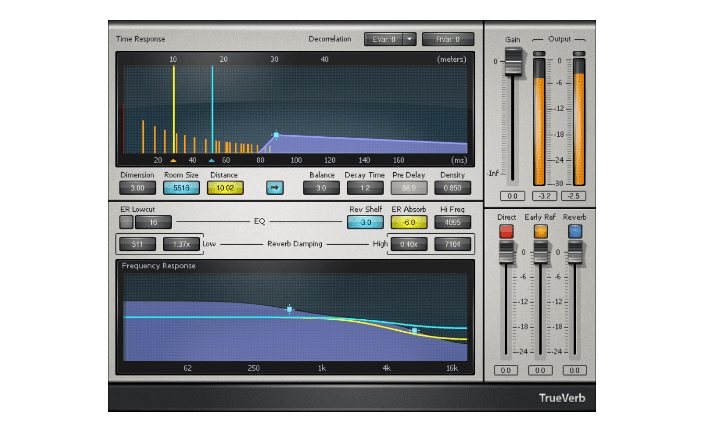
TrueVerb splits reverb controls into 4 clearly defined sections: early reflections, reverb tail, EQ, and damping.
— Waves official site
What is TrueVerb?
TrueVerb is a room-simulator-style reverb from Waves. The Japanese distributor describes it as a plug-in with a distance control that reproduces not only the shape of a room but also the distance from the source.
It is built from two modules, early reflections and reverb tail. Plugin Boutique describes four clearly defined sections: early reflections, reverb tail, EQ and damping. Early reflections and reverb can be optimized separately, and a link button moves them proportionately.
Reflections and reverb can have independent frequency responses. A shelving filter trims highs going into the reverb for smoother tails, and a low-frequency cut before the early reflections reduces mud. Low- and high-frequency damping have dual, independent controls.
It includes 30 presets and a streamlined interface. The maker highlights its open, transparent clarity for vocals and its low CPU use, which also makes it suitable as a front end for shaping early reflections ahead of convolution reverbs.
Key features
Early reflections and tail, separately
The two can be optimized separately, and the link button moves them proportionately. This helps when you want to shape the first impression of the room and its tail independently.
Distance control
The Japanese distributor's page describes a control that reproduces not only room shape but also the distance from the source. It could help when placing a sound nearer or further back.
Independent frequency responses
Reflections and reverb can each have their own frequency response, which helps manage low-end buildup separately.
Taming highs going into the reverb
A shelving filter trims highs going into the reverb for smoother tails, which may help when a tail sounds too bright.
Low cut and dual damping
A low-frequency cut ahead of the early reflections minimizes mud, and low- and high-frequency damping have separate controls.
30 presets and low CPU
30 presets help you start quickly. Its low CPU use allows several instances, and the maker notes you can differentiate early reflections between multiple TrueVerbs.
Specifications
| Item | Details |
|---|---|
| Type | Room-simulator reverb |
| Sections | Early reflections / reverb tail / EQ / damping |
| Presets | 30 |
| Formats | Windows: VST / AAX, Mac: VST / AU / AAX (SoundGrid also supported) |
| OS (per Plugin Boutique) | Windows 10+, macOS Monterey 12 to Sequoia 15 |
What is included and system requirements
- TrueVerb plug-in (perpetual license)
- 30 presets
- Installed and managed through Waves Central
- A 7-day demo is mentioned on the Japanese distributor's page
How to use it
- Load TrueVerb on a send in your DAW.
- Choose a preset that is close.
- Set the room size and decay.
- Use the distance control to place the sound.
- Balance early reflections and reverb, and use the link button to move them together if needed.
- Use EQ and damping to adjust the tail's brightness and low-end buildup.
- Set the amount with the whole mix playing.
Where it may come in handy
Natural reverb on vocals
The clear, transparent sound the maker says fits vocals could be tried as a vocal reverb.
A shared room across several tracks
With low CPU use described, it may be suitable for building a common room on several tracks.
A front end for convolution reverbs
The maker mentions using it ahead of convolution reverbs to augment early reflections.
Who it may suit
- People who want to adjust early reflections and tail separately
- People looking for a clear, natural reverb
- People who need a space effect for CPU-limited projects
Good to know before you buy
- Plugin Boutique lists macOS Monterey 12 to Sequoia 15 and Windows 10 or later, while the Japanese distributor lists macOS Ventura 13 to Tahoe 26 for V17 products. Check the current requirements before buying.
- Waves products are installed through Waves Central.
- The Japanese distributor's page also mentions perpetual and subscription (Essential / Ultimate) plans.
How it differs from similar products
We do not pick a winner; the official figures are placed side by side.
Waves OneKnob Wetter
TrueVerb adjusts through four sections (early reflections, reverb tail, EQ, damping) with 30 presets. OneKnob Wetter is a single-knob effect for insert use.
Price
$99 (Plugin Boutique, checked 2026-10-27). Prices can vary by region and promotion, so check the official page before buying.
See TrueVerb on the product page
More of the same kind
We have introduced 112 reverbs. Here are some of the others.
- Cherry Audio Galactic Reverb
- Safari Audio Flamingo Verb V2
- Inspired Acoustics INSPIRATA
- Nomad Factory BlueVerb DRV-2080
- AudioThing Springs
- AudioThing Environments
We have introduced 215 other products from Waves.
- Waves IR-L Convolution Reverb
- Waves Magma Springs
- Waves IR-Live Convolution Reverb
- Waves Atlas Reverb
- Waves Abbey Road Chambers
For a side-by-side comparison scored on the same criteria, see our comparison of reverbs.
See the full list in Product database: Effects.
Sources: pluginboutique.com wavesjapan.jp (checked 2026-10-27)










Comments