
Disclosure: This page may contain affiliate links. Prices were checked on the date shown and may change.
An introduction to Waves CLA Epic, based on information from the maker and distributors: what it does, how to use it and who it may suit. It is not scored.
CLA’s entire suite of 4 go-to reverbs and 4 go-to delays, based on his best studio hardware—in one epic yet easy-to-use plugin.
— Waves official site
What is CLA Epic?
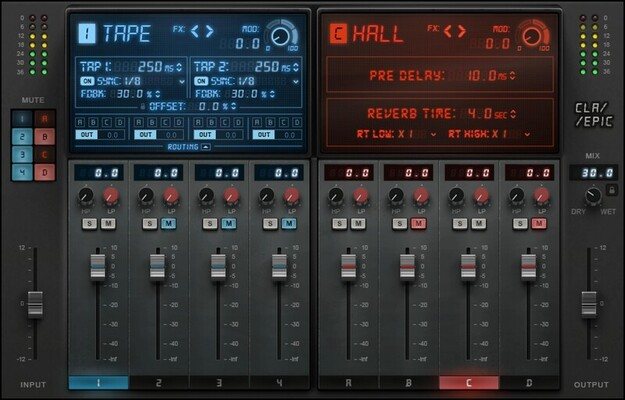
CLA Epic is a reverb and delay plugin from Waves, designed with mix engineer Chris Lord-Alge. It contains four reverbs and four delays.
According to the maker, the effects are based on hardware he uses in the studio, with the idea of blending different delays and reverbs on one track and routing them to each other to build depth.
The reverbs are Plate, Room, Hall and the non-linear Space, and the delays are Tape, Slap, Crowd and Throw. A button feeds delays into any number of reverbs, and series, parallel and series-parallel routings are available.
350 presets by Chris Lord-Alge, Greg Wells, Michael Brauer and others are included. The regular price on Plugin Boutique is $149.
Key features
Four reverbs
Plate, Room, Hall and the non-linear Space.
Four delays
Tape, Slap, Crowd and Throw delay types.
Layer all eight
The eight effects can be layered and blended easily on one track.
Feed delays into reverbs
One click sends delays into any number of reverbs.
Routing options
Series, parallel and series-parallel routings.
Modulation and tempo sync
Per-effect modulation adds texture and spread, and host BPM sync allows rhythmic effects.
350 presets
Presets by Chris Lord-Alge, Greg Wells, Michael Brauer and others.
Specifications
| Item | Details |
|---|---|
| Type | 4 reverbs + 4 delays |
| Presets | 350 |
| Mac | macOS 12-15, VST/AU/AAX |
| Windows | Windows 10 or later, VST/AAX |
What is included and system requirements
- CLA Epic plugin
- Four reverbs (Plate, Room, Hall, Space)
- Four delays (Tape, Slap, Crowd, Throw)
- 350 presets
How to use it
- After purchase, install the plugin with Waves Central.
- Activate the license.
- Load CLA Epic on a send or track.
- Pick a preset.
- Choose the reverbs and delays you want.
- Decide whether delays feed the reverbs.
- Select series, parallel or series-parallel routing.
- Refine with modulation and tempo sync.
Where it may come in handy
Vocal depth
Layering delay and reverb may add depth to vocals.
Drums and guitars
Slap and Room may suit short spaces.
Synth width
Combining Space reverb with Throw delay may make a large space.
Who it may suit
- People who want reverb and delay in one plugin
- Users who like to start from presets
- Anyone who wants to learn layered send-style depth
Good to know before you buy
- Waves license activation is required.
- Plugin Boutique may show a limited-time sale price; the regular price is $149.
How it differs from similar products
We do not pick a winner; the official figures are placed side by side.
Slate Digital VerbSuite Classics
CLA Epic combines four reverbs and four delays. VerbSuite Classics holds eight reverbs and no delays.
Price
$149 (Plugin Boutique, checked 2026-10-27). Prices can vary by region and promotion, so check the official page before buying.
See CLA Epic on the product page
More of the same kind
We have introduced 62 delays. Here are some of the others.
- Native Instruments Psyche Delay
- United Plugins Mirror
- Valhalla DSP ValhallaFreqEcho
- Universal Audio Capitol Chambers
- Native Instruments REPLIKA XT
- McDSP EC-300 Echo Collection Native v7
We have introduced 215 other products from Waves.
- Waves Lofi Space
- Waves SuperTap
- Waves H-Delay Hybrid Delay
- Waves Manny Marroquin Delay
- Waves IR-L Convolution Reverb
For a side-by-side comparison scored on the same criteria, see our comparison of delays.
See the full list in Product database: Effects.
Sources: pluginboutique.com (checked 2026-10-27)










Comments